Proofreaders in a shared office
When you’re reading, marking up and commenting, familiar keys and a typing feel that causes as little disruption as possible matter most. CHERRY describes the STREAM versions mentioned here as quiet.


When proofreading a report draft at a shared desk, a familiar German keyboard layout, easy-to-reach editing keys and a typing feel suited to your surroundings make a sensible starting point. If you rarely enter numbers, a TKL keyboard can free up space for your mouse and papers. If you need to switch between approved computers, however, you’ll need a connection that works with the specific devices. Check the connection, key layout and cleaning instructions for the exact variant: manufacturer descriptions such as “quiet” or “ergonomic” are not comparable test results or a guarantee of health benefits.
When you’re reading, marking up and commenting, familiar keys and a typing feel that causes as little disruption as possible matter most. CHERRY describes the STREAM versions mentioned here as quiet.
If your mouse, printouts and notes need to sit beside your keyboard, a model without a number pad can leave more room. CHERRY describes the STREAM KEYBOARD TKL as a compact keyboard without a number pad.
If you switch between approved computers, check the connection and device allocation for the specific keyboard. Wireless doesn’t automatically mean that multiple devices are supported.
First decide which keys you need for proofreading, then check that the keyboard’s size and connection are suitable for your workspace.
| What matters | What to look for when buying | Who is it important to? |
|---|---|---|
| Quiet typing and accurate text editing | Check for a German keyboard layout and make sure the arrow, Delete and other editing keys you need are easy to reach; assess the typing feel and noise level of the specific model. | When I’m commenting at a shared desk, I need familiar editing keys and want my typing to disturb others as little as possible. Around 33% of consumers put quiet typing and accurate text editing first. |
| Room for your mouse and papers | Check the overall dimensions and key layout; consider whether you really need a separate number pad. | When there also needs to be room for a report and notes alongside my keyboard and mouse, I can manage without a number pad if I rarely enter numbers. For around 27% of consumers, desk space is the main consideration. |
| Connection and switching between devices | Check that approved USB ports or Bluetooth are available; if you use several devices, confirm that the keyboard actually supports multiple devices and lets you switch between them. | When I work on different computers, the keyboard needs to work with their approved connection, and I need to be able to tell which device is active. Around 20% of consumers put a suitable connection and device switching first. |
| Hand position during longer sessions | For split or contoured models, consider the key layout, how long it may take to get used to and how much space it needs. | When I’m typing for long periods, I’d like to try a layout that suits the way I hold my hands, without assuming it will have a particular effect. For around 20% of consumers, their individual hand position comes first. |
Connection options vary by model. CHERRY describes the STREAM KEYBOARD WIRELESS as a 2.4 GHz keyboard; the MX Keys S is listed as using Bluetooth and a Logi Bolt receiver.
Before using a keyboard at work, check which connection types are approved and whether the specific version supports multiple devices.
A smaller design can leave room for papers, but the keys you need must be arranged to suit the way you work.
Compare the specific key layout with the commands you use to mark up, delete and navigate text.
Split designs change the position of your hands and may take some getting used to. The label alone is no proof of an individual benefit.
Assess the fit, setup and space requirements for yourself, and bear in mind that other people may also use the keyboard at a shared desk.
The STREAM KEYBOARD TKL is a compact wired model without a number pad; according to the manufacturer, the STREAM KEYBOARD WIRELESS uses 2.4 GHz.
The MX Keys S is a low-profile keyboard with customisable functions; the Ergo K860 is a differently shaped, split option.
According to the manufacturer’s overview, the PERIBOARD range includes split and compact ergonomic models.
The German version of the wired KB216 is a full-size keyboard for a workspace with a suitable USB-A port.
The products below include compact wired TKL keyboards, a 104-key USB keyboard and wireless keyboards for use with multiple devices.
 No image available
A good fit for a workspace with a German QWERTZ layout and limited desk space; the TKL design has no number pad.
A suitable USB port is needed for wired use.
 No image available
For a shared desk with limited space and a German ISO-DE QWERTZ layout; the TKL version has no number pad.
The product name specifies Akko V3 Pro Cream Yellow Switches and a wired version.
 No image available
An option if a wired USB connection and a 104-key keyboard suit your workspace.
Before buying, check the layout and the position of the keys you need for proofreading reports.
 No image available
For switching between multiple devices: the product name lists three connection modes and support for connecting up to three devices.
The product name also lists scissor keys, USB-C charging and compatibility with Windows, Android and iOS. Check that the connection is approved for the computer you use at work.
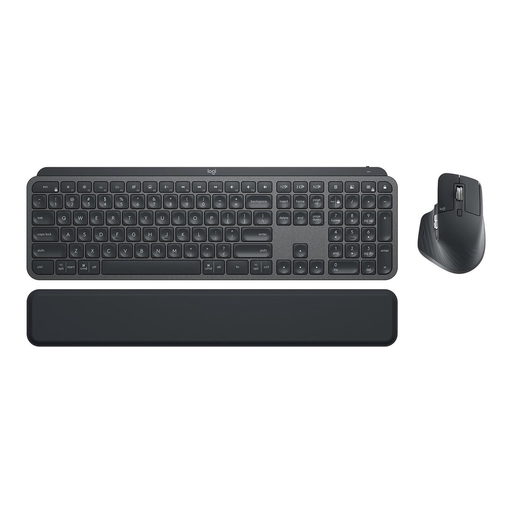 No image available
For workspaces where a keyboard-and-mouse set and a connection designed to support multiple devices are a good fit.
The product name specifies a German QWERTZ layout, Logi Bolt, backlighting and a set comprising the MX Keys and MX Master 3S. Check that the intended connections are approved for your work computer.
If you mainly mark up and comment on text, a TKL keyboard can free up space for your mouse and papers. If you often enter figures into tables, a full-size keyboard with a separate number pad may be a better fit; what matters is having the keys you actually need.
First check whether the computer allows the USB port or wireless connection you need. With a multi-device keyboard, check which device is active before you start commenting; a 2.4 GHz receiver alone doesn’t confirm support for multiple devices.
Follow the instructions for the specific model and your workplace’s guidance. Logitech recommends unplugging a wired keyboard before cleaning it, or switching off a wireless keyboard. This doesn’t mean that any cleaning product is suitable for every model.
For a standard online distance purchase in the EU, you generally have 14 days from receiving the goods to withdraw from the contract; exceptions and return costs should be taken into account. Your Europe, the European Union’s information portal, also states that the statutory minimum guarantee is two years from receipt of the goods. These consumer rights do not apply to purchases made by an employer.
The German Federal Institute for Occupational Safety and Health’s July 2024 edition of workplace rule ASR A6 sets out requirements for display screen work within its scope. At a shared workplace desk, the setup and use should be assessed as part of workstation design. This doesn’t create a general requirement to buy a particular keyboard model, wireless system or certified product. Its workplace scope does not cover purely personal use.