You don’t need a special keyboard just because you’re designing a puzzle level across two screens. What matters is the commands you use in your editor, how much room you have for your mouse and keyboard, and which keys you actually need. Programmable keys may be useful if you repeat commands often; a compact layout can help when space is tight, while a full-size keyboard gives you a number pad. A split design, meanwhile, needs to suit the way you position your hands. Microsoft Support explains how to arrange windows in Windows using display and snapping features, while the German Social Accident Insurance (DGUV) says that relevant office ergonomics recommendations generally also apply when using two screens.
Who these keyboards may suit
Level designers who use lots of editor commands
If you often repeat the same inputs when placing, testing and refining elements, customisable keys or macros may come in handy. The options available depend on your editor, operating system and keyboard software; Keychron Germany, Logitech and Perixx each describe different ways to customise their keyboards.
Designers short on space for a mouse and keyboard
A compact layout can leave you with more room to move your mouse. First, check that the keys you need in your editor are included and easy to reach. Keychron Germany lists the V1 Max as a 75% layout, while CHERRY describes the KC 6000 SLIM as a full-size keyboard with a number pad.
Designers who spend long periods typing
If hand position and typing comfort matter to you, compare a split keyboard with the layout you normally use. Logitech describes the ERGO K860 as a split keyboard, and Perixx also offers a split design with the PERIBOARD-335. The key thing is whether its shape and dimensions suit your workspace.
What to consider when choosing
Compact and programmable
A good fit if: you want to assign frequently used editor commands to specific keys while leaving room for your mouse. Keychron Germany lists the V1 Max as a 75% layout with VIA key mapping.
The trade-off: there’s no separate number pad. Check that the available key layout meets your needs and works with your editor.
Full-size with software actions
A good fit if: you have room for a full-size keyboard and want to set up routines you repeat often. Logitech describes Smart Actions for the MX Keys S through Logi Options+.
The trade-off: setup requires compatible software, and a full-size keyboard takes up more desk space than a compact layout.
Split keyboard
A good fit if: you type for long periods and want to try a split key layout. The Logitech ERGO K860 and Perixx PERIBOARD-335 are examples of this design.
The trade-off: it may take time to get used to the layout. Check the shape and dimensions against your workspace rather than assuming it will have a particular health benefit.
Wired full-size keyboard
A good fit if: you use a fixed computer and prefer a number pad and a USB-A connection. CHERRY lists the KC 6000 SLIM as a full-size keyboard with scissor keys.
The trade-off: check that you have a free USB-A port and confirm the exact layout version. The DE version should not be assumed to match other regional versions.
| Buying priority |
What to check |
Who it matters most to |
| Editor commands |
Check that you can assign the keys you need and that the software works with your operating system. |
If I want quick access to commands I use repeatedly in my editor, the right key mapping matters to me. Around 29% of consumers put repeated editor inputs first. |
| Space for a keyboard and mouse |
Compare the footprint and key layout, and check whether you need a separate number pad. |
If there’s little room to move around my desk alongside two screens, I want to keep space for my mouse without losing access to important editor keys. Around 23% of consumers prioritise space requirements. |
| Hand position during long sessions |
Check that the split design and, where applicable, the wrist rest suit your posture and desk space. |
If I type for long periods, I want a design that I can position comfortably in my workspace. Around 18% of consumers prioritise hand position during longer sessions. |
| Key feel and noise |
Check the specific switch type or scissor mechanism; different models in the same range can feel different to type on. |
If I do a lot of typing or don’t want to disturb others at work, key feel and noise are important factors for me. Around 18% of consumers base their choice primarily on these points. |
| Switching between computers |
Check the connection and key mapping for each device; using two screens doesn’t automatically mean you have two computers. |
If I actually switch between several computers, I need a connection that works with those devices. Around 12% of consumers prioritise switching between devices rather than simply working with multiple monitors. |
How to avoid common buying mistakes
-
Confusing two screens with two computers
A keyboard that lets you switch between devices won’t arrange windows or displays on a single computer. Microsoft Support describes dedicated features for arranging displays and windows in Windows.
First, work out whether you actually use more than one computer. If not, check your display settings and the keys you need for your editor.
-
Assuming the same model name means the same keyboard layout
CHERRY lists a DE version of the KC 6000 SLIM with the model number JK-1600DE-2. A Joybuy product page, however, describes the JK-1600EU-2 as having a US/EU layout.
Before buying, compare the full model number with the layout stated on the product page.
-
Assuming macro keys are ready to use for editor commands
Customisation options vary by model: Keychron Germany lists VIA key mapping, Logitech offers Smart Actions through Logi Options+, and Perixx provides configuration software for Windows.
Make a list of the actions you repeat, then check that the software, operating system and key mapping work with your editor.
Setting up the key mapping and checking software compatibility will take extra time.
Relevant brands to consider
The examples below relate to the product ranges and versions mentioned. A brand name alone doesn’t mean a particular model is available.
Keychron
The V1 Max DE-ISO offers a compact, customisable layout for frequent editor commands.
- Keychron Germany lists a 75% layout and VIA key mapping.
- Check that it has the keys you need and confirm the exact version. The layout alone won’t tell you whether it works with your editor.
Logitech
The MX Keys S and ERGO K860 offer different designs: a low-profile full-size keyboard and a split keyboard, respectively.
- Logitech describes Smart Actions for the MX Keys S through Logi Options+ and a split design for the ERGO K860.
- Software actions need to be set up, and the split layout needs to suit the way you prefer your keys to be arranged.
Perixx
The PERIBOARD-335 combines a split design with a choice of low-profile mechanical switches.
- Perixx lists a German QWERTZ option and a choice of switch types.
- Perixx says its downloadable configuration software is limited to Windows. Check which version suits your needs and workflow.
CHERRY
The KC 6000 SLIM DE is a low-profile, wired, full-size option for a fixed computer.
- For the DE version JK-1600DE-2, CHERRY lists scissor keys, USB-A and a number pad.
- According to the spec sheet, the KC 6000 SLIM doesn’t support N-key rollover. Other regional layouts may differ.
Joybuy products for different ways of working
The selection includes compact programmable and split keyboards, wireless mechanical models, full-size keyboards and keyboard-and-mouse sets.
 No image available
Wireless keyboard and mouse set, QWERTZ, full-size
An option if you want a German layout and a separate number pad.
According to the product name, the set includes a wireless keyboard with a number pad and a mouse. It also lists quiet keys, a detachable wrist rest and a 2.4 GHz connection. The layout is QWERTZ, and Windows and Mac are listed as compatible systems.
View at Joybuy
 No image available
Ticktype EVO75, mechanical, ISO-DE, 75% layout
This model may suit you if you want to customise frequently used editor inputs and use a compact layout. Check that the key mapping works with your editor and operating system.
The product name describes a mechanical keyboard with an ISO-DE layout, VIA compatibility, hot-swappable switches and tri-mode wireless connectivity.
View at Joybuy
 No image available
Logitech ERGO K860, QWERTZ
A split key layout may suit you if you prefer this design for longer typing sessions.
The product name lists a QWERTZ layout, Bluetooth and a USB receiver, as well as compatibility with Windows and Mac. Check that the split design and wrist rest suit your workspace.
View at Joybuy
 No image available
Logitech MX Mechanical, German QWERTZ
If you’re looking for a German layout and a mechanical feel, compare this version with the typing experience you prefer.
The product name lists quiet tactile mechanical switches, Bluetooth and Logi Bolt. If you use several computers, also check whether device switching fits your workflow.
View at Joybuy
 No image available
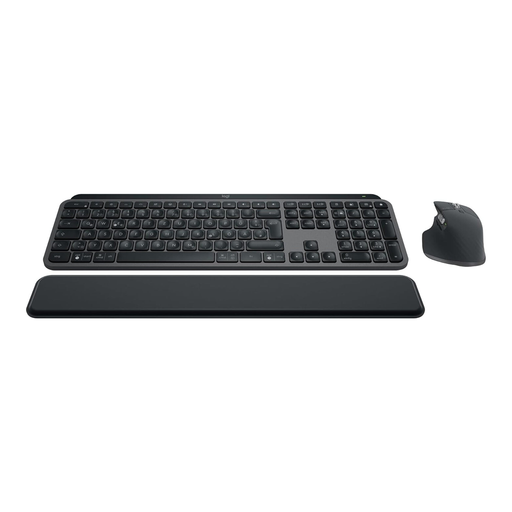
Logitech MX Keys S Combo, German QWERTZ
This set may suit you if you’re looking for a full-size keyboard and a mouse together.
The product name lists the MX Keys S with MX Master 3S, German QWERTZ, backlighting, Bluetooth and Logi Bolt. Logitech describes Smart Actions through Logi Options+; check that the software works with your operating system and workflow.
View at Joybuy
Frequently asked questions
Do I need a special keyboard because I use two screens?
No, not just because of the number of screens. As Microsoft Support explains, you can set up displays in Windows display settings and arrange windows using snapping features. Choose a keyboard mainly based on the editor keys you need and your workspace.
Can I use macros in the same way on every operating system?
That depends on the model and how it’s set up. Logitech describes Smart Actions through Logi Options+, while Perixx limits the downloadable configuration software for the PERIBOARD-335 to Windows and says that macros can be set up directly on the keyboard for other systems. Before buying, check that the command you need works with your operating system.
What should I consider when choosing a split keyboard?
Check that the split layout suits your hand position and the space available on your desk. It may feel different from a straight, standard layout; you shouldn’t assume that it will have a particular health benefit.
If a product develops a fault, what’s the difference between statutory rights and a guarantee?
The seller is responsible for meeting your statutory rights, while a manufacturer’s guarantee is a voluntary additional promise. The German consumer advice centre, Verbraucherzentrale, explicitly distinguishes between these two. Check the guarantee terms and the seller information for the specific offer.


