Labels and text
If you enter lots of place names, quest text and notes, look for a suitable keyboard layout and a typing feel that works for you.


If you mainly type place names and quest text, start by checking for the right German layout, a comfortable typing feel and a suitable connection. For commands you use regularly, customisable keys are worth considering, provided your mapping application and the necessary software support them. For long sessions or limited desk space, a split design, hand position or available surface may matter more than extra features.
If you enter lots of place names, quest text and notes, look for a suitable keyboard layout and a typing feel that works for you.
If you often use the same commands when designing, check whether you can assign them to keys and whether your mapping application supports the commands you need.
If you spend long hours at your desk, compare the hand position and keyboard design. A keyboard alone cannot guarantee freedom from discomfort; the rest of your workstation setup matters too.
First decide whether typing, frequently used commands, hand position or the space available matters most to you.
A good fit if: you mainly enter labels at a fixed workstation and want a low-profile design with a number pad.
Worth considering: A wired model needs a compatible connection. Also check that it has the key functions you want.
A good fit if: you want to assign regular tasks to keys and your application offers the commands you need.
Worth considering: The layout, switch type and key assignment software all need to suit your computer and workflow.
A good fit if: you prefer low-profile keys and repeatable actions to a mechanical design.
Worth considering: The Logitech MX Keys S requires Logi Options+ for Smart Actions. Also check your operating system and keyboard layout.
A good fit if: hand position is especially important to you during longer typing sessions.
Worth considering: A split layout may take some getting used to. Assess it alongside your workstation setup.
| Priority | What to check before buying | Who it matters most to |
|---|---|---|
| Labels and layout | Check the exact DE-ISO or QWERTZ version, special characters and whether you want a number pad. CHERRY lists a full-size DE version of the KC 6000 SLIM. | If I write lots of place names and quest text, I want to be able to use the supplied key layout straight away. Around 33% of consumers prioritise labels and layout when choosing a keyboard. |
| Commands you use regularly | Make a note of the commands you use most, then check that the application, operating system and key assignment software support the key actions you want. | If I repeat the same steps often when designing, I want to be able to use suitable shortcuts. Around 27% of consumers first look for customisable keys for frequently used commands. |
| Hand position | Compare low-profile and split designs at your own workstation, and allow time to get used to a split layout. | For longer sessions, I want a design that suits my hand position and desk. Around 20% of consumers prioritise hand position. |
| Space and connection | Measure the desk space available and check for USB-A, a wireless receiver or Bluetooth on the device you plan to use. Consider whether you need a number pad. | If my desk also needs to accommodate a mouse and map materials, I want to make sure the design and connection will work beforehand. Around 20% of consumers prioritise space requirements and device connectivity. |
A product range may include layouts for several countries. The actual key assignment supplied is what matters for labels and shortcuts.
Check the layout and full variant name in the specific listing, not just the model name.
Assignable keys are only useful if your mapping application supports the commands you want and the necessary software works on your computer.
Start by listing the steps you repeat regularly. The MX Keys S requires Logi Options+ for Smart Actions; check compatibility with your operating system.
A different keyboard design can change your hand position, but it cannot replace a suitable setup for the rest of your workstation.
Assess the keyboard and your workstation together. If you already have discomfort, a product claim should not take the place of professional advice.
The CHERRY KC 6000 SLIM requires USB-A; Perixx lists a USB-A wireless receiver and 4 × AAA batteries for the PERIBOARD-624B.
Before ordering, check your device’s connections, as well as the receiver and power supply for the specific version.
The KC 6000 SLIM is a low-profile, wired keyboard for a fixed workstation.
The K10 Pro ISO collection is a mechanical option for customisable key assignments.
The MX Keys S combines low-profile keys with programmable actions, while the ERGO K860 has a split layout.
The PERIBOARD-624B is a wireless split keyboard with adjustable tilt.
The Joybuy products below offer German keyboard layouts, and several models list customisable keys or macros for frequently used commands. Check the features and design of the specific version to make sure they suit your workstation.
 No image available
The German layout and programmable keys suit labels and frequently used commands, provided the required software works on your computer.
Low-profile design with Mecha-Membrane keys; Razer Synapse is listed for the programmable keys. The TKL design has no number pad.
 No image available
The ISO-DE layout is designed for German labels. Before choosing customisable keys, check that your application supports the commands you want.
This version is described as both wireless and wired. The product description lists web and cloud drivers for key remapping and macros.
 No image available
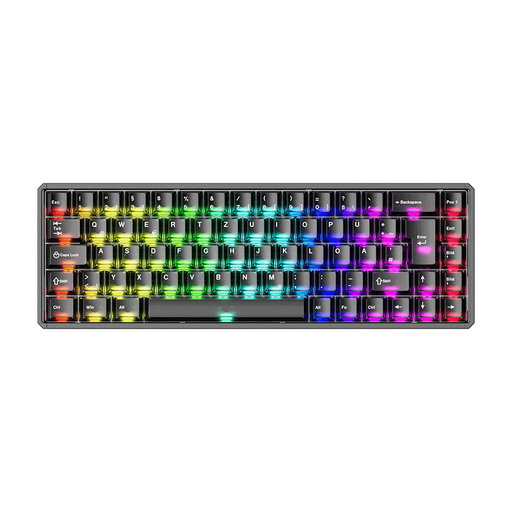
The German ISO-DE layout is suitable for quest text, and the product description also lists macro functions for frequently used commands.
75% design with Bluetooth, 2.4 GHz and USB-C connectivity, plus hot-swap support. The description says it has no number pad.
 No image available
The German ISO-DE layout is suited to text typed with a German key layout. Hot-swap support may be useful if you want to change the switch type.
Mechanical TKL keyboard with a wired connection and hot-swap support.
 No image available
The ISO-DE layout includes Ä, Ö, Ü and ß for German quest text. The description also lists macros and customisable key assignments for frequently used commands.
75% design with Bluetooth, 2.4 GHz wireless and USB-C. Hot-swap support and VIA compatibility are listed for this version.
Not just because you’re working on a map. Choose based on the text you enter and the shortcuts you use, and consider whether you need particular key functions. For example, the CHERRY KC 6000 SLIM does not offer N-key rollover.
First list the commands you use most in your mapping application, then check whether you can access them there using keyboard shortcuts. Logitech lists Logi Options+ for Smart Actions on the MX Keys S; according to the manufacturer, the Keychron K10 Pro offers QMK/VIA. Check in your application whether the key assignment works as intended.
For consumer purchases made at a distance, European Union consumer information states that you generally have a 14-day right to cancel, although exceptions apply. Your statutory rights when goods are faulty are separate from a voluntary manufacturer’s guarantee and generally apply for at least two years; you should initially direct any claim to the seller.
According to the German Environment Agency, old electrical equipment must not go in household waste. Collect removable used batteries separately and take them out when returning old equipment, if you can do so easily.