Quiz creators at a fixed desk
You write and edit lots of questions on a computer with two screens. A suitable layout, easy-to-reach typing and editing keys, and a setup that works for your desk are what matter most.


If both screens are connected to the same computer, all you need is a keyboard that suits your desk, preferred layout and available space; you don’t need a device-switching feature. If you’re using two separate computers, however, you’ll need to check that the keyboard explicitly supports switching between devices. Microsoft Support explains how to set up multiple screens on a computer, while Logitech describes Easy-Switch for switching between compatible devices.
You write and edit lots of questions on a computer with two screens. A suitable layout, easy-to-reach typing and editing keys, and a setup that works for your desk are what matter most.
You switch between two separate devices and want to use the same keyboard with both. What matters is confirmed support for switching between devices, not simply the number of connected monitors.
You’d like to try a different hand position and can weigh up the space required and adjustment time against a familiar standard layout.
First, work out whether you’ll be using one computer or two. Then you can weigh up the layout, form factor and customisation options to find what suits your desk.
| What matters | What to check before buying | Who is this important to? |
|---|---|---|
| Writing and editing | German QWERTZ layout and key arrangement; check whether you need a number pad. | If I write and edit lots of quiz questions, I need a familiar layout and keys that are easy to reach. Around 33% of consumers put comfortable typing and editing first. |
| Switching between computers | First check whether you’ll be using two separate computers; then check device compatibility and the switching function. | If I use the same keyboard with two separate computers, I want to be able to switch inputs without confusing this with switching between monitors. Around 27% of consumers prioritise switching between computers. |
| Hand position during long typing sessions | If you’re considering a split design, allow for desk space and time to adjust; don’t assume the design will have a particular effect for you. | If I want to try a split layout for longer typing sessions, I need enough room and the change needs to be practical for me. Around 20% of consumers prioritise a different hand position. |
| Space and custom shortcuts | Check which keys you need, including whether you need a number pad; confirm the DE-ISO layout and software requirements. | If there’s little room on my desk alongside the screens, I still want to be able to reach the keys I need for quiz questions comfortably. Around 20% of consumers prioritise a compact design and customisable keys. |
Setting up screens and connecting a keyboard are two different things. You don’t need a device-switching function just because two monitors are connected.
Before choosing a keyboard, make a note of which computer each screen is connected to. Only consider device switching as a buying criterion if you actually want to switch between separate computers.
A multi-device feature you don’t need can add to the cost without helping you switch between monitors.
CHERRY lists different country versions of the KC 6000 SLIM; the Keychron K3 Max also comes in different layout variants.
Before ordering, check the full variant details and a clear image showing the actual key layout.
An unfamiliar layout can make it harder to enter umlauts, punctuation and keyboard shortcuts repeatedly.
According to Perixx, the PERIBOARD-512 B measures 485 × 236 × 44 mm and takes time to get used to. A 75% layout, such as the Keychron K3 Max, doesn’t have an integrated number pad.
Measure the space available and check that you can comfortably reach the keys you need for your usual quiz entries, including numbers and special characters.
Depending on the model, you may need to allow for more desk space or get used to a different key layout.
The KC 6000 SLIM is a wired option for a fixed desk, while the DW 9100 SLIM is a keyboard and mouse set with Bluetooth and 2.4 GHz wireless connectivity.
The MX Keys S is designed for people who want a low-profile keyboard with backlighting and customisable features.
According to Keychron, the K3 Max combines a compact 75% layout with mechanical switches and QMK/VIA customisation.
The PERIBOARD-512 B is a split, wired keyboard for a fixed desk.
These keyboards at Joybuy cover German-language typing, with compact layouts, a wired full-size keyboard, a split design and an option described as multi-device.
 No image available
For a compact desk setup if you’re looking for a compact layout and customisable keys.
75% layout, ISO-DE and VIA-compatible; hot-swappable version with Creamy Rye switches.
 No image available
For a fixed desk setup with one computer if you’re looking for a full-size keyboard with a number pad.
Wired, USB plug and play, full size.
 No image available
For longer typing sessions if you’d like to try a split key layout; the design alone doesn’t prove that it will have a particular effect for you.
Split key field, Bluetooth and USB receiver.
 No image available
For a workspace with limited room if a compact mechanical layout has the keys you need.
75% layout, ISO-DE and hot-swappable; Bluetooth, 2.4 GHz or USB-C connectivity.
 No image available
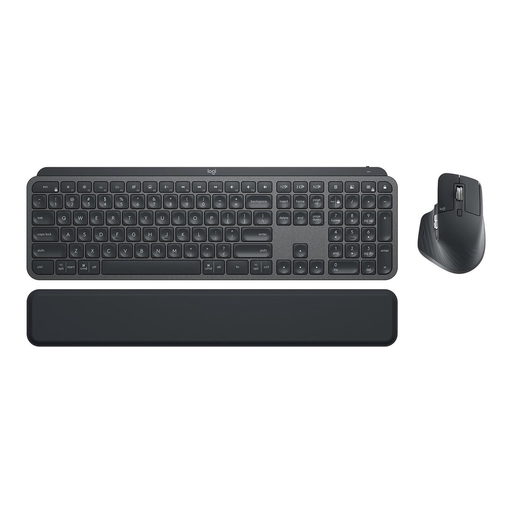
For typing in German if you’re looking for a keyboard and mouse set. Before buying, check which devices the specific multi-device function supports.
Set comprising MX Keys and MX Master 3S; backlit keyboard, Bluetooth and Logi Bolt.
No, not if both screens are connected to the same computer. Microsoft Support explains how to set up multiple screens in display settings; keyboard switching is designed for switching between separate computers.
In Windows 11, you can identify and arrange connected screens in display settings. Microsoft Support explains these steps for Windows 11; check the settings for the operating system you actually use. Keyboard shortcuts may vary between applications.
Allow space and time to get used to it, and check that the key layout gives you easy access to the keys you usually need for quiz entries. The German Social Accident Insurance (DGUV) notes that intensive computer work can be associated with discomfort in the hands, arms, shoulders and neck; you can’t assume that a particular keyboard design will have a specific effect for you.
For a consumer purchase from a trader in the EU, you have a minimum two-year legal guarantee from the date you receive the goods; the seller is generally your point of contact. Your Europe distinguishes these statutory rights from a voluntary manufacturer’s guarantee.
Products covered by relevant EU harmonisation legislation and placed on the EU market must carry the CE marking. The German Federal Network Agency explains that the manufacturer uses this marking to declare that conformity assessment has been carried out; it is not an independent product assessment. Check the marking and the manufacturer’s information for the specific version.