For a dedicated computer, a wired keyboard with quiet, low-profile keys is a sensible starting point. If space is tight, consider a model without a number pad. If you regularly switch between computers, a multi-device keyboard may suit your workflow better, while a split keyboard is worth considering if you find its layout comfortable when you try it. Check the exact UK layout, the available connections and how it sounds at your usual typing speed: manufacturers’ claims about quiet typing are not comparable sound measurements.
Which keyboard is right for you?
Scriptwriters who prefer quiet typing
If you write longer passages while others are working at the same desk, judge the sound at your usual typing speed. CHERRY describes the scissor keys on certain STREAM models as quiet, but this does not mean comparable volume measurements are available.
Writers short on desk space
If you need room for script notes alongside your keyboard and mouse, and rarely use the number pad, a TKL layout could be a good fit. CHERRY says the number pad is omitted from the CHERRY STREAM KEYBOARD TKL, while the main key area is retained.
Writers using different computers
If you use several approved devices at a shared desk, check how easily you can switch the keyboard between them. The models considered here differ in their wireless connections and power supplies.
What to look for when buying
At a shared desk, start by weighing up how the keyboard sounds when you type and how much space you need. Then consider its connection, key layout and care requirements to narrow down the right option for your shared workflow.
| What to consider |
What to look for |
Who it matters most to |
| Typing noise |
Try it at your usual typing speed; don’t treat manufacturers’ claims as independent sound measurements. |
If I’m writing at the same desk as other people, I want to judge the sound of my typing for myself. Around 31% of consumers put the quietest possible typing first. |
| Desk space |
Consider whether you need a number pad and whether the layout of the specific model suits you. |
If there’s little room beside my mouse and script notes, a clear work area matters more to me than a number pad. Around 25% of consumers say saving space is their top priority. |
| Connection and switching devices |
Check whether Bluetooth is permitted and which USB ports are available at your workstation; don’t mistake a charging port for a wired input connection. |
If I switch between several approved computers, I want the keyboard’s connections to work with them. Around 19% of consumers say switching between devices matters most to them. |
| Key layout |
If possible, try a split keyboard for yourself and make sure you have enough space for it. |
If I’m considering a split layout, I want to check first whether it suits the way I type. Around 13% of consumers want to try this type of layout before anything else. |
| Care when sharing |
Follow the cleaning instructions for the exact model, and only consider protective covers if they’re confirmed to fit. |
If several people use the same keyboard, it’s particularly important to me that it’s easy to plan its care. Around 12% of consumers put maintenance first. |
Common keyboard-buying misconceptions
-
“Quiet” means the same volume for every keystroke
Manufacturers’ claims about low noise aren’t based on a consistent comparison of keyboards used at shared desks.
If possible, try the keyboard at your usual typing speed, especially if others are working within earshot.
-
“Compact” automatically means “no number pad”
Dell’s KB740 has “Compact” in its name, but Dell says it includes a number pad. The CHERRY STREAM KEYBOARD TKL explicitly does without one.
Compare the keys and dimensions of the specific model rather than relying on its form-factor name alone.
-
A charging cable means it supports wired input
HP lists USB-C as the charging connection for the HP 975; according to the manufacturer, it connects to devices via Bluetooth or a USB-A wireless receiver.
If wireless isn’t an option on your work computer, choose a model that explicitly states it supports wired input.
-
A split keyboard suits everyone straight away
Perixx says the PERIBOARD-512 B takes time to get used to; the manufacturer lists its width as 485 mm.
If possible, check the space and layout for yourself, and make sure others are comfortable with it if you’ll be sharing it. Don’t assume it will have any particular effect on your health.
Key brands at a glance
CHERRY
The STREAM range includes options for fixed workstations with a full-size key layout, a narrower TKL model and a multi-device version.
- For the specific STREAM models, CHERRY lists SX scissor keys and quiet typing.
- The TKL version has no number pad, while the ULTIMATE adds four connection channels. These claims aren’t independent volume comparisons.
Dell
The German-layout Pro Plus KB740 combines a full-size key layout, including a number pad, with the ability to switch between three devices.
- Dell lists Bluetooth, a wireless receiver and AA batteries.
- Despite “Compact” in its name, the KB740 isn’t a TKL keyboard. Dell specifies that its configuration software is for Windows.
HP
The German-layout 975 Dual-Mode is a backlit multi-device keyboard for workspaces with changing light conditions.
- HP lists quiet keys, connections for three devices and a rechargeable battery.
- HP says USB-C is for charging; input is via Bluetooth or a USB-A wireless receiver. The stated battery life applies with the backlight switched off.
Logitech
The MX Keys S is a low-profile, backlit keyboard with customisable key functions.
- Logitech says stable keys help reduce noise and offers features through Logi Options+.
- This isn’t an independent volume comparison. Check the layout version and whether you can use the software on your work computer.
Perixx
The PERIBOARD-512 B is a wired option for anyone who wants to try a split key layout.
- Perixx lists USB-A, membrane switches and an integrated wrist rest.
- The manufacturer notes that it takes time to get used to and gives its width as 485 mm. You can’t infer any particular effect on an individual’s health from this.
Keyboards at Joybuy
This selection includes wired and wireless keyboards for writing at a shared desk, including models described as having quiet keys, a compact design or the ability to switch between devices.
 No image available
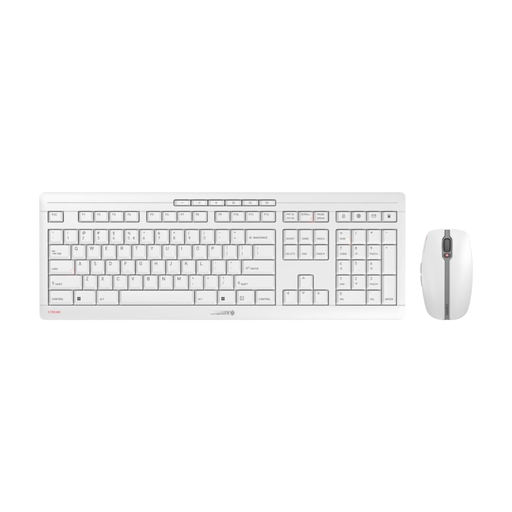
CHERRY Stream Desktop Recharge keyboard and mouse set, EU layout (QWERTY)
This wireless set is worth considering if you want to use a keyboard and mouse together.
The title specifies an EU layout (QWERTY); before buying, check that the key layout suits your typing habits. The product description lists rechargeable NiMH batteries with USB-C charging and a 2.4 GHz receiver.
View at Joybuy
 No image available
Logitech MX Mechanical, Tactile Quiet, German QWERTZ layout
This wireless multi-device keyboard suits a workflow where you switch between several computers.
The title lists Tactile Quiet switches, Bluetooth, Logi Bolt, smart backlighting and a German QWERTZ layout. The product description says you can switch between up to three devices.
View at Joybuy
 No image available
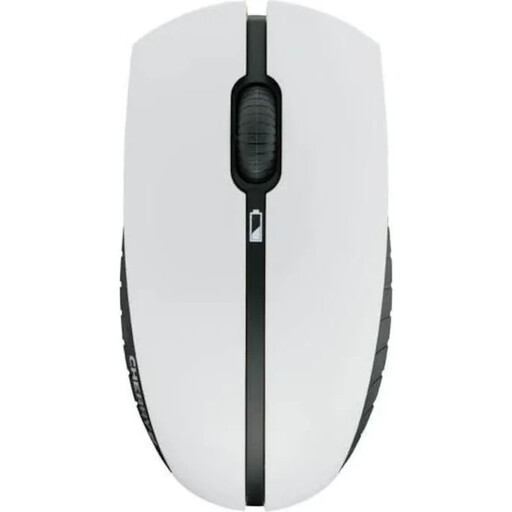
CHERRY B.UNLIMITED 3.0 wireless rechargeable keyboard and mouse set, German layout
This set is an option if you’re looking for a wireless keyboard with a German layout and a matching mouse.
The product description lists DE-QWERTZ, SX scissor keys and a 2.4 GHz receiver. The full-size model measures 460 × 165 mm; check that it will fit on your shared desk.
View at Joybuy
 No image available
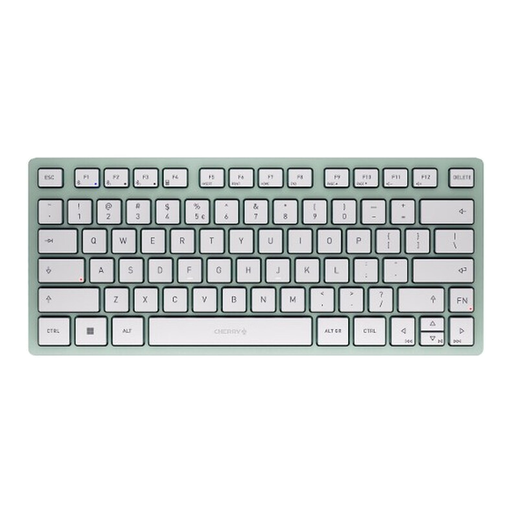
CHERRY KW 7100 Mini Bluetooth keyboard, TKL, US layout
This compact design could be a good fit if you have little space for a keyboard and want to switch between devices.
The product description lists Bluetooth for three devices and SX scissor keys. It has a US rather than DE-QWERTZ layout, so the key positions differ when typing German text.
View at Joybuy
 No image available
Rapoo E9050L 75%, wireless membrane keyboard, US layout
This compact keyboard could suit a limited workspace and make it easy to switch between several devices.
The product description lists 78 keys, Bluetooth and 2.4 GHz wireless, as well as connections to up to four devices. It has a US rather than DE-QWERTZ layout, so the key positions differ when typing German text.
View at Joybuy
Frequently asked questions
Do you have to use QWERTZ for radio scripts?
There’s no general legal requirement to use a particular layout for this type of writing. If you type German text with umlauts and familiar keyboard shortcuts, check that the model is actually DE-QWERTZ; a model sold in Germany may be available in several layouts.
How do I connect the keyboard to a shared computer?
First check which connections are available and permitted at your workstation. Perixx says the PERIBOARD-512 B uses USB-A; the Dell KB740 offers Bluetooth or a wireless receiver. HP describes USB-C on the HP 975 as a charging connection, not a wired input mode.
Can I buy any wipe-clean cover for a shared keyboard?
No. CHERRY says its protective covers are made to fit specific models. Check the exact model name and cleaning instructions before choosing a cover for your shared workspace.
What are my rights in Germany if a new keyboard is faulty?
For a consumer purchase, the statutory warranty against the retailer is separate from a voluntary guarantee. The Verbraucherzentrale generally gives two years for defects that were present when the item was handed over. For purchase contracts from 31 July 2026, it also describes a one-off 12-month extension if you choose a repair for a defect reported within the warranty period. Whether you have a specific claim depends on the purchase and the defect.
Are there any specific requirements for a keyboard at a workplace computer station?
If the shared desk is a computer workstation used by employees at a place of work, the Workplace Ordinance and the related ASR A6 guidance on workstation design are relevant. The ASR applies to employers setting up and operating the workplace; simply describing a desk as “shared” does not mean that a privately bought keyboard has to meet a particular certification requirement.


