If both screens are connected to one computer, choose a keyboard based on how it feels to type, which keys you need and how much space you have; you won’t need a device-switching feature. If the screens are connected to two computers, a keyboard with explicit support for switching between devices may be useful. For longer typing sessions, you could also try a split keyboard, but bear in mind the space it takes up and the time it may take to get used to.
Which keyboard is right for you?
People who do a lot of typing
If you enter lots of recipe text, a key shape you find comfortable and a suitable hand position matter. The German Social Accident Insurance (DGUV) studied text-entry and sorting tasks at workstations with different screen configurations; its findings do not amount to an individual keyboard recommendation.
People with a small desk
If you keep templates and an entry form open on two screens, you may want to leave room for a mouse or paperwork. Compact keyboards without a number pad are one option; first consider whether you need a number pad when managing your recipes.
People using two computers
If the two screens belong to different computers, a keyboard that supports switching between devices can make it easier to change which computer you’re typing on. Two monitors connected to a single computer don’t create a need for this feature.
What should you look for when buying?
First, work out whether you use one computer or two. You can then choose a suitable key layout, size and features to match your recipes and workflow.
| Consideration |
What to check when buying |
Who will value this? |
| Typing comfort |
Key feel and layout; if you’re considering a split keyboard, also think about the space it needs and how long it may take to get used to. |
If I enter lots of recipes, I want a key shape that feels comfortable to use. Around 33% of consumers put typing comfort first. |
| Space and the keys you need |
Check whether you need a number pad and whether the keyboard’s size and layout will suit your desk. |
If I want to leave room for a mouse or paperwork, a more compact model may be appealing. Around 25% of consumers prioritise desk space and the keys they need. |
| Switching between devices |
First check whether the screens are connected to one computer or two; then check which devices and connection types are supported. |
If I use the two screens with different computers, I want to be able to switch between them when typing. Around 25% of consumers put device switching first. |
| Repeated actions |
Identify the tasks you carry out, then check that the keyboard, software and operating system support the key assignments you want. |
If I regularly repeat the same navigation or entry steps, I want to be able to set up the keys to suit me. Around 17% of consumers prioritise controlling repetitive tasks. |
Avoiding common buying pitfalls
-
Confusing two screens with two computers
A keyboard with device switching won’t switch between monitors. If both screens are connected to one computer, you don’t need this feature for that setup.
Before you buy, check which computers the screens are connected to.
-
Choosing a similar layout without checking
Different layout versions have different key arrangements. A compact format or a similar model name doesn’t tell you whether that specific keyboard has the German layout you need.
Compare the full layout description for the specific product with the key layout you want.
-
Assuming customisable keys come ready to automate tasks
Logitech says that Smart Actions on the MX Keys S are set up using Logi Options+ software. So a customisable key won’t automatically be set up as a recipe shortcut.
Check that the software is supported, and only factor in setup time if you have a specific task you regularly repeat.
Allow time to set things up and check that the software is compatible.
Brands and keyboard styles to consider
Logitech
The models mentioned cover the compact POP Icon Keys, customisable actions on the MX Keys S and the split ERGO K860.
- Logitech says Easy-Switch lets supported keyboards switch between up to three devices. According to the manufacturer, Smart Actions on the MX Keys S run through Logi Options+.
- Specific requirements apply to supported devices and software. The F.A.Z. Kaufkompass praised the ERGO K860’s typing feel and wrist rest, but noted that it lacks backlighting and wired operation (3 November 2026).
CHERRY
The STREAM KEYBOARD TKL is a compact wired option, while the STREAM KEYBOARD ULTIMATE is a separate model with multi-device functionality.
- CHERRY specifies SX scissor switches and quiet keystrokes for the TKL model.
- The TKL model doesn’t have a number pad. The manufacturer’s claim that it can switch between up to four devices applies to the ULTIMATE, not the TKL.
Perixx
The PERIBOARD-612 is a split wireless keyboard, and the manufacturer lists a German QWERTZ version.
- The manufacturer lists Bluetooth 4.2 and a 2.4 GHz receiver as connection options.
- A split design takes up space, and only you can decide whether the key layout feels right for you.
Keychron
The K3 Pro is a compact mechanical keyboard with customisable key assignments.
- Keychron lists VIA, along with several ISO, switch and keycap options.
- Check the exact layout and switch version: a UK ISO version isn’t automatically a German DE ISO keyboard. The compact layout also won’t replace a number pad if you need one.
Joybuy products
The products below are intended for entering text at a recipe workstation and differ in layout, design and device connectivity, among other features. Check that these details suit your computer and the key layout you need.
 No image available
Inateck Bluetooth Keyboard KB01003G, QWERTZ
The QWERTZ layout and device switching may suit you if you enter German recipe text and actually use multiple devices.
The product name specifies Bluetooth for up to three devices, Bluetooth 5.3 and enlarged 15 × 15 mm keycaps.
View at Joybuy
 No image available
Inateck Foldable Mini Keyboard N0153BK, QWERTZ
The foldable design with an integrated touchpad may appeal if you’re looking for a compact typing option on the go. For a permanent workstation, consider whether its size and key layout will suit you.
The product description lists Bluetooth 5.3 with three channels, 1.5 mm key travel and a weight of 228 g.
View at Joybuy
 No image available
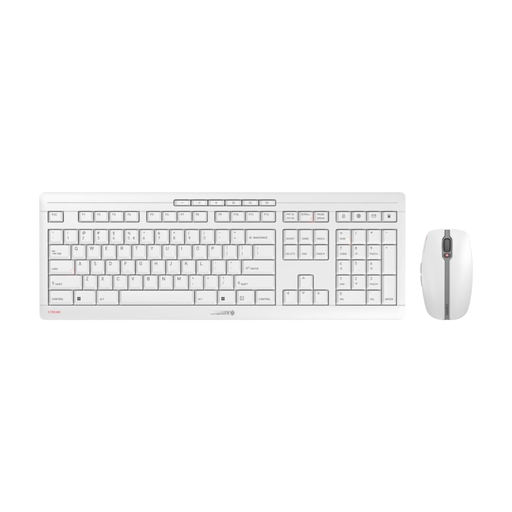
CHERRY Stream Desktop Recharge keyboard and mouse set, EU QWERTY
This set includes a keyboard and a mouse. Bear in mind that the stated EU QWERTY layout is not the same as a German QWERTZ layout.
The product description lists a 2.4 GHz connection, rechargeable NiMH batteries, USB-C charging while in use and CHERRY SX scissor switches.
View at Joybuy
 No image available
Redragon RS68, 65% mechanical keyboard with 68 keys
The compact layout can free up desk space. Check whether you’d miss the keys that smaller formats leave out, particularly for numbers and navigation.
The product name lists Bluetooth, 2.4 GHz and a wired connection. The product description also mentions a hot-swap PCB and a detachable wrist rest.
View at Joybuy
 No image available
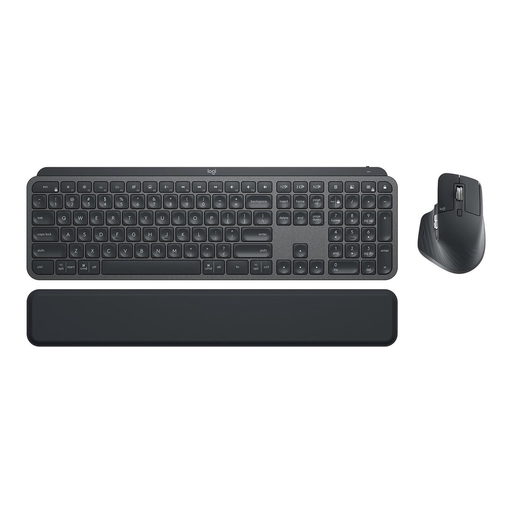
Logitech MX Keys Combo for Business Gen 2, QWERTZ
This set may suit you if you’re looking for a German-layout keyboard and a mouse together. The device-switching feature is only relevant if you use multiple supported devices.
The product description lists a full-size layout, backlighting, Logi Bolt and multi-device support. The set includes the MX Keys and MX Master 3S.
View at Joybuy
Frequently asked questions
Do I need a multi-device keyboard because I have two screens?
No, not if both screens are connected to the same computer. Logitech describes Easy-Switch as a way to switch between supported devices, not monitors. Check that the specific keyboard model is compatible with your devices.
How do I get started with customisable keys for entering recipes?
First, decide which steps you repeat regularly. Logitech says that Smart Actions on the MX Keys S are set up through Logi Options+; check in advance that your operating system is supported.
What should I consider when choosing a split keyboard?
Make sure you have enough desk space and check that the split key layout feels comfortable to you. The F.A.Z. Kaufkompass also reported that, on the ERGO K860 it tested, the gap between the wrist rest and keyboard was difficult to clean.
Do I need to choose a private-use keyboard based on ASR A6?
Not just because of the number of screens. The Federal Institute for Occupational Safety and Health (BAuA) uses ASR A6 to set out requirements for workplaces and certain home-working setups; it isn’t a blanket buying requirement for a personal recipe project.


