Recipe transcribers entering lots of quantities
If you often enter ingredient quantities and times into separate fields, a built-in number pad could suit the way you work.


For entering quantities and times frequently, a full-size keyboard with a number pad is an obvious choice. If you repeat the same keystrokes, a configurable key could be useful, provided your recipe app supports the actions you need. If you want to keep your handwritten recipe beside the keyboard or spend long periods transcribing, desk space and a typing position that feels comfortable to you matter more than extra features. A keyboard can’t recognise handwriting or create custom data fields in your recipe software.
If you often enter ingredient quantities and times into separate fields, a built-in number pad could suit the way you work.
If you record lots of recipes using the same template, check whether your app supports the keystrokes you want to repeat.
If you want to keep a handwritten recipe beside your keyboard or spend long periods transcribing, desk space and a hand position that feels comfortable to you are important.
Start by checking the form you actually use to enter recipes. Then decide whether a number pad, configurable keys or clear desk space matters most for the way you work.
| Buying consideration | What to check | Who will find this particularly important |
|---|---|---|
| Entering numbers and text | Test numbers, German special characters and tab keys in the form. Also check the DE-QWERTZ layout and connection. | If I often enter quantities and times, a dedicated number pad matters more to me than a particularly compact format. Around 36% of consumers put number entry first. |
| Repeating entry steps | Check the keyboard shortcuts in your recipe app and whether you can set up the actions you need using the keyboard software. | If I always record recipes using the same template, I want to make supported keystrokes easier to use. Around 29% of consumers prioritise repeated field-entry steps. |
| Hand position during long sessions | Try a split layout with your usual recipe beside it, and check that the keyboard, your hands, mouse and paper all fit on the desk. | If I spend a long time transcribing, a hand position that feels comfortable to me matters more than extra features. Around 21% of consumers prioritise hand position. |
| Space for your recipe and mouse | Measure the available desk space with your recipe laid out. Check whether you can manage without a separate number pad. | If I want to keep my recipe card beside the keyboard, I need clear space and can more readily do without a dedicated number pad. Just under 14% of consumers put space for their source material first. |
A configurable key can trigger supported entry steps, but it doesn’t define the data model of your recipe app.
Start by creating a test record and checking which fields and keyboard shortcuts the app actually supports.
A compact keyboard can leave more room for your recipe, but may not have a separate number pad for entering quantities.
Decide based on the entries you make most often, and measure your workspace with the recipe laid out.
The language of a product description alone doesn’t confirm the key layout of the specific version.
Ask for confirmation that the model you’ve selected has the German layout you want.
Among the models considered here, the range includes everything from configurable Smart Actions to a split keyboard with a number pad.
The STREAM KEYBOARD is a slim, wired option; the STREAM KEYBOARD TKL has no number pad.
The PERIBOARD-512 is a wired split keyboard with a number pad.
The Q6 Pro is a full-size mechanical option for buyers who want to configure keys and macros in detail.
The following Joybuy options include German keyboards in compact and full-size designs, as well as a model with configurable Smart Actions. Choose based on your need for a number pad, the space you have available and the features of your recipe app.
 No image available
The compact 65% layout could be a good fit if you need more room for your recipe while transcribing.
German QWERTZ layout; connects via 2.4 GHz, Bluetooth or USB-C; RGB lighting and low-profile MX Speed switches.
 No image available
The full-size layout with number pad suits frequent entries of ingredient quantities and times.
USB connection and German QWERTZ layout; the product description specifies plug-and-play use without software installation.
 No image available
The full-size layout with number pad could suit a recipe workflow where you regularly enter quantities and times.
German QWERTZ layout; Bluetooth, 2.4 GHz or USB-C connection options.
 No image available
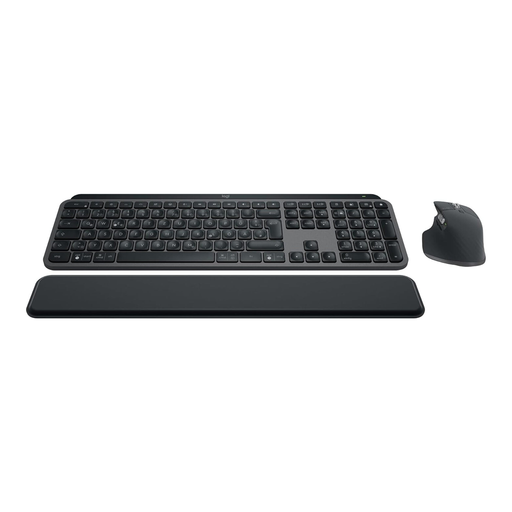
Smart Actions could suit repeated entry steps, as long as your recipe app supports the actions you need.
The set includes the MX Keys S and MX Master 3S. Smart Actions need to be set up using Logi Options+; Bluetooth and Logi Bolt are also specified.
 No image available
The TKL format can leave more room for a recipe if you can manage without a separate number pad.
The description specifies programmable keys via Razer Synapse, a USB connection and a detachable wrist rest. This model doesn’t have a number pad.
No. Keyboard features relate to typing and, in some cases, configurable keystrokes. Whether your recipe app lets you create and search titles, ingredients or custom fields depends on the app. Check its field features and keyboard shortcuts before buying a macro keyboard.
First, try the step you want to automate using standard keys and a record in your recipe app. Logitech specifies Logi Options+ for Smart Actions on the MX Keys S; Keychron specifies VIA for macros on the Q6 Pro. You’ll need to check separately whether your specific app and computer support the action.
Try the keyboard with your usual recipe and desk setup. Perixx notes that it may take time to get used to the PERIBOARD-512; the German Social Accident Insurance’s Institute for Occupational Safety and Health describes ergonomics as a matter of choosing suitable input devices, rather than guaranteeing a particular model will have a specific effect.
According to the Verbraucherzentrale, online consumer purchases generally come with a 14-day right to cancel; you must notify the retailer that you wish to cancel. Your statutory rights against the seller are separate from any voluntary guarantee. For new goods, the Verbraucherzentrale generally specifies a two-year statutory warranty period.
There is no personal registration requirement for ordinary keyboard use. The Bundesnetzagentur describes requirements under the relevant EU regulations for electrical and electronic products within its remit. It also checks matters such as CE marking, manufacturer information and required German-language documentation; this does not prove that a specific product listing is compliant.