Start by considering whether long writing sessions, frequent revisions or entering recipe quantities are the main part of your day. For longer chapters, typing feel and desk layout matter; when revising, easy-to-reach navigation keys or customisable commands can help. Then check the UK layout and connection, and bear in mind that split keyboards can take some getting used to, while compact models usually don’t have a separate number pad.
Which keyboard is right for you?
For people who write for long stretches
If you draft longer chapters at your desk, consider typing feel, hand position and the space you need for your manuscript and mouse together. CHERRY describes the KC 6000 SLIM as having a low-profile scissor mechanism; Perixx notes that it can take time to get used to the split key layout of the PERIBOARD-512 B.
For people who revise frequently
If you often switch between passages, comments and repetitive tasks, check that the navigation keys and customisation options work with your writing software. Microsoft describes comments and Track Changes as Word features; customisable keyboard commands don’t replace them.
For people who organise recipes and notes
If you frequently enter quantities and times, or keep handwritten recipes next to your keyboard, weigh up having a number pad against the space it takes up. CHERRY lists the KC 6000 SLIM as a full-size model with a number pad; according to the manufacturer, the Keychron K3 Max is a compact 75% model without a separate number pad.
What should you look for when buying?
Low-profile full-size wired keyboard
A good fit if: you usually write at a fixed computer and enter recipe quantities using a number pad.
Bear in mind: a cable and full-size layout take up space; check the product number to identify the DE version of the CHERRY KC 6000 SLIM.
Wireless keyboard with customisable commands
A good fit if: you want to set up repetitive tasks and switch between writing and revising.
Bear in mind: setup depends on compatible software; comments and Track Changes remain features of your writing software.
Split keyboard
A good fit if: hand position matters to you during long writing sessions and you have room for a larger keyboard.
Bear in mind: Perixx notes that it may take time to get used to the layout; F.A.Z. also found that a gap between the palm rest and keyboard on the Logitech ERGO K860 it tested was difficult to clean.
Compact, customisable keyboard
A good fit if: you want room for manuscript pages next to your computer and would like to customise the key assignments yourself.
Bear in mind: the Keychron K3 Max doesn’t have a separate number pad; layouts and switches vary by version.
| Priority |
What to check when buying |
Who should consider this? |
| Typing feel and hand position |
If possible, try the key feel and layout; allow room for your keyboard, mouse and manuscript. |
If you write long chapters, look for a layout that suits your hand position and desk. Around 33% of consumers are likely to have this as their main priority. |
| Navigation and commands |
Check the position of frequently used keys, and make sure your software and operating system support any customisation. |
If you often switch between passages and notes while revising, look for accessible navigation keys and suitable commands. Around 27% of consumers are likely to prioritise this workflow. |
| Space and connection |
Allow room for papers and a mouse; check which connection your computer needs. |
If you spread manuscript pages out next to your keyboard, consider its size and connection together. Around 20% of consumers are likely to prioritise desk space and connectivity. |
| German layout and recipe quantities |
Check the specific listing for DE-ISO or German QWERTZ; weigh up having a number pad against the space it takes up. |
If you write in German and frequently enter quantities or times, compare the key layout and number pad carefully. Around 20% of consumers are likely to have this as their main priority. |
Avoid common buying mistakes
-
Assuming the model name guarantees a particular regional layout
A model may be available in different regional versions. For the German version of the CHERRY KC 6000 SLIM, the manufacturer gives the product number JK-1600DE-2.
Before ordering, check the layout and, where provided, the full product number of the specific listing.
An unfamiliar key layout can make writing more difficult.
-
Confusing a programmable key with document revision tools
A keyboard can trigger actions, while comments and Track Changes are managed by your writing software.
Try the task you have in mind in the app you actually use before choosing a model for its macro function.
-
Choosing a compact or split keyboard based on its name alone
The Keychron K3 Max is a 75% model without a separate number pad; Perixx notes that the PERIBOARD-512 B may take some getting used to.
Think about how often you enter recipe quantities and how much room your manuscript, mouse and keyboard need together.
A new key layout can take time to get used to; if you enter numbers frequently, you may need a separate number pad.
Brands to consider
Logitech
The MX Keys S is designed for writers who want to use customisable wireless workflows; the ERGO K860 is a split, full-size alternative.
- Logitech describes Smart Actions for repetitive tasks; setup and compatible software are important.
- F.A.Z.’s independent test of the ERGO K860 notes that it lacks backlighting and a wired connection.
CHERRY
The KC 6000 SLIM is a low-profile, wired, full-size keyboard for a permanent writing space.
- CHERRY lists a scissor mechanism, number pad and USB-A connection; the product number for the German version is JK-1600DE-2.
- Check the regional layout against the product listing.
Keychron
According to the manufacturer, the K3 Max combines a compact 75% format with mechanical switches and a customisable layout.
- Keychron lists several connection options and offers a DE-ISO version.
- The compact layout doesn’t have a separate number pad; layouts and switch types vary.
Perixx
The PERIBOARD-512 B is a wired, split, full-size alternative available with a German layout.
- Perixx lists an integrated palm rest.
- The manufacturer notes that it can take time to get used to the split key layout; this doesn’t imply any individual health benefit.
Keyboards at Joybuy
Here you’ll find keyboards for writing in German, including full-size and split models, as well as compact and customisable options.
 No image available
Logitech K120, German QWERTZ layout
A wired, full-size keyboard for writing in German and entering numbers frequently.
The product details list 104 keys, a number pad, USB connection, low-profile keys and adjustable tilt legs.
Joybuy
 No image available
Logitech ERGO K860, QWERTZ layout
A split, full-size keyboard for writers looking for this layout and a number pad.
The product details list Bluetooth and a USB receiver. F.A.Z. notes that a gap between the palm rest and keyboard on the model it tested was difficult to clean.
Joybuy
 No image available
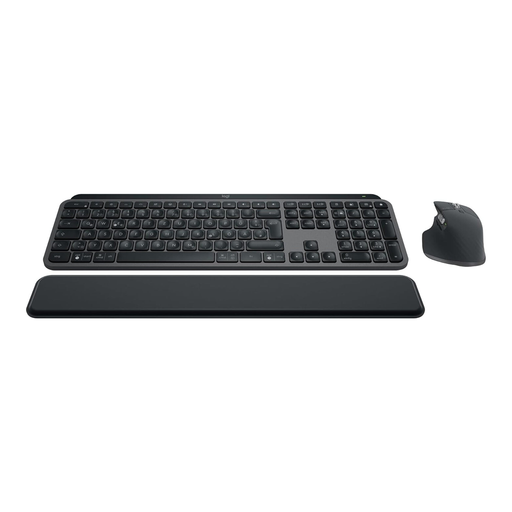
Logitech MX Keys S Combo, keyboard and mouse, German QWERTZ layout
This set could suit writers looking for a wireless keyboard with a mouse and customisable actions.
The product details list Bluetooth, Logi Bolt, backlighting and German QWERTZ. According to Logitech, Smart Actions need to be set up through Logi Options+; comments and Track Changes remain features of your writing software.
Joybuy
 No image available
Logitech MX Keys S Graphite
A wireless option for writers who want to trigger repetitive tasks with a customisable command.
The product details list Bluetooth, a Logi Bolt receiver and USB-C charging. According to Logitech, Smart Actions require Logi Options+; document revisions are still handled by your writing software.
Joybuy
 No image available
Razer Ornata V3 Tenkeyless, German layout
A compact, wired keyboard for writers who want programmable keys and can do without a separate number pad.
The product details list German QWERTZ, programmable keys and a detachable palm rest. The keys are configured using Razer Synapse.
Joybuy
Frequently asked questions
Does a keyboard save my revision notes or track changes?
No. You set up comments and Track Changes in your writing software; Microsoft describes these features under the ‘Review’ tab in Word. Customisable keyboard commands can trigger actions, but they don’t replace document revision tools.
What should I check before connecting a keyboard?
Check that the connection you need is compatible with the specific keyboard version and your computer. CHERRY lists USB-A for the KC 6000 SLIM; Logitech describes the ERGO K860 as connecting via Bluetooth or the supplied USB receiver. You should also check that your operating system supports any software features you want to use.
What should I expect when using a split keyboard?
Allow time to get used to the new key layout; Perixx specifically notes that the PERIBOARD-512 B may take some getting used to. F.A.Z. also mentions a gap between the palm rest and keyboard on the ERGO K860 model it tested that was difficult to clean. Follow the instructions for your specific device when cleaning it.
What rights do I have when buying a keyboard online in Germany?
For a qualifying distance sale from a business, you generally have a 14-day right to cancel from the date of delivery; exceptions and rules on return costs apply. Your Europe also explains the legal guarantee for faulty goods, which generally lasts for at least two years from receipt. This is separate from any voluntary manufacturer’s warranty.


