What to look for when buying
For regex characters, both the keyboard layout and the active input layout matter. Microsoft Learn explains the importance of the backslash in regular expressions, while Microsoft Support describes how to manage input layouts in Windows.
| Consideration |
What to check before buying |
Who is it important to? |
| Special characters and layout |
Check the exact country and model variant, as well as the active input layout; try the characters you need in your own editor. |
If I want to enter backslashes and other special characters while practising, and also write German text, I’ll check the physical layout and the computer settings separately. Around 31 % of consumers are likely to prioritise character layout above all else. |
| Hand position and desk space |
Compare the dimensions and key layout with your desk, screen and mouse position. |
For longer writing sessions, I want to choose a layout that suits my workspace without overlooking the space it needs. Around 25 % of consumers are likely to prioritise hand position and desk space. |
| Typing feel and noise |
Check the exact switch variant and, if possible, try the specific model. |
If I do a lot of writing while learning or share a room, I want to judge the typing feel in my own surroundings rather than assume how noisy a keyboard is based on its switch name alone. Around 19 % of consumers are likely to put typing feel and noise first. |
| Connectivity and switching between devices |
Check for USB-A or wireless connections, compatible devices and the setup required for the specific model. |
If I practise on several computers in turn, I want to know how to connect the keyboard and switch between devices. Around 13 % of consumers are likely to prioritise switching between devices. |
| Cost and extra features |
Check the exact variant, included components, connection options and any software required. |
If my main aim is to avoid unnecessary extras and preventable connection or variant issues, I’ll compare the features and requirements before buying. Around 12 % of consumers are likely to have this as their main priority. |
Joybuy keyboards for different needs
The selection below includes keyboards for a range of priorities, from compact layouts and customisable features to switching between devices. For each model, check that the specific variant suits your input layout and other typing needs.
 No image available
Razer Ornata V3 Tenkeyless, German layout
The tenkeyless format could be a good fit if you want more room for your mouse next to the keyboard.
German layout; tenkeyless format.
Joybuy
 No image available
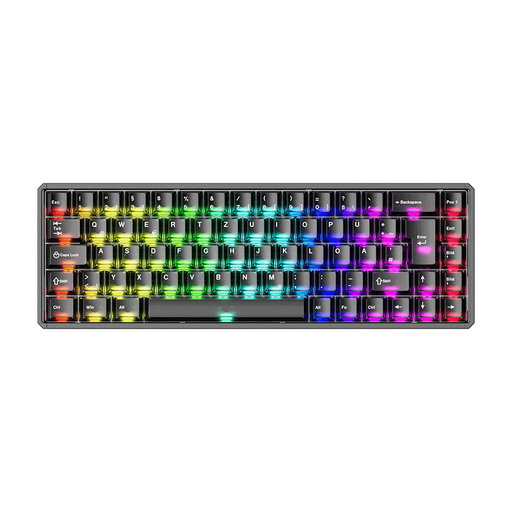
Akko MOD68-HE Tri-Mode Wireless, AstroAim Magnetic Switch, RT, SOCD
If you want to customise key functions, this mechanical model could be an option. Before buying, check that the specific layout variant suits the text you write.
Tri-Mode Wireless; AstroAim Magnetic Switch; RT; SOCD; Black Transparent.
Joybuy
 No image available
Akko 3084B Plus, 75% ISO-DE, V3 Pro Cream Blue Switch, Tri-Mode
If you’re looking for a more compact layout and an ISO-DE variant, this model could be worth considering.
75% layout; ISO-DE; V3 Pro Cream Blue Switch; Bluetooth/2,4 GHz/USB-C; Hot-Swappable; RGB; Black & Gold.
Joybuy
 No image available
Akko 5087S V1 TKL, ISO-DE QWERTZ, V3 Pro Cream Yellow Switch
This model could be a good fit if you want a German layout in a tenkeyless format. Hot-swap is mainly useful if you want to change the switches.
TKL; ISO-DE QWERTZ; V3 Pro Cream Yellow Switches; Hot-Swap; RGB; Black & Gold.
Joybuy
 No image available
Foldable Bluetooth keyboard with wireless mouse, connects to up to 3 devices
If you switch between several devices, the stated connection for up to three devices could be useful. Check that the keyboard layout suits the German text and regex characters you use.
Bluetooth; up to 3 devices; 3 connection modes; USB-C charging; foldable design; for Windows, Android and iOS.
Joybuy
Frequently asked questions
Do I need a US keyboard for regular expressions?
No. What matters is being able to enter the characters you need reliably with your specific keyboard and active input layout. Try a few regex patterns in your usual editor before changing the layout; Microsoft Support explains how to change the input layout in Windows.
How can I check which key produces a special character on a Mac?
Open the macOS Keyboard Viewer to see which keys produce the symbols you need. Apple explains how to use the Keyboard Viewer; don’t assume Windows keyboard shortcuts work the same way on macOS.
How should I position and clean a split keyboard?
For the ERGO K860, Logitech recommends lining up the split with the centre of your body and the middle of your screen. For a Logitech keyboard, unplug the cable or switch off a wireless model before cleaning it; also follow the care instructions for your specific model.
What are my rights if an online purchase is faulty or doesn’t feel right to type on?
For a typical online consumer purchase, Verbraucherzentrale says you generally have a 14-day right to cancel; the contract and any exceptions should be taken into account. Separately, goods bought in the EU that are faulty are generally covered by a legal guarantee of at least two years from receipt, as explained by the European Union’s Your Europe. This is separate from a manufacturer’s warranty.
Do screen-workplace rules apply to all private regex learning at home?
No. ASR A6 applies to teleworking workplaces, among other settings, within its defined scope. According to the Committee for Workplaces, such a workplace requires a corresponding agreement and setup by the employer. Private learning or occasional work at home doesn’t automatically count as a teleworking workplace under these rules.


