What should you look for when buying?
Start with your software’s keyboard shortcuts and how often you enter numbers. Then compare noise, size, ease of cleaning and hand position with the conditions at your specific workspace.
| Buying consideration |
What to look for |
Who it matters most to |
| Shortcuts and layout |
Check the shortcuts, special characters and function keys you need in your software. Inkscape notes that non-US layouts may have some limitations; configurable shortcuts are not always available. |
If I often switch between tools and labels while drawing, I want reliable access to the commands I’m used to. That’s why around 29% of consumers are likely to prioritise shortcut and layout compatibility. |
| Typing noise |
CHERRY describes the SX scissor keys on certain models as quiet, but this is not the same as a comparative noise measurement. If possible, try the key action and typing feel for yourself. |
People working in a quiet shared space want to keep disruption to others to a minimum. Around 24% of consumers are likely to consider low key noise particularly important. |
| Space and connections |
A TKL model without a number pad can leave more room for your mouse; check whether you would miss having a separate number pad. For wireless models, make sure the receiver and connections are compatible with the shared computers. |
If I need room for my mouse next to the keyboard or switch between computers, size and connection options matter. Around 18% of consumers are likely to prioritise these space and connectivity needs. |
| Hand position during long typing sessions |
Check the keyboard’s width, shape and wrist rest against the space available. A split keyboard may take time to get used to and is not automatically right for everyone. |
When I’m labelling for long periods, I want a keyboard that suits my hand position without taking over the desk. Around 17% of consumers are likely to prioritise this. |
| Cleaning when shared |
Look for hard-to-reach gaps and follow the care instructions for the specific model. Logitech’s cleaning guidance applies to Logitech keyboards and should not automatically be used for other brands. |
If several people use the same keyboard, I want to be able to clean it easily in line with the model’s care instructions. Around 12% of consumers are likely to give cleaning particular importance. |
Keyboards at Joybuy
The range includes compact and foldable keyboards, as well as wired models, including versions without a number pad. Pay particular attention to the keyboard layout, whether you need a number pad and the connections available on the shared computer.
 No image available
Foldable Bluetooth keyboard with wireless mouse
The foldable design and connection options listed in the title may be useful if you work in different places.
The product description lists Bluetooth and 2.4 GHz connectivity, support for up to three devices, USB-C charging and compatibility with Windows, Android and iOS. Check that the keyboard layout suits your German typing and software shortcuts.
Joybuy
 No image available
CHERRY KW 9200 MINI Wireless Multi-Device Keyboard
The compact design may suit you if you want to save space and can manage without a separate number pad.
Features listed include a 75% layout, SX scissor keys, a rechargeable battery and up to four connection options, including Bluetooth, 2.4 GHz wireless and USB-C. The listed version has a QWERTY layout (UK English); check that it suits your shortcuts and special characters.
Joybuy
 No image available
CHERRY MX 2.0S Wired Mechanical Gaming Keyboard
The wired, full-size design with a German QWERTZ layout may suit you if you frequently enter numbers or type in German.
The product description lists 110 keys, linear MX2A Red switches, multimedia keys and a USB cable connection.
Joybuy
 No image available
CHERRY STREAM KEYBOARD TKL
The wired TKL design leaves out the number pad, giving you more room for your mouse.
Features listed include 87 keys, six multimedia hotkeys, USB and SX scissor keys. This version has an English US layout with a euro symbol; check how the keys you need for your diagram software are mapped.
Joybuy
 No image available
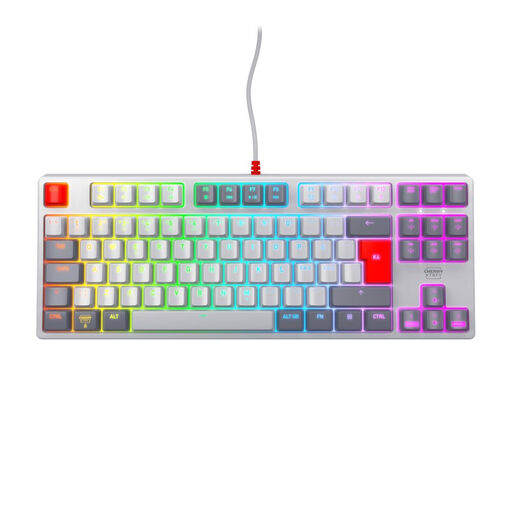
CHERRY XTRFY K4V2 TKL
This wired TKL model without a number pad may suit you if you value extra mouse space more than having a separate number pad.
The product name lists MX2A Red switches, USB, RGB and a Pan-Nordic layout in a TKL design. This version has a Pan-Nordic QWERTY layout; check the key mapping for your typing needs.
Joybuy
Frequently asked questions
Do I need a programmable keyboard for diagrams?
No. First, check the shortcuts for the application you use and how they work with your layout. Inkscape documents customisable shortcuts, but notes that some commands may not be available on non-US layouts.
Is a TKL keyboard suitable for scientific diagrams?
It may suit you if you want more room for your mouse and do not need a separate number pad. If you enter measurements frequently, check whether the top row of number keys works for your workflow.
How do I clean a keyboard at a shared desk?
Follow the care instructions for the specific model. For its keyboards, Logitech recommends disconnecting a wired model or switching off a wireless one before cleaning. Do not assume that this guidance applies to other brands.
Which compliance details matter for a keyboard sold in Germany?
For products covered by the relevant European harmonisation legislation, Germany’s Federal Network Agency lists correct CE marking as a requirement. It also highlights product identification, manufacturer details and a declaration of conformity as points to check; a CE mark alone does not prove that a product has been independently tested.
Where should I dispose of an old keyboard?
In Germany, electrical and electronic waste must not be put in household rubbish. The Federal Environment Agency lists local collection points and retail take-back schemes; removable batteries must be taken out and disposed of separately.


