If you revise your work frequently, choose a keyboard layout that makes it easier to navigate, and check whether your writing software supports the editing and note-taking commands you need. Track Changes is a software feature, as Microsoft’s guide to Word explains. For long writing sessions, it’s also worth considering how you can position your keyboard, mouse and forearms. The BAuA stresses the importance of having enough space to arrange your workstation flexibly, while split, low-profile and mechanical keyboards each involve different trade-offs in terms of getting used to them, noise and key feedback.
Who writes with lots of revisions, in long sessions or in shared spaces?
Writers who revise frequently
If you often switch between script text, Track Changes and notes, the commands in your writing software should be easy to access. Microsoft describes Track Changes as a Word feature; keyboard remapping can call up existing commands.
Writers in long sessions
During longer writing sessions, you’ll want to think carefully about the position of your hands, keyboard and mouse. The BAuA stresses the importance of having enough space to arrange your workstation flexibly; this doesn’t mean that any particular model has a medical benefit.
Writers in shared spaces
If you write in a room with other people, weigh up a keyboard described by its manufacturer as quiet against its key feedback, size and connection type. You’ll need to assess the noise level of the specific model itself.
Which keyboard features matter for scripts and revisions?
First, find out which commands your writing software offers for revisions. Then consider the layout, workstation setup, noise and connectivity in relation to your day-to-day needs. The BAuA stresses that having enough space to position your mouse and keyboard flexibly is important.
| Your needs |
What to look for when buying |
Who is this important for? |
| Revisions and notes |
Navigation keys and remapping options; your writing software must support Track Changes and notes. |
If I switch frequently between my script, Track Changes and notes, I want quick access to the commands I need. Around 27% of consumers have revisions as their main priority. |
| Posture during long writing sessions |
Check whether you can position your keyboard, mouse and forearms comfortably on your desk; a split design changes the usual position of the keys. |
During long writing sessions, I want to be able to position my keyboard, mouse and forearms comfortably; the keyboard alone doesn’t determine my posture. Around 27% of consumers have this as their main priority. |
| Typing noise |
Check the specific switch type and, if possible, compare the noise at your own typing speed. |
If I’m writing in a shared space, I want my typing to disturb others as little as possible without compromising on the key feedback I prefer. Around 20% of consumers prioritise quiet typing. |
| Switching between devices |
Check whether the model offers Bluetooth, a receiver or a cable, and whether it supports your operating system and any configuration software you need. |
If I work on my script and notes across several devices, I need suitable connections and an easy way to switch between them. Around 13% of consumers have switching between devices as their main priority. |
| Key feedback and customisation |
Check the switch type, layout and model variant; hot-swappable switches and programmable keys depend on the specific version. |
For longer texts, I may value a particular kind of mechanical key feedback more than the quietest possible keystroke. Around 13% of consumers prioritise mechanical feedback. |
Which assumptions should you avoid?
-
A German shop page doesn’t automatically mean the keyboard has a German layout
With keyboards, the shop language, the selected variant and the actual key layout may not match.
Before buying, check the variant details and confirm that the specific item is listed as having a DE-ISO or QWERTZ layout.
-
A split keyboard isn’t guaranteed to solve discomfort
Good positioning involves your whole workstation. A different keyboard alone can’t be shown to have a medical benefit, and it may take time to get used to.
Choose based on your desk setup and how the keys feel to you; if possible, try a different key position before you buy.
-
Macro keys aren’t built-in revision software
Programmable keys and Track Changes are different features. A remappable key can call up an existing command, but it can’t replace a feature in your writing software.
First check the revision commands in your application, then make sure the keyboard layout and configuration software are compatible with your system.
An overview of relevant keyboard brands
Logitech
The MX Keys S is a low-profile keyboard with customisable keys; the ERGO K860 has a split layout, while the MX Mechanical is available with various mechanical switch types.
- Logitech says Smart Actions for the MX Keys S are available through Logi Options+; according to the manufacturer, the ERGO K860 connects via Bluetooth or a USB receiver.
- The F.A.Z. Kaufkompass review notes that the ERGO K860 lacks backlighting and wired connectivity. Whether a particular design suits you is a matter of personal preference.
CHERRY
The STREAM KEYBOARD TKL is a wired scissor-switch keyboard without a number pad; the STREAM KEYBOARD ULTIMATE offers several connection options.
- CHERRY describes the TKL version as a scissor-switch keyboard with the main key section of the larger STREAM model. For the ULTIMATE, the manufacturer lists two Bluetooth channels, 2.4 GHz wireless and a USB cable.
- The description ‘quiet’ comes from the manufacturer; it isn’t an independent noise measurement. With the TKL version, you should also check whether you can manage without a number pad.
Keychron
The K8 Pro is aimed at writers who want mechanical switches and the option to set up their own key mappings.
- Keychron lists QMK/VIA for key mappings and macros, as well as variants with replaceable switches.
- Check the specific layout and switch variant: choosing a UK-ISO version doesn’t tell you which layout an available DE-ISO version has.
Perixx
The PERIBOARD-335 combines a split layout with a choice of low-profile mechanical switches.
- Perixx lists a German QWERTZ version and a choice of switch options.
- The manufacturer says its downloadable configuration software is for Windows only. Any benefits for comfort or posture haven’t been independently demonstrated.
Joybuy keyboards for script writing and notes
This selection includes a foldable model for typing on the go, compact scissor-switch keyboards, a split keyboard and a mechanical keyboard. For each model, pay particular attention to the stated key layout and connections.
 No image available
Inateck N0153BK, foldable mini Bluetooth keyboard with touchpad
The foldable design with touchpad is worth considering if you type on the go and switch between several devices.
QWERTZ; three Bluetooth channels; compatible with iPadOS, Android and Windows according to the product name.
View at Joybuy
 No image available
CHERRY STREAM KEYBOARD TKL, wired, US layout
The compact TKL design is a good option if you’re happy to do without a number pad and are looking for a wired model.
CHERRY SX scissor keys; six multimedia hotkeys; wired USB model. Stated layout: English (US) with euro symbol.
View at Joybuy
 No image available
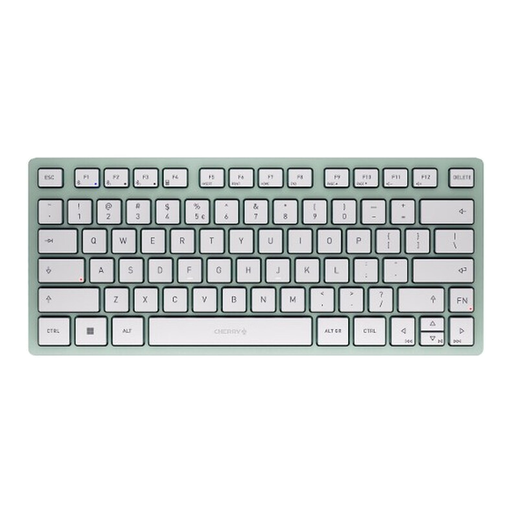
CHERRY KW 7100 Mini Bluetooth Keyboard, US International QWERTY
This compact Bluetooth keyboard is worth considering if you want to switch between several devices.
CHERRY SX scissor keys; connects to three devices according to the product name; stated layout: US International (QWERTY).
View at Joybuy
 No image available
Logitech ERGO K860, split QWERTZ layout
The split layout is an option if you’d like to try a different hand position during longer writing sessions.
QWERTZ; Bluetooth or USB receiver according to the manufacturer. The keyboard alone won’t determine the right workstation setup.
View at Joybuy
 No image available
Logitech MX Mechanical, Tactile Quiet, German QWERTZ layout
This model is worth considering if you’re looking for mechanical, tactile feedback and connections to several devices.
Tactile Quiet switches; German QWERTZ layout; Bluetooth and Logi Bolt; Smart Backlighting.
View at Joybuy
Frequently asked questions
Can a keyboard track changes and revision notes by itself?
No. Track Changes is a feature of your writing software. Microsoft, for example, describes it as a Word feature; check the commands in your own application before assigning keys to them.
What should I consider when setting up for longer writing sessions?
Make room for your keyboard and mouse together on your available desk space. The BAuA highlights the importance of having enough space to position the mouse and keyboard flexibly and to support your hands and arms.
How do cancellation rights, statutory rights and guarantees differ when buying online?
Consumers generally have the right to cancel a standard distance purchase; section 355 of the German Civil Code (BGB) sets a 14-day period, while section 312g of the BGB provides for exceptions. Statutory rights relating to faults are claims against the seller. A guarantee is voluntary and is subject to its own terms, as the Verbraucherzentrale also explains.
Do I have to buy a particular ergonomic keyboard for personal use?
Workplace regulations don’t create a general obligation for private buyers to purchase a particular keyboard model. The Workplace Ordinance applies to the design of workplaces; separate requirements apply to screen-based workstations set up by an employer.


