If you write flashcards at a shared desk, focus your choice on the biggest constraint: a considerate typing experience, more desk space, switching between devices or the way you hold your hands. CHERRY describes the STREAM KEYBOARD TKL as a model without a number pad and with quiet keystrokes, but manufacturer claims are not an independent noise comparison. Also check the layout, connection and dimensions of the specific variant.
Who is this keyboard for?
Quiet typists at a shared table
If you’re writing words and example sentences while others are working nearby, a considerate typing experience and clear rules for shared equipment are important. The German Social Accident Insurance (DGUV) lists cleanliness and tidiness rules, along with a noise-control plan, as considerations for desk-sharing.
Flashcard makers short on desk space
You need room for cards, notes or templates alongside your keyboard and mouse, and may be able to do without a number pad. CHERRY describes its STREAM KEYBOARD TKL as a space-saving model without a number pad.
Flashcard makers switching between devices
If you edit the same cards on several devices, a keyboard with a switching function could be a good fit. Logitech says the Pebble Keys 2 K380s features Easy-Switch, letting you switch between three devices.
What should you look for when buying?
First, decide which factor is the biggest constraint on your workflow. Then check that the layout, connection and dimensions of your chosen variant suit your workspace.
For this flashcard workflow at a shared desk, each row focuses on the most important selection criterion for that particular need.
| Priority |
What to look for |
Who is it important for? |
| Considerate typing experience |
Check the key mechanism and the specific noise description. If possible, try the model using your usual typing style. |
When I’m writing at a shared table, I want my typing to disturb others as little as possible. Around 31% of consumers prioritise a considerate typing experience. |
| Space for cards and a mouse |
Consider the width and depth of the variant, as well as whether you need a number pad. |
When I want to lay out cards and templates beside my mouse, I need enough clear desk space. Around 31% of consumers put space requirements first. |
| Switching between devices and connectivity |
Check compatible operating systems, available wireless connections or USB ports, and the layout you want. |
When I alternate between my computer and tablet, I want to carry on typing without constantly unplugging and reconnecting. Around 23% of consumers prioritise switching between devices. |
| Hand position during longer writing sessions |
Check whether the layout suits the way you type, and how much space you have for the keyboard and wrist rest. |
When I’m writing for longer, I want to choose a keyboard layout that feels right for me. Around 15% of consumers prioritise their hand position when choosing. |
Common buying misconceptions
-
‘Compact’ doesn’t always mean a smaller footprint
A TKL layout mainly saves width by removing the number pad. By contrast, the PERIBOARD-413 is 275 mm deep, according to Perixx, so it may take up space you need for your flashcards.
Measure the available width and depth, and allow room for your mouse and writing materials too.
-
‘Quiet’ isn’t an objective measure for comparison
Descriptions from manufacturers of individual keyboards can’t be used to rank them without a consistent noise comparison.
If being considerate of others is a priority, try the specific model using your usual typing style, if possible.
-
The model name doesn’t always tell you which variant you’re choosing
Keyboards with several layouts or switch options may differ from what the model name alone suggests.
Just before buying, check the layout, switches and connection type that will work at your desk.
The wrong layout or connection could mean you need to arrange a return or buy additional accessories.
Brands to consider
The points below apply to the product lines and variants mentioned, not necessarily to every product from each brand.
CHERRY
The options here include a compact TKL keyboard without a number pad and a low-profile full-size alternative.
- CHERRY lists SX scissor switches for the STREAM KEYBOARD TKL and describes its keystrokes as quiet.
- The noise description is not an independent comparison. According to CHERRY, the KC 6000 SLIM is a full-size model measuring 440 mm in length.
Logitech
The MX Keys Mini and Pebble Keys 2 K380s offer different options for compact typing and switching between devices.
- Logitech describes the MX Keys Mini as having stabilised keys with less typing noise, and says the K380s features Easy-Switch between three devices.
- The operating system, layout and connection depend on the model and variant; noise levels have not been measured independently.
Perixx
The PERIBOARD-413 may suit anyone looking for a split keyboard with an integrated wrist rest.
- Perixx lists USB-A, a choice of DE-QWERTZ layout and a depth of 275 mm.
- Allow for its depth on your flashcard desk. The manufacturer’s claims about preventing discomfort don’t prove that it will have the same effect for everyone.
Keychron
The K3 Max is a compact mechanical option with several connection types and customisable keys.
- Keychron lists QMK/VIA, Bluetooth, 2.4 GHz and wired connectivity; a DE-ISO variant is available.
- Check the layout and switches of your chosen variant before buying. You can’t compare its noise levels directly with claims about scissor-switch keyboards.
Joybuy products for your flashcard workflow
These keyboards cater for different priorities, from switching between devices and compact designs to a more clearly divided key layout. Compare the layout and connection details of each variant with your workspace.
 No image available
Logitech MX Mechanical, Tactile Quiet, German QWERTZ, Graphite
If you type on several devices and need a German QWERTZ layout, this variant could suit your workflow.
Features include Tactile Quiet switches, Bluetooth, Logi Bolt and Smart Backlighting. The description says you can switch between up to three devices.
Joybuy
 No image available
Inateck KB01003G Bluetooth Keyboard, QWERTZ
If you want to switch between compatible devices without reconnecting your keyboard each time, this Bluetooth option could be worth considering.
Features include QWERTZ, Bluetooth 5.3 and switching between up to three devices. The design is described as slim and lightweight.
Joybuy
 No image available
CHERRY STREAM KEYBOARD TKL, USB, US layout
If you want to save space to the side and the US layout suits the way you type, the TKL format could be an option.
Features include a USB connection and CHERRY SX scissor switches. The layout is English (US) with a euro symbol, not German QWERTZ.
Joybuy
 No image available
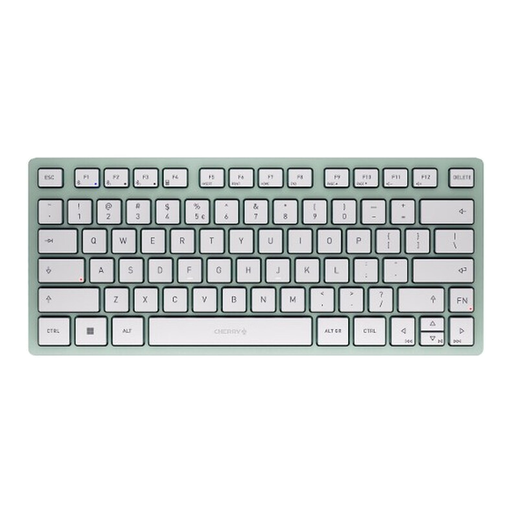
CHERRY KW 7100 Mini, Bluetooth, US QWERTY, Agave Green
If you type wirelessly on several devices and US QWERTY suits you, this compact variant could be worth considering.
Features include Bluetooth, a compact TKL format and the SX scissor mechanism. The layout is US QWERTY.
Joybuy
 No image available
Logitech 920‑012404 Ergonomic Wave, German QWERTZ
If a curved, split key layout and wrist rest matter to you during longer writing sessions, check whether this design suits the way you type.
Features include German QWERTZ, Bluetooth and quiet membrane keys. The keyboard is full-size, at 100%, so it may take up more desk space.
Joybuy
Frequently asked questions
Which layout should I choose for German flashcards?
If you regularly write in German, check that the specific listing clearly states DE-QWERTZ or DE-ISO. Perixx and Keychron also offer other layout options, so the model name alone won’t tell you which layout you’re getting.
How should I set up my keyboard at a hot-desk?
First, check that there’s enough room for your flashcards as well as your keyboard and mouse, and that the USB port or wireless connection you need is available. In its desk-sharing guidance dated 29 April 2024, the German Social Accident Insurance (DGUV) lists cleanliness and tidiness rules, along with a noise-control plan, as considerations for a shared workspace.
Who can help if a keyboard I bought privately is faulty?
For a private consumer purchase in Germany, the seller is generally responsible for the statutory warranty; a manufacturer’s guarantee is separate. The Verbraucherzentrale (as at 28 September 2026) lists repair or replacement as possible remedies. Different terms may apply to business purchases.
Are there legal requirements for setting up a shared office workspace?
If it’s a workplace with a display screen, the relevant requirements of the Workplace Ordinance also apply to desk-sharing. The DGUV-CHECK-UP from October 2025 highlights this; it does not mean that private buyers are generally required to buy a particular keyboard model.


