Who these keyboards suit

Teachers who want to type quietly

If other people are working within earshot, the sound of the keys can be an important factor in your choice. CHERRY describes its STREAM models as quiet; this is a manufacturer’s claim, not a comparative noise measurement.

Teachers who use several devices

If you prepare lesson plans on several of your own computers, switching between them, check that the keyboard offers the connection types you need and makes it easy to switch devices.

Teachers with limited desk space or long typing sessions

At a shared desk, you may need to leave room for papers and a mouse, or find a hand position that suits you. The BAuA recommends allowing enough space at computer workstations to position the keyboard and mouse comfortably; this does not point to one particular keyboard shape.

What to consider when buying

Buying priority What to look for Who it matters most to
Quiet key action Check the manufacturer’s information about key noise and, if possible, try the typing feel for yourself. If other people work beside me, I want to keep disruption to a minimum while typing. Around 31% of consumers prioritise quiet keys.
Switching between devices Check which connections you need: Bluetooth, a receiver or a cable. If you use a receiver, make sure you have a spare USB port. If I regularly switch between my own computers, I need a suitable connection and an easy way to switch. Around 25% of consumers prioritise switching between devices.
Hand position Consider the keyboard’s shape and size, the available support space and whether you’ll need time to get used to it. During longer typing sessions, I want to find a key layout that suits my hand position, without assuming it will relieve any discomfort. Around 25% of consumers focus mainly on hand position.
Desk space and layout Check whether you need a number pad and whether the specific product listing has a German keyboard layout. If I need to fit papers and a mouse on my desk too, I can do without a number pad if I rarely use one. Around 19% of consumers give limited desk space the greatest priority.

Common misconceptions

  • ‘Ergonomic’ doesn’t automatically mean pain-free

    A split keyboard needs to suit your hand position and workspace. A product description or review can’t predict how your individual discomfort may develop.

    Before buying, check whether you can position the keyboard comfortably and whether you’re happy to get used to its layout.

  • A German-language product page doesn’t guarantee a German keyboard layout

    The PERIBOARD-835 version mentioned here is listed with an English (US) layout. Its key labels may therefore differ from those on a German layout.

    Check the layout and version shown on the specific listing rather than relying on the language of the product page.

    A different layout can make it harder to type German special characters.

  • Extra device channels aren’t automatically useful

    The models described differ in whether they use Bluetooth, a receiver or a cable. Not every connection type will work with every computer.

    Before choosing, make a note of the devices you use and check which connection types are available and permitted on them.

    A USB-A receiver takes up a port. Switching between devices you don’t need can also mean extra set-up work.

Brands to consider

CHERRY

The STREAM range includes wired models, a TKL version without a number pad and the STREAM KEYBOARD ULTIMATE, which offers several connection types.

  • CHERRY describes the key action on its SX models as quiet. For the ULTIMATE, the manufacturer lists two Bluetooth 5.2 channels, 2.4 GHz wireless and a USB cable.
  • The TKL version has no number pad. The additional connection options are available on the ULTIMATE, not across the entire STREAM range.

Logitech

The ERGO K860 is a full-size split keyboard with a wrist rest. The MX Keys S is a low-profile keyboard with backlit keys and programmable functions.

  • The ERGO K860 may be worth considering if you want to try a different hand position and have enough desk space.
  • A review by F.A.Z. Kaufkompass noted that the gap on the ERGO K860 is difficult to clean, and that it has no backlighting or wired mode. Logitech’s claims about its effect on posture are manufacturer statements, not medical guarantees.

Kensington

The Pro Fit Ergo KB675 EQ TKL combines a more compact ergonomic design with several connection options.

  • According to Kensington, you can connect two devices via Bluetooth and one using a 2.4 GHz USB-A receiver.
  • Kensington says that Windows PCs with ARM processors are not currently supported. Consider the manufacturer’s comfort claims in light of whether the shape suits your hands.

Perixx

The PERIBOARD-835 is a full-size split mechanical keyboard, offering an alternative for consumers looking for this type of key.

  • Its full-size split design sets it apart from compact TKL models.
  • The version shown is listed with an English (US) layout. Check that the key labels and version suit your typing needs on the specific product listing.

Joybuy products

This selection includes keyboards for quieter typing, switching between devices, compact workspaces and split layouts when preparing lesson plans.

Foldable Bluetooth keyboard with wireless mouse, silver and white

Foldable Bluetooth keyboard with wireless mouse

A compact, foldable design may suit you if space is limited or you switch between several devices.

The product details list quiet scissor keys, support for up to three devices, USB-C charging and compatibility with Windows, Android and iOS.

View at Joybuy

Logitech ERGO K860, QWERTZ, graphite

Logitech ERGO K860, QWERTZ, graphite

The split key layout and wrist rest let you try a different hand position, provided you have enough desk space.

The product details list QWERTZ, Bluetooth and a USB receiver. The F.A.Z. Kaufkompass review notes that the gap between the rest and keyboard is difficult to clean.

View at Joybuy

Logitech MX Mechanical, German QWERTZ

Logitech MX Mechanical, German QWERTZ

This version may suit you if you’re looking for a German QWERTZ layout and connections to several devices.

The product details list Tactile Quiet Mechanical Switches, Bluetooth, Logi Bolt and Smart Backlighting.

View at Joybuy
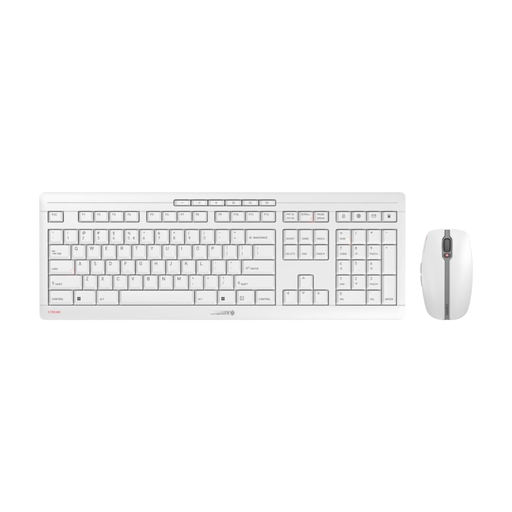
CHERRY STREAM DESKTOP RECHARGE, keyboard and mouse, EU QWERTY

CHERRY STREAM DESKTOP RECHARGE, keyboard and mouse, EU QWERTY

This set may suit you if you’re looking for a keyboard and mouse together and the listed layout matches your typing needs.

The product details list EU QWERTY, a 2.4 GHz receiver and USB-C charging. EU QWERTY is not the same as QWERTZ; check the key labels before buying if you need a German layout.

View at Joybuy

Rapoo E9050L 75%, US QWERTY

Rapoo E9050L 75%, US QWERTY

The compact design and ability to switch between several devices may suit you if desk space is limited.

The product details list 78 keys, US QWERTY and connections to up to four devices. US QWERTY is not QWERTZ; check the layout if you need German key labels.

View at Joybuy

Frequently asked questions

Do I need a number pad to prepare lesson plans?

No, it depends on how often you enter numbers. If you rarely work with long strings of numbers, a TKL model without a number pad can save space. A number pad may be more practical if you often work with spreadsheets and enter figures.

How do I connect a compatible wireless Logitech keyboard via Bluetooth?

For compatible models, Logitech says to press and hold an Easy-Switch key to start pairing, select the keyboard in your computer’s Bluetooth menu, then type the code shown using the keyboard. Check that these instructions apply to your model; Logitech also describes connecting via a USB receiver.

What should I consider for a permanent computer workstation at work?

For a computer workstation in a workplace, ASR A6 is relevant. The BAuA explains the requirements for working with screens and recommends allowing enough space to reposition the keyboard and mouse. This does not mean you have to buy a particular keyboard model for personal use; these workplace requirements cannot be applied to an occasional-use desk at home.

Are a manufacturer’s guarantee and statutory rights the same thing?

No. According to information from the European Union, when you buy as a consumer from a trader, you are generally entitled to a minimum two-year legal guarantee from the seller, starting from the date you receive the goods. A voluntary manufacturer’s guarantee does not replace this; check the terms of any additional guarantee separately.

How do I care for a keyboard with an integrated wrist rest?

Follow the cleaning instructions for the specific model and the rules for your shared workspace. The F.A.Z. Kaufkompass review described the gap between the wrist rest and keyboard on the Logitech ERGO K860 as difficult to clean. If the keyboard is used by several people, this is worth bearing in mind.