For a shared desk, a compact keyboard with keys described as quiet is a good option if you rarely need a number pad. CHERRY describes the SX scissor mechanism on the STREAM KEYBOARD TKL as quiet, while Logitech also calls the low-profile keys on the Pebble Keys 2 K380s quiet. If you switch between devices or often write longer texts, the available connection options and the split layout are also worth considering. The latter takes up more space and requires a different hand position.
Who will be using the keyboard?
People working on slides at a cramped shared desk
When you also need room for a mouse and documents, a compact design and quiet keystrokes are important things to check. CHERRY describes the SX scissor mechanism on the STREAM KEYBOARD TKL as quiet; Logitech also calls the keys on the Pebble Keys 2 K380s quiet.
People using several work devices
If you work on presentations across different computers or mobile devices, check which connection types are compatible with each one. Logitech says the Pebble Keys 2 K380s can switch between three devices.
People who write a lot for presentations
If you write longer slide text, a split layout could be an alternative to a straight keyboard. Logitech describes the ERGO K860 as a split keyboard, but that alone doesn’t tell you whether the hand position will feel comfortable for you.
What should you look for when buying?
Start by checking how noisy the keyboard is and how much desk space it takes up, then make sure it connects to your devices. Next, compare the layout and the navigation and function keys you need with the way you work on slides. If you write for longer periods, the key arrangement matters too.
| Priority |
What to check before buying |
Who is this most important for? |
| Quiet typing |
Assess the key mechanism and noise level in the conditions you’ll be using it in. |
If I write slide text alongside other people, I want to disturb them as little as possible while typing. Around 31% of consumers put quiet typing first. |
| Switching between devices |
Check Bluetooth availability, whether you have a free USB port and the connection options available on the specific model. |
If I work on presentations across several devices, I want to switch between them without having to set everything up again each time. Around 25% of consumers prioritise switching between devices. |
| Saving desk space |
Weigh up the space available on your desk against your actual need for a number pad. |
If I share a desk with others, I want to leave room for a mouse and documents beside the keyboard. Around 19% of consumers put a small footprint first. |
| Easy access to slide controls |
Check the F keys, navigation keys, Fn functions and layout on the specific model. |
If I often edit slides using particular function or navigation keys, I want the commands I need to be within easy reach. Around 13% of consumers prioritise having the right keys and controls. |
| Choosing a typing position |
Check the split layout and the desk space available, and consider whether the hand position suits you. |
If I often write longer slide texts, I want to decide whether a split key arrangement suits the way I work. Around 12% of consumers put typing position first. |
Pitfalls to watch out for
-
Assuming similar model names mean the same receiver technology
Logitech specifies different receiver technology for the standard ERGO K860 and the ERGO K860 for Business. Make sure the information you check matches the exact product version.
Before you decide, check the full model name, receiver type and what’s included in the box.
If you need an additional receiver, it will take up another USB port.
-
Assuming a German product page means a German keyboard layout
The CHERRY STREAM KEYBOARD TKL is listed with a US layout and a euro symbol.
Check the key layout of the exact version, especially if you regularly type German characters.
-
Assuming a split keyboard will solve individual aches and pains
A split layout changes your hand position, and a full-size model takes up more space. A positive test result doesn’t prove that it will have a specific health benefit for you.
Check that the layout and footprint suit the way you work. If you’re setting up a workplace, consult the person or team responsible for its design.
Key brands at a glance
CHERRY
Depending on the version, STREAM models are designed for compact workspaces or setups with several devices.
- CHERRY describes the SX scissor mechanism on the STREAM KEYBOARD TKL and STREAM KEYBOARD ULTIMATE as quiet.
- The TKL model has no number pad. For the ULTIMATE, check that the connection options available suit your work computer.
Logitech
The Pebble Keys 2 K380s is compact and designed for switching between devices; the ERGO K860 is a split, full-size keyboard.
- Logitech describes the K380s as having low-profile, quiet keys and the ability to switch between three devices. The ERGO K860 has an integrated wrist rest.
- The ERGO K860 takes up more space. The standard and Business versions use different receiver technology, so don’t assume they’re the same.
Perixx
The PERIBOARD-335 is a split, wired alternative available with different switch and layout options.
- The available versions let you choose the feel of the keys.
- Not all switches are described as quiet; one version is clicky. According to the manufacturer, the configuration software is for Windows only.
Rapoo
The E9800M combines a low-profile keyboard with several connection options.
- Rapoo lists Bluetooth and 2.4 GHz connections, as well as a rechargeable battery.
- Check the keyboard layout of the specific version before buying.
Joybuy products
The Joybuy models below include compact keyboards for shared workspaces, as well as options for switching between devices. For each model, check the exact layout and connection options available for your work computer.
 No image available
Foldable Bluetooth keyboard with wireless mouse, silver and white
The foldable design could suit you if you want to use the keyboard at different desks or on shared work surfaces.
- Bluetooth keyboard with three connection modes
- Connects to up to three devices
- Quiet scissor keys and USB-C charging
- Compatibility listed in the title: Windows, Android and iOS; check the layout of the specific version
- Offered with a wireless mouse
View at Joybuy
 No image available
CHERRY KW 9200 MINI
The compact design could work well at a shared desk if you want to switch between devices.
- Four connection channels
- Rechargeable battery
- CHERRY SX scissor mechanism
- The listed layout is UK English QWERTY; check that it meets your needs
View at Joybuy
 No image available
CHERRY STREAM KEYBOARD TKL
The TKL design could suit you if you can manage without a number pad and need space on your desk for a mouse and documents.
- Wired USB keyboard
- CHERRY SX scissor mechanism
- Six multimedia hotkeys
- US layout with euro symbol
View at Joybuy
 No image available
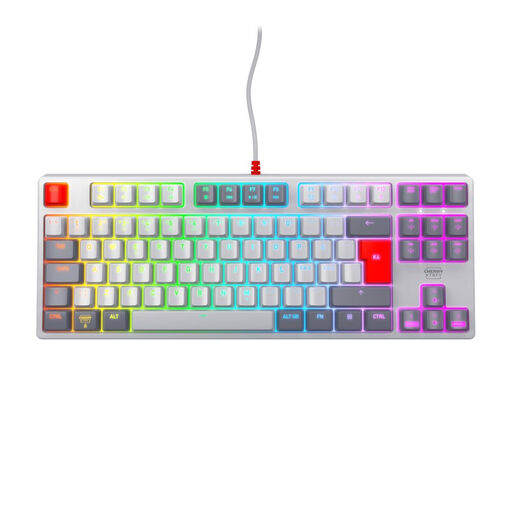
CHERRY XTRFY K4V2 TKL
The wired TKL design could suit you if you’re looking for a compact keyboard without a number pad.
- Mechanical MX2A Red switches
- Wired USB connection
- RGB lighting
- Pan-Nordic layout
View at Joybuy
 No image available
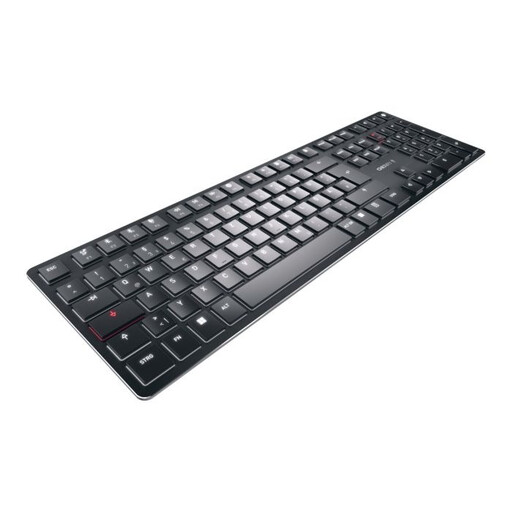
CHERRY KW X ULP
The multi-device version could suit you if you’re considering a low-profile keyboard for more than one device.
- Ultra-slim design with tactile MX switches
- White backlighting
- US English layout
View at Joybuy
Frequently asked questions
Do I need a full-size keyboard for working on slides?
No. If you rarely use the number pad, a TKL model could save space. Instead, check that the main, navigation and function keys cover what you need for your workflow.
How do I set up a keyboard to use with different computers?
First, check whether Bluetooth or a USB receiver is allowed and available on each computer. Then follow the instructions for the specific model. Logitech says you can switch between devices on the Pebble Keys 2 K380s using the Easy-Switch keys.
What should I bear in mind when using a keyboard at a shared workstation?
Follow the manufacturer’s cleaning instructions and check the rules for your shared workspace. The F.A.Z. Kaufkompass notes that the gap between the wrist rest and keyboard on the ERGO K860 is difficult to clean.
Do the rules for screen-based workstations apply to my home desk too?
The Workplace Ordinance applies to employers setting up and operating workplaces for employees; buying a keyboard for personal use does not in itself create this workplace obligation. For equipment at a workplace with screen-based equipment, check the specific setup with the person or team responsible. The Federal Institute for Occupational Safety and Health explains the scope of the Ordinance.


