What should you consider when choosing?
First decide whether desk space, your writing routine, hand position or switching between devices is the biggest factor in your choice.
| Priority |
What to check before buying |
Who will find this important? |
| Space for a mouse and papers |
Measure the footprint, including room to move the mouse, and check the navigation and arrow keys you need. CHERRY lists the KW 9200 MINI as measuring 29.5 × 12.9 × 1.6 cm. |
If I need to move the mouse and put papers down beside the keyboard in a tight space, the amount of usable room matters. Around 36% of consumers say space is their main priority. |
| Writing lengthy feedback |
Compare the DE QWERTZ layout, key positions and easy-to-reach functions with your usual writing routine; check for functions that share keys and require Fn. |
If you type lots of comments, you’ll want to reach the keys you need without unnecessary detours. Around 29% of consumers prioritise extended typing. |
| Hand and arm position |
Check the full width and depth, including any wrist rest, and think about how the keyboard and mouse will fit on your desk. |
During longer marking sessions, I want to be able to position my keyboard and mouse in a way that suits my hand and arm position. Around 21% of consumers give this priority. |
| Connections and switching between devices |
Check the connection options for each device you work on; for customisable keys, also check software compatibility and the specific layout version. |
If I switch between a computer and tablet, the connection needs to work with both. Around 14% of consumers say switching between devices is their main priority. |
Keyboards at Joybuy
The selection includes compact keyboards for smaller workspaces, from TKL and smaller layouts to models with several connection options.
 No image available
Exodus 220 TKL, QWERTZ DE
A TKL option for a small desk if you’re looking for a layout without a number pad.
German QWERTZ layout. The 12 multimedia functions are accessed using Fn combinations.
View at Joybuy
 No image available
Akko 3084B Plus Tri-Mode, 75% ISO-DE
A compact option if you’re looking for a 75% layout and several connection types.
Mechanical keyboard with ISO-DE layout; tri-mode connectivity with Bluetooth, 2.4G and USB-C.
View at Joybuy
 No image available
Akko 5087S V1 TKL, ISO-DE QWERTZ
A wired TKL option for a workspace where you can do without a number pad.
Mechanical keyboard with Akko V3 Pro Cream Yellow switches, hot-swappable switches and RGB lighting.
View at Joybuy
 No image available
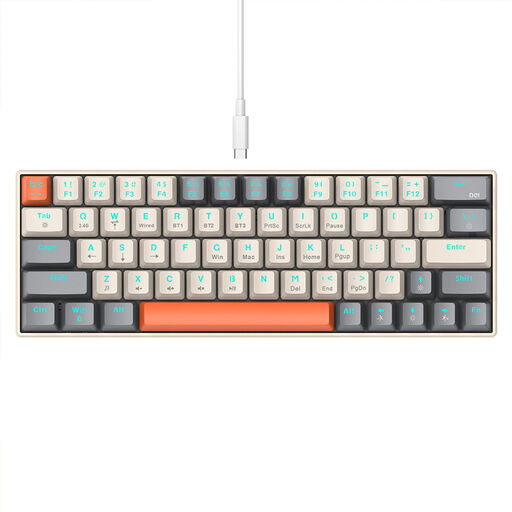
KINSI Compact Gaming Keyboard, 63 Keys
A compact 63-key option if you’re looking for a particularly small layout.
Mechanical keyboard with Bluetooth and 2.4GHz wireless connectivity.
View at Joybuy
 No image available
CHERRY MX-LP 2.1, 65%, German QWERTZ
A 65% layout for a small workspace if you need several connection options.
Low-profile MX Speed switches; tri-mode connectivity with 2.4GHz, Bluetooth and USB-C; RGB lighting.
View at Joybuy
Frequently asked questions
Is a particularly small keyboard always more ergonomic for longer marking sessions?
No. What matters is whether you can position the keyboard and mouse comfortably on your desk, and how you hold your hands and arms while working. The Federal Institute for Occupational Safety and Health recommends leaving enough space for flexible positioning and support for your hands and arms. With split keyboards, also check the overall depth, including any wrist rest.
Can I use a cable with the CHERRY KW 9200 MINI instead of a wireless connection?
Yes. CHERRY says the USB cable transfers data when used in wired mode, as well as charging the keyboard. Beforehand, check that your device has a suitable port.
What should I check about configuration and batteries?
Check that your devices support the connection you want and that you’re allowed to use any required customisation software at work. Logitech lists two replaceable AAA batteries for the POP Icon Keys; CHERRY describes the KW 9200 MINI as having a rechargeable battery.
What are my rights in Germany if a keyboard is faulty or an online purchase isn’t suitable?
If a product is faulty, your statutory consumer rights are against the seller; a manufacturer’s guarantee is separate. The Verbraucherzentrale states that online consumer contracts generally come with a 14-day cancellation period from the date the contract is concluded or the goods are received. The applicable conditions depend on the specific purchase.
What product safety information should I check for a wireless or Bluetooth keyboard?
As part of its market surveillance, the Bundesnetzagentur lists the CE marking, product traceability, manufacturer details and a German instruction manual with the necessary usage and warning information among the points to check. This is a guide to checking a specific listing, not a statement that any of the models mentioned here has been individually tested by the authorities.


