Designers with limited desk space
If you need room for sketches or study materials alongside your keyboard and mouse, and rarely use the number pad, a TKL or smaller layout could be a good fit. What matters is which keys you actually need.


For a small desk, a compact model is a sensible place to start. A TKL keyboard keeps the main keys but does away with the number pad, while smaller Bluetooth models may let you switch between devices, depending on the version. You can’t tell from a manufacturer’s ‘quiet’ claim alone whether a keyboard will be unobtrusive in a shared room; the layout, connection and typing noise should suit how you plan to use it. Also check the markings and documentation for the version on offer.
If you need room for sketches or study materials alongside your keyboard and mouse, and rarely use the number pad, a TKL or smaller layout could be a good fit. What matters is which keys you actually need.
If you’re writing or designing while someone else is in the room, the typing noise of your particular setup matters. A manufacturer’s claim that a keyboard is ‘quiet’ doesn’t mean it’s silent.
If you switch between a computer and a mobile device while designing, or want to customise recurring tasks, check the connection, specific key layout and supported features.
First, decide which keys you need and which devices you want to connect. Then weigh up the space required and typing feel to find the right fit for your desk.
| Consideration | What to check before buying | Who it matters most to |
|---|---|---|
| Typing noise in a shared room | Assess the noise with your own typing style and on the desk surface you plan to use; don’t treat manufacturers’ claims as directly comparable measurements. | When I’m writing for a long time while someone else is in the room, I want my typing to be as unobtrusive as possible. Around 31% of consumers put typing noise first. |
| Room for a mouse and sketches | Measure the space available and check whether you need a number pad, navigation keys and arrow keys. | At a small desk, I need room for my mouse and sketches, and might be able to do without a number pad. Around 31% of consumers prioritise the space a keyboard takes up. |
| Layout and device connection | Check the language variant, keys you need and compatibility. For Bluetooth, confirm device support; for a wired connection, check that the connector is right. | When I switch between a computer and a mobile device, the connection and key layout need to suit my devices. For around 23% of consumers, compatibility comes first. |
| Customisable keys | Check whether the version you want supports the keys or macros you need, and whether the layout and switches are right for you. | I want to be able to configure keys or macros for recurring tasks. Around 15% of consumers prioritise customisation. |
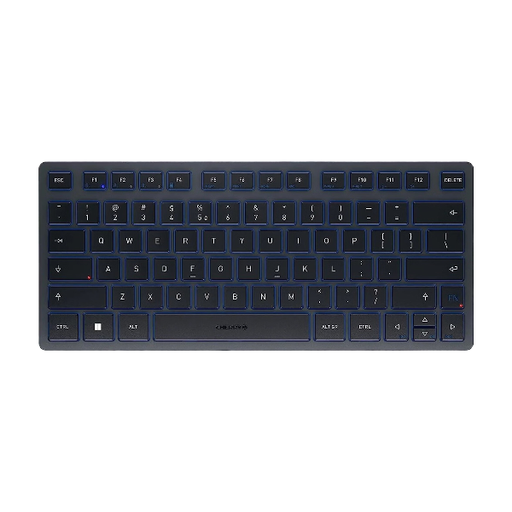
One listing for the CHERRY STREAM KEYBOARD TKL specifies a US layout with a euro symbol; CHERRY also offers a DE version. So the euro symbol alone doesn’t tell you that the keys are arranged in QWERTZ.
Check the language variant selected in the specific listing and compare it with the image of the keyboard layout.
CHERRY and Logitech describe certain models as quiet. This doesn’t provide a verified comparison of how loud they’ll be with your typing style and on your desk.
If possible, assess the typing noise for yourself and consider whether you share the room.
The Keychron K3 Max comes in different versions, including variations in ISO layout and switches. The specific version can therefore make a difference to the key layout and typing feel.
Compare the full model name, layout, switches and what’s included.
The STREAM KEYBOARD TKL is a space-saving wired option with a main key section and no number pad.
The Pebble Keys 2 K380s is designed for compact typing and switching between devices; the compact MX Keys Mini also has backlit keys.
The K3 Max with an ISO layout is a compact mechanical option for people who want to configure keys or macros.
This selection includes compact keyboards for small work surfaces, with options for different devices and connection preferences. For each version, check that the layout and compatibility suit your computer.
 No image available
The foldable design and integrated touchpad could be useful for a small or mobile workspace.
The title specifies QWERTZ and three Bluetooth channels; compatible systems listed include iPadOS, Android and Windows.
 No image available
The compact 75% layout with ISO-DE key arrangement could suit a small desk if it works for the way you work.
The model is listed with Bluetooth, 2.4 GHz wireless and USB-C, as well as hot-swap.
 No image available
The compact design and three Bluetooth channels could suit a workspace with several devices.
The listed layout is US International QWERTY, not German QWERTZ. Before buying, check that this key arrangement works for you.
 No image available
The 65% layout and listed German QWERTZ arrangement could be a good fit if you’re looking for a compact keyboard with this key layout.
Connections listed include 2.4 GHz wireless, Bluetooth and USB-C; this version is white.
 No image available
The 65% layout with 68 keys is a compact option if the listed key arrangement suits your needs.
Bluetooth, 2.4 GHz and USB connections are listed; the wrist rest is detachable.
Compare the stated language variant and keyboard image with the layout you want to use. US International QWERTY is not the same as German QWERTZ, and a euro symbol alone doesn’t confirm a German key layout.
You can’t tell from the manufacturer’s description alone. CHERRY and Logitech describe certain models as quiet, but that doesn’t provide a comparable measurement for your typing style and desk surface. If possible, assess the noise for yourself.
For relevant electrical and electronic equipment, the Federal Network Agency specifies requirements including correct CE marking, device identification and the necessary manufacturer information. For non-commercial users, instructions covering the required usage and safety information must be provided in German. Check the specific version on offer.
For a standard online purchase from a business seller, you generally have a 14-day right to cancel from the date of delivery; exceptions may apply. Separately, if the goods are faulty, you have a statutory warranty claim against the seller for at least two years. These rules don’t apply in the same way to purchases from private individuals.
Check that links, buttons and forms can be reached and used with Tab and other keyboard inputs, and that the focus order makes sense. This tests the website, not a special feature of any particular keyboard model.