UI designers with limited desk space
You need room for a mouse, laptop or paperwork alongside your keyboard, while keeping your most-used shortcuts within easy reach.


First, measure the space available for your keyboard and mouse. Then check that your most-used design shortcuts and the German key layout are easy to reach. A compact keyboard may suit a small or shared desk. If you prefer custom key mappings, switching between devices or a split keyboard, make sure the layout, connection and footprint of the model suit your setup and daily routine.
You need room for a mouse, laptop or paperwork alongside your keyboard, while keeping your most-used shortcuts within easy reach.
You design or write while other people study or live within earshot. The specific key and switch type matters more to you than flashy features.
You switch between compatible devices while designing or testing, and want to check connectivity and switching options before you buy.
For a student room, it’s worth checking the keyboard’s footprint and key layout first. Then consider noise, connections and your preferred hand position.
| What matters | What to check before buying | Who it matters to |
|---|---|---|
| Room for a mouse and paperwork | Check the dimensions of the specific keyboard and whether you need a number pad. | If there’s little desk space left for a mouse and paperwork, finding a keyboard that fits is especially important; around 27% of consumers put footprint first. |
| Shortcuts and German layout | Check the physical key layout, Fn layer and software settings. Figma supports German QWERTZ as a keyboard layout. | If you often use design commands or write in German, the layout and shortcuts should suit your workflow; around 27% of consumers prioritise shortcuts and key layout. |
| Typing noise in your room | Compare the specific switch type. Manufacturer claims about quiet typing aren’t a measurement of how it will sound in your room. | If other people study or live within earshot, you’ll want to keep typing noise to a minimum; around 20% of consumers give this priority. |
| Connectivity and switching between devices | Check Bluetooth, USB receiver or cable compatibility against your devices’ ports and the items included in the box. | If you regularly switch between compatible devices, a suitable switching option is essential; around 13% of consumers prioritise switching between devices. |
| Hand position while typing | Compare split and straight keyboard layouts with the space you have available. | If you’d prefer a different hand position for longer typing sessions, check the shape and footprint beforehand; around 13% of consumers put hand position first. |
On compact keyboards, frequently used keys may be on an Fn layer. The layout you choose also affects how easy it is to access characters and shortcuts.
Write down your most-used commands and check the physical layout, Fn layer and German QWERTZ setting in the software you use.
An unfamiliar layout may take extra time to set up and get used to.
Claims about typing noise refer to specific manufacturer descriptions and switch types. The PERIBOARD-335 is also available with clicky switches.
Check the exact switch type and, if possible, assess the typing noise in conditions similar to your room.
For the Pebble Keys 2 K380s, Logitech lists a separately available Logi Bolt receiver as a connection option if your computer doesn’t have Bluetooth.
Check Bluetooth compatibility, available ports and what’s included for your devices.
The Pebble Keys 2 K380s and MX Keys Mini are worth considering if you’re after a compact design. Logitech also offers models with device switching or programmable keys.
The STREAM KEYBOARD is a wired option for a fixed workstation.
According to the manufacturer, the K3 Max ISO collection has a compact 75% layout, configurable keys and several connection options.
The PERIBOARD-335 is an option if you’d like to try a split keyboard.
The 975 Dual-Mode is an option for switching between devices, if you have room for a wider keyboard.
This selection includes compact, wired and wireless keyboards for UI work. Layout and connection options vary by model.
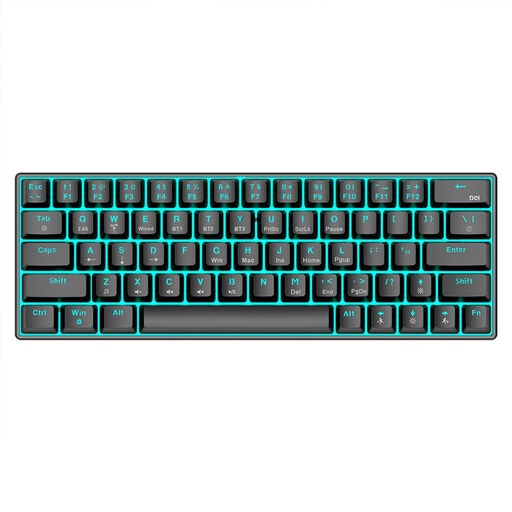 No image available
The product details list a compact 63-key layout, ideal for a small desk.
Connections: Bluetooth, 2.4 GHz wireless and USB-C cable. The listed features also include RGB lighting and a 1.450-mAh battery.
 No image available
The TKL format is a more compact wired option for a fixed workstation.
The product details list German QWERTZ, MX2A RED switches, RGB lighting and a USB-A connection.
 No image available
If you want to switch between devices, the product details list Easy-Switch for up to three devices.
Features include Bluetooth and Logi Bolt, German QWERTZ and smart illumination. “Tactile Quiet” is the stated switch type, not a measurement of how noisy it will be in your room.
 No image available
The 65% layout is a compact option if you’re looking for a wired keyboard with a German layout.
The product details list hot-swappable MX2A RED switches and a wired connection. Secondary functions are printed on the sides of the keys.
 No image available
For tasks you repeat regularly, the product description lists programmable macros and key functions.
Connections include Bluetooth, 2.4 GHz and USB-C. The product title specifies US QWERTY rather than a German QWERTZ layout, so check that the key mapping suits your German typing and shortcut needs.
No. The Figma Help Center lists German QWERTZ as a supported keyboard layout. Check that the physical layout matches your operating system and Figma settings, so the characters and shortcuts suit your workflow.
Check which connection methods each device supports and what’s included in the box. Logitech lists Bluetooth for the Pebble Keys 2 K380s. If your computer doesn’t have Bluetooth, Logitech says a Logi Bolt receiver, available separately, is an option.
When you buy from a business seller, your statutory rights are against the seller. According to EU consumer information, the minimum period is generally two years from the date you receive the goods. Any additional manufacturer’s guarantee doesn’t replace these rights.
For a distance contract with a business seller, you generally have a 14-day right to cancel from the date of delivery, subject to legal exceptions. You may have to pay the return costs if the seller told you about this beforehand; check the terms of the specific offer.