When developing a responsive repair booking website, choose a keyboard based on your main bottleneck: a compact, customisable keyboard for coding, a multi-device keyboard for switching between devices, or a split or slim wired keyboard for long periods of typing at a fixed workstation. Keychron lists QMK/VIA and wired, Bluetooth and 2.4 GHz connections for the K3 Max; Logitech describes multi-device features for the MX Keys S. Check the specific UK layout, operating system and connection compatibility, and the space you have available. No keyboard design can replace a suitable workstation setup.
Which keyboards are right for you?
Coders and layout developers
If you write website code and want to customise frequently used keys, a compact layout and a supported customisation method may be important. Keychron lists QMK/VIA support for the K3 Max; make sure you check the specific UK layout variant.
Developers using multiple test devices
If you test responsive layouts across different devices, look for suitable connections and a layout that works with the operating systems you use. Logitech describes multi-device features for the MX Keys S; support depends on the specific device and variant you choose.
People who type for long periods at a fixed workstation
When you spend long periods writing code, form text and corrections, hand position, space for your mouse and typing noise may all matter. Compare the keyboard’s design with your actual desk space rather than assuming a model name guarantees personal comfort.
What should you look for when buying?
| What matters to you |
What to check before buying |
Who is it important to? |
| Coding and key customisation |
Check the UK ISO layout, the characters you need and whether your preferred customisation software is supported. |
If I want to assign recurring commands to custom keys while coding and can do without a number pad, the specific layout is crucial. Around 33% of consumers put customisable coding input first. |
| Hand position during long typing sessions |
Consider whether you want a split or straight design, and assess the space available for the keyboard and mouse. |
During long typing sessions, I want to find a setup that suits my hands and leaves enough room for the mouse; I should try a split design in person first. Around 25% of consumers prioritise hand position when typing for long periods. |
| Switching between devices |
Check the supported connections, operating system layout and how many devices can be paired. |
If I test responsive layouts on multiple devices, I want to switch between them using the same keyboard only if the connection and layout work for each one. Around 25% of consumers prioritise switching between work and test devices. |
| Space and typing noise |
Weigh up TKL or full-size, whether you need a number pad and which connection suits you. |
At a small, fixed workstation, I want to free up space for my mouse without overlooking a number pad I need or typing noise that bothers me. Around 17% of consumers put space-saving and quiet typing first. |
Avoiding buying pitfalls
-
Assuming the model name guarantees a UK keyboard layout
Several ISO layouts are available for the Keychron K3 Max; on the product page we looked at, ES-ISO was selected by default. With other models, too, the specific variant determines the key legends.
Before ordering, check explicitly that you’re choosing the UK or UK ISO version and confirm the key legends.
-
Assuming compact is automatically better for your work
A TKL keyboard saves space because it has no number pad. If you enter numbers frequently, you’ll lose a familiar way of doing so.
Choose between TKL and full-size based on how much you use the number pad and how much space you need for your mouse.
-
Thinking a split keyboard is a guaranteed fix for discomfort
A split layout is not a guaranteed treatment or preventative measure for discomfort. The F.A.Z. also notes that the gap between the wrist rest and keyboard on the ERGO K860 is difficult to clean. Requirements for a workplace with screen equipment apply to the workstation as a whole.
Check the keyboard’s design and position in your working environment. Don’t assume product claims mean it has a medical benefit.
Brands to consider
Keychron
The K3 Max combines a compact 75% layout with customisable keys and several connection options. This may be useful for coding and switching between devices.
- Keychron lists QMK/VIA and wired, Bluetooth and 2.4 GHz connections for the K3 Max.
- The ES-ISO version selected by default on the product page is not the same as the also-available UK ISO variant. Check the layout and specific version before buying.
Logitech
According to the manufacturer, the MX Keys S is designed for low-profile typing and use with multiple devices. The ERGO K860 is a separate split design for longer typing sessions.
- Logitech describes multi-device features and programmable keys for the MX Keys S. The F.A.Z. reviewed the ERGO K860 as part of a test of ergonomic keyboards.
- The F.A.Z. notes that the ERGO K860 has no backlit keys and cannot be used with a cable. The review applies to this model, not to Logitech keyboards in general.
CHERRY
The STREAM KEYBOARD TKL is a compact wired option without a number pad. The KC 6000 SLIM is a separate, slim full-size keyboard for those who need a number pad.
- CHERRY lists SX scissor switches for both models. The TKL version has no number pad, while the KC 6000 SLIM is a full-size keyboard with one.
- Information about typing noise and comfort comes from the manufacturer; no comparative test has been carried out here. Also check the specific UK layout variant.
Perixx
The PERIBOARD-335 is a compact split wired keyboard available with a UK layout. It could be an option if you want to try a different key arrangement.
- Perixx lists adjustable tilt and a choice of switch options.
- According to the manufacturer, the downloadable customisation software is only available for Windows, even though the keyboard works with other systems. Check whether you need the software and which layout variant you’re choosing.
Keyboards at Joybuy
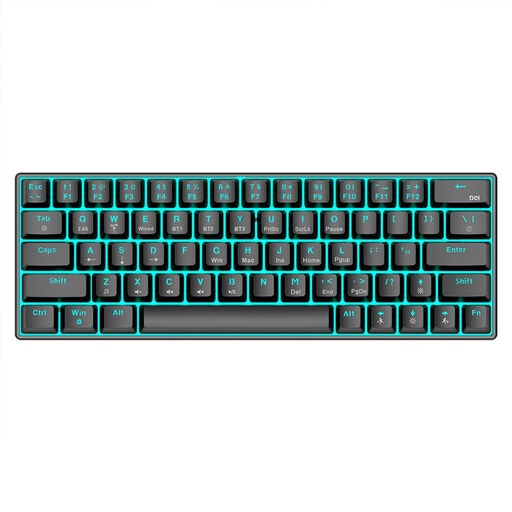
This selection is aimed at compact workstations and switching between devices; some models also offer a UK layout or customisable keys.
 No image available
Inateck N0153BK, foldable mini keyboard with QWERTZ
Suitable if you want to use a foldable keyboard with an integrated touchpad across several compatible devices.
QWERTZ layout; Bluetooth 5.3; listed as compatible with Windows, iPadOS and Android; switch between up to three Bluetooth devices.
View at Joybuy
 No image available
KINSI 63-key mechanical keyboard
Suitable if you’re looking for a space-saving keyboard and several connection options for compatible devices.
63 keys; Bluetooth 5.0, 2.4 GHz wireless or USB cable; RGB lighting; 1,450 mAh; listed in the product name as suitable for PC, laptop and tablet.
View at Joybuy
 No image available
Foldable Bluetooth keyboard with wireless mouse
Suitable if you’re considering a foldable keyboard with a mouse for working in different locations.
Quiet scissor keys according to the product description; three connection modes and connection to up to three devices; 2.4 GHz receiver; USB-C charging; listed as compatible with Windows, Android and iOS.
View at Joybuy
 No image available
CHERRY MX-LP 2.1 Wireless, UK QWERTZ, 65%
Suitable if you want to combine a compact UK layout with several connection options.
65% layout; UK QWERTZ; low-profile MX Speed switches; Bluetooth, 2.4 GHz or USB-C; RGB lighting; white version.
View at Joybuy
 No image available
Ticktype EVO75, ISO-DE, 75%, VIA-compatible
Suitable if you’re looking for a compact German layout with customisable keys and several connection options.
ISO-DE; 75% layout; VIA-compatible and hot-swappable; Bluetooth, 2.4 GHz or USB-C; Creamy Rye switches; 8,000 mAh; Spray-coated Nebula version.
View at Joybuy
Frequently asked questions
Do I need a wireless keyboard for responsive layouts?
No. What matters is whether you actually want to use the same keyboard with other compatible test devices. A wired keyboard could also work for a fixed development computer; check the connection and operating system layout before buying.
How do I set up a keyboard with custom coding keys?
First, check the exact model variant and the method it supports: Keychron lists QMK/VIA for the K3 Max, while Logitech offers Smart Actions in the Logi Options+ app for the MX Keys S. Features depend on the model and software. Keep a working standard layout until you’ve tested your preferred configuration on your work computer.
What should I consider when choosing a split keyboard?
Make sure you have enough room for your keyboard and mouse, and try out the hand position rather than assuming the product name guarantees comfort. The F.A.Z. notes that the gap between the wrist rest and keyboard on the ERGO K860 is difficult to clean.
What are my rights if an online purchase is faulty?
For consumer purchases from traders in the EU, you’re generally entitled to a legal guarantee of at least two years from receiving the goods. Your Europe explains that an additional warranty does not replace these rights. Online purchases generally come with a 14-day right to cancel, subject to legal exceptions, as explained by the Council of the European Union. These rights do not automatically apply to purchases from private individuals or business-to-business purchases.
Are there specific requirements for keyboards at workplace screen workstations?
If the specific workstation falls within its scope, ASR A6 sets out requirements for workstations with screens and for teleworking. The Federal Institute for Occupational Safety and Health describes these as requirements for workstation design, not a requirement to buy a particular keyboard model; private use is not automatically covered.


