What to look for when buying
The right keyboard can make testing easier, but it cannot replace checking the website itself: its functions must be accessible without a mouse, and you must be able to move keyboard focus out of interactive elements. The W3C Web Accessibility Initiative sets out these requirements independently of the hardware you use.
| Buying priority |
What to check |
Who it matters to |
| Testing keyboard navigation |
Whether the keys you need are easy to reach; connection to the test computer |
If I want to check menus, search and forms without a mouse, I need a layout that makes the controls I need easy to reach. Around 33% of consumers put keyboard navigation testing first. |
| Writing longer pieces |
Key layout and desk space; whether a split layout may take some getting used to |
If I regularly write longer gardening articles, I want to choose a keyboard I can work comfortably with, without assuming it will have a particular effect. Around 27% of consumers prioritise typing longer pieces when buying. |
| German layout |
Language variant listed for the specific product; layout on compact or split models |
If I write in German, familiar German key labels matter to me. Around 20% of consumers put a German layout first when buying. |
| Switching devices and using shortcuts |
Connection options and power supply; required software and operating system |
If I work on several computers or want to set up my own shortcuts, I check that the connection and required software are right for my setup. Around 20% of consumers prioritise switching between devices and setting up their own shortcuts. |
Joybuy products for writing and keyboard testing
The models below include wired keyboards with a German layout, as well as a split wireless model for writing and testing on your computer.
 No image available
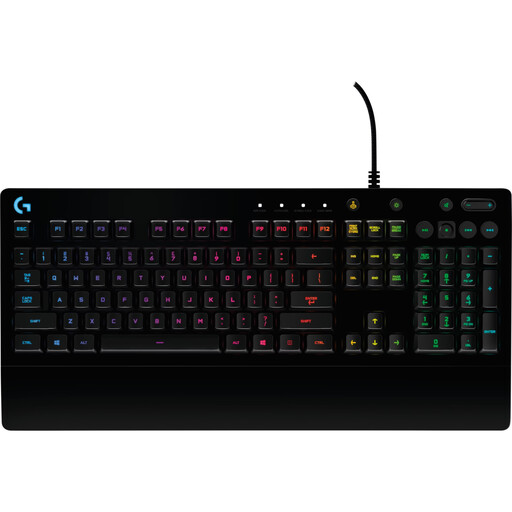
Logitech G213 Prodigy
For writing and navigation testing on a desktop computer; the keyboard itself cannot make a website keyboard-accessible.
Full-size layout, DE-QWERTZ, membrane keys, wired USB connection and an integrated palm rest.
View at Joybuy
 No image available
CHERRY XTRFY MX 3.1
For writing and navigation testing at a fixed workstation, if a wired full-size layout suits your workflow.
Mechanical keyboard with tactile MX2A Brown keys, German QWERTZ layout and USB connection. The product description lists programmable media keys and adjustable feet.
View at Joybuy
 No image available
Logitech K120
For typing and testing on a PC or laptop, if you’re looking for a familiar German key layout.
Wired USB connection, German QWERTZ layout and full-size arrangement with 104 keys, function keys and a number pad.
View at Joybuy
 No image available
Logitech ERGO K860
For longer typing sessions, if a split layout and palm rest appeal to you; allow time to get used to it.
Split layout, QWERTZ, Bluetooth and USB receiver. F.A.Z. Kaufkompass described the model as having neither a wired mode nor backlit keys.
View at Joybuy
 No image available
Logitech K280e
For longer periods at your desk, if you’re looking for a wired full-size model with a German layout.
German QWERTZ layout, USB connection, single-colour backlighting and a large palm rest.
View at Joybuy
Frequently asked questions
Will a specialist keyboard automatically make my garden guide usable without a mouse?
No. What matters is whether the website’s functions can be operated with a keyboard and whether you can move focus out of interactive elements again. Test the finished website without a mouse; a quick preliminary test is no substitute for a full accessibility assessment.
What should I look for when testing the website for the first time?
Navigate through the interactive elements without a mouse, checking that focus is visible and the order makes sense. If you’re using a split keyboard for the first time, allow time to get used to it. With a wireless model, first check that it connects to your computer.
What ongoing costs and rights should I consider when buying online?
For wireless models, check the power requirements; for programmable features, check what software you’ll need. When buying as a consumer, statutory rights relating to faulty goods are separate from a voluntary manufacturer’s warranty. The Verbraucherzentrale explains that online purchases generally come with a right to cancel, usually within 14 days. Whether consumer rights apply also depends on whether you’re buying as an individual or a business.
Does the BFSG apply to my garden guide?
It’s not possible to give a general answer without knowing more about the business model and who runs it. According to the information provided by the Bundesfachstelle Barrierefreiheit, the BFSG covers certain products and services, including e-commerce in some circumstances; microbusinesses that provide services are exempt. Section 2 of the BFSG explains what counts as an e-commerce service. Whether your guide falls within its scope depends on the specific circumstances. Making it usable with a keyboard remains a worthwhile development goal regardless.


