People creating a site without a mouse
If you need to use the editor, preview and forms with a keyboard, look for a familiar key layout. You’ll still need to check separately whether the software itself can be operated entirely by keyboard.


Choose a keyboard with the right German layout and the keys you need for your computer and website editor. Then decide between a full-size, split or compact design. A keyboard alone cannot make an unsuitable editor or a website without keyboard controls or a visible focus accessible. Test the specific workflows, including menus and forms, as recommended by the W3C Web Accessibility Initiative.
If you need to use the editor, preview and forms with a keyboard, look for a familiar key layout. You’ll still need to check separately whether the software itself can be operated entirely by keyboard.
If you write or edit longer invitation texts and event schedules, weigh up the key shape, keyboard size and split layout to find what suits you.
If you work on content at different workstations, check that the connection suits the equipment at each one and that you’ve chosen the right layout.
Start by checking the layout and the keys you need for your editor. Then compare typing feel, connection and the space required to suit the way you work.
| Buying criterion | What to check before buying | Who is it important to? |
|---|---|---|
| Layout and navigation | Check for a German QWERTZ layout and arrow, navigation and function keys; try using the editor with the keyboard. | If I want to use the editor, preview and forms without a mouse, I need the right key layout and easy-to-reach navigation keys. Around 33% of consumers put these features first. |
| Typing comfort | Compare the design and key layout; with split layouts, consider the space they need and the time it may take to get used to them. | If I’m writing or editing invitations and event schedules for longer periods, I look for keys that suit the way I type. Around 27% of consumers prioritise comfort for extended typing. |
| Connection | Check that USB-A, Bluetooth or a specifically named receiver is compatible with your available ports and operating system. | If I work at different workstations, the connection needs to suit the ports available at each one. Around 20% of consumers prioritise connectivity and switching between devices. |
| Space and key mapping | Check which keys you need to be able to reach directly, and whether configuration software and custom shortcuts work well with your browser and assistive technologies. | If my desk space is limited or I want to assign shortcuts to recurring steps, I check which keys are missing and whether any shortcuts might conflict. Around 20% of consumers prioritise a compact design or custom key mapping. |
A different key layout won’t make up for missing keyboard controls or an invisible focus in the editor or on the website.
Consider your hardware choice and software checks separately. Go through menus, dialogue boxes and forms without a mouse, and make sure the focus remains visible.
Manufacturers offer different regional layouts, and a similarly named set may not be the same standalone keyboard.
Compare the full model name, German layout, items included and connections for the version you’ve selected.
With compact layouts, functions that are usually easy to access may require extra key combinations.
Before deciding, check which keys you regularly need in your editor and whether custom shortcuts might conflict with your browser, operating system or assistive technologies.
The product ranges mentioned include everything from split layouts and keyboards with wrist rests to compact models.
The KC 6000 SLIM is a slim, wired full-size option; the KW 9100 SLIM is a slim wireless alternative.
The PERIBOARD-512 B is an option to consider if you’re looking for a split layout with a USB-A cable and German QWERTZ layout.
The K2 Pro ISO could suit buyers considering a compact mechanical layout with configurable keys.
The models below include full-size and compact keyboards, as well as split and wireless designs. Check that the German layout, keys you need and connection are compatible with your computer and website editor.
 Image unavailable
The QWERTZ layout and several listed connection options may be useful if you work at different stations. Check which ones your computer supports.
Bluetooth, 2.4 GHz wireless and USB-C; 2,000 mAh battery; backlighting and rotary dial.
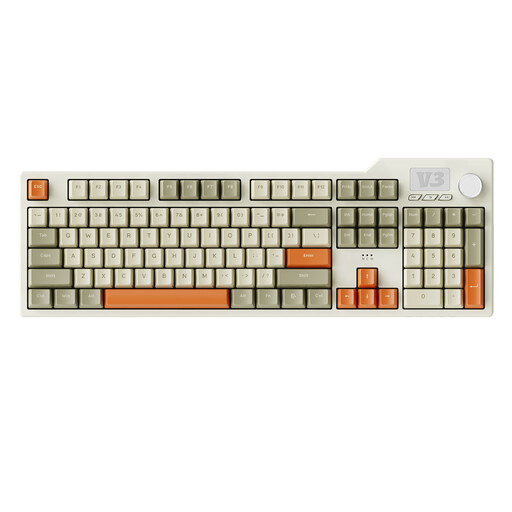 Image unavailable
The full-size design with numeric keypad is an option if you want these keys within easy reach when typing longer texts or navigating.
Full-size mechanical keyboard with 104 keys; USB-C; RGB backlighting; PBT keycaps and hot-swappable switches.
 Image unavailable
The compact design may suit a limited workspace; check that the navigation and function keys you need are easy to reach.
65% layout with 68 keys; Bluetooth, 2.4 GHz wireless or wired connection; detachable wrist rest and hot-swappable switches.
 Image unavailable
The German QWERTZ layout and listed full-size design are worth considering if you’re looking for a familiar key layout and keys that are easy to reach.
Wired USB plug-and-play; function keys and numeric keypad; listed for Windows.
 Image unavailable
The split keyboard may be worth considering if you’d like to try a different key layout; bear in mind the space it needs and the time it may take to get used to it.
Wireless, with Bluetooth or USB receiver; QWERTZ layout; padded wrist rest and adjustable feet.
No. The editor’s features and the website itself need to work with a keyboard and have a visible focus. The W3C Web Accessibility Initiative outlines these requirements. In particular, test navigation, dialogue boxes and forms using the keyboard.
Go through the steps you’ll actually use without a mouse: move the focus forwards and backwards, use menus and forms, and check that the focus remains visible. Look for possible conflicts between custom shortcuts and your browser, operating system or assistive technologies. The W3C Web Accessibility Initiative offers guidance on this.
Check that the layout, operating system and connection are compatible with your computer. CHERRY lists USB-A and a German version for the KC 6000 SLIM; the PERIBOARD-512 B is listed with a USB-A cable. For wireless models, check that Bluetooth or the specified receiver suits your equipment.
That depends on which keys you need to reach directly in the editor. With a compact design, check whether some functions require extra key combinations and whether custom shortcuts might conflict with your browser, operating system or assistive technologies.
No, you can’t determine that from the website’s subject alone. The Federal Office for Accessibility describes the scope of electronic commerce services in relation to an individual consumer request to enter into a consumer contract. Section 3 of the BFSG also includes an exemption for micro-enterprises providing services. Whether a specific website is covered depends, among other things, on who operates it and what features it offers. Keyboard accessibility remains a worthwhile design goal regardless.