Club website editor at a fixed workstation
You write and edit pages on a computer with two monitors. A suitable layout and easy-to-reach keys may matter more than switching between devices.


When working on a club website, a keyboard with the right German layout and easy-to-reach keys matters more than a feature specifically designed for two screens. A compact TKL keyboard gives you more room for your mouse, while a full-size model includes a number pad. A split keyboard is worth considering if you want to try a different typing position. A multi-device keyboard is most useful if you switch between separate computers.
You write and edit pages on a computer with two monitors. A suitable layout and easy-to-reach keys may matter more than switching between devices.
If you edit text for long periods, it’s worth choosing your keyboard shape and workstation layout carefully. A split keyboard can feel different from a straight keyboard and may take some getting used to.
If you really do switch between separate computers, a keyboard with switchable connections may be useful. Having two monitors connected to one computer does not, by itself, mean you need to switch devices.
Start by checking the layout and key arrangement, then decide whether you need a number pad and what keyboard shape suits you. Only consider device switching if you use more than one computer.
| What matters when buying | What to check | Who it matters most to |
|---|---|---|
| Layout and easy-to-reach keys | Check that it has a German QWERTZ or DE-ISO layout, and look at the arrangement of the arrow, function and navigation keys. | If I write and frequently edit club pages, I want my familiar keys within easy reach. This is a priority for around 36 % of consumers who focus on layout and typing. |
| Hand and arm position | With a split keyboard, consider its dimensions, the space it needs and whether it may take time to get used to. Assess the keyboard alongside its position in relation to your screens. | When I’m doing a lot of typing, I want to choose a shape that feels right for the way I type. Around 29 % of consumers prioritise a comfortable hand and arm position. |
| Space and typing noise | If you rarely enter numbers, a model without a number pad can leave more room beside the keyboard. Bear in mind that claims about typing noise are subjective. | If space beside the keyboard is limited, or I want to type as quietly as possible in a shared workspace, this trade-off matters. Around 21 % of consumers make this their top priority. |
| Connections and switching between devices | Check the supported connections, the ports on your computer and what’s included with the specific model. | If I regularly switch between separate computers, I want to be able to use the keyboard with them; two monitors alone don’t change that. Around 14 % of consumers prioritise switching between devices. |
A switchable connection is designed for moving between separate devices, not between screens connected to the same computer.
Before buying, check how many computers you want to use the keyboard with.
A TKL keyboard doesn’t have a number pad. CHERRY describes the main key area on the STREAM KEYBOARD TKL as the same as that on the full-size model, but without the number pad.
Before doing without a number pad, think about how often you work with membership lists, accounts or other numerical data.
For models available in different language versions, the model name alone doesn’t always tell you which key layout you’re choosing. For example, the Keychron K8 Max is available with different ISO layouts.
Check the specific layout option you’ve selected and what’s included with the offer.
The STREAM range includes full-size and TKL keyboards. According to CHERRY, the STREAM KEYBOARD ULTIMATE offers several connection channels.
The range includes the split ERGO K860 and switchable models such as the MX Keys S.
The PERIBOARD-512 B is a wired, split, full-size keyboard available with a German QWERTZ layout.
The K8 Max is a mechanical TKL option, available in a DE-ISO version, among others.
This selection includes keyboards with a German QWERTZ layout, as well as models for full-size, split and multi-device use.
 No image available
For consumers who want German-labelled keys and the option to switch between several separate devices.
The product name mentions three Bluetooth connections and a QWERTZ layout.
 No image available
A full-size option for consumers who want a number pad for typing.
The product name describes a full-size USB plug-and-play model with a German QWERTZ layout.
 No image available
For consumers who want to try a split keyboard layout for longer typing sessions.
The product name describes a wireless keyboard with a QWERTZ layout, Bluetooth and a USB receiver.
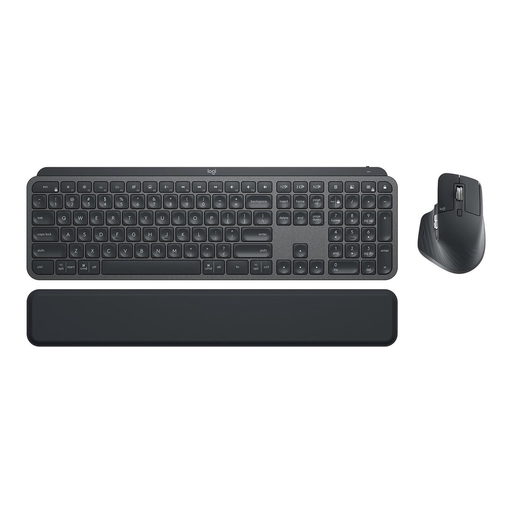 No image available
For consumers considering a keyboard and mouse set with a German key layout and the option to switch between devices.
The product name describes a set with the MX Keys and MX Master 3S, a German QWERTZ layout, Logi Bolt and backlighting.
 No image available
A wired option for consumers looking for a keyboard with a German layout for office work.
The product name specifies the K280e model with a German QWERTZ layout.
No, not just because you have two screens. A switchable connection is useful if you switch between separate computers. Logitech says Easy-Switch lets you connect compatible models to up to three devices.
Check that the connection on the specific model is compatible with your computer. The PERIBOARD-512 B uses USB-A; for the STREAM KEYBOARD ULTIMATE, CHERRY lists Bluetooth, 2.4 GHz wireless and a USB cable. For wireless models, also check which receiver is required and what’s included.
A discarded electrical keyboard must not go in your household rubbish. Germany’s Federal Environment Agency lists recycling centres and suitable retailer take-back points; removable batteries should be disposed of separately.
For faulty goods, statutory rights against the seller are separate from a voluntary guarantee. The Verbraucherzentrale says the general period for goods to be free from defects at the point of delivery is two years. Most online purchases also usually come with a 14-day right to cancel, starting when you receive the goods; exceptions and the terms of the specific contract apply.
Products covered by relevant EU harmonisation rules must meet the applicable conformity requirements. Germany’s Federal Network Agency explains that CE marking is required for such products when placed on the EU market by a manufacturer or importer; a product description alone does not prove that a specific offer is compliant.