Prolific writers
If you write for long stretches at a time, the keyboard layout and how it feels to type are important factors. Compare a split design with a conventional keyboard.


For long writing sessions, start by choosing a keyboard layout and typing feel that work for you. A split keyboard is one option, but it isn’t essential. If you often switch between your manuscript and section outline, also check that the navigation and programmable keys work with your writing software. The software creates the outline, not the keyboard.
If you write for long stretches at a time, the keyboard layout and how it feels to type are important factors. Compare a split design with a conventional keyboard.
If you often switch between your text, scenes and section outline, look for commands that are easy to reach and check how they work with your writing software.
If you edit your manuscript or notes on more than one device, check the keyboard layout and connection type for your devices.
First compare the keyboard layout and typing feel, then check how easy it is to access your software commands. Finally, consider the layout, noise level and connections that suit your workspace.
| What matters when buying | What to check | Who it matters to |
|---|---|---|
| Typing feel and hand position | Compare split and straight designs, as well as key height and the space needed on your desk. It may take time to get used to a different layout. | If I spend long periods working on my manuscript, I want to choose a hand position and key feel that suit me; around 31% of consumers rank typing comfort as their top priority. |
| Outlining and navigating scenes | First check the commands in your writing software and whether the keys you want are easy to reach or can be assigned. | Anyone who often switches between their manuscript and scene outline will want quick access to the right commands; around 25% of consumers give outlining and navigation top priority. |
| Typing noise | Check the specific key or switch version. Manufacturers’ claims about quiet keys aren’t a comparable measure of noise levels. | If I write in a shared space, I want to take noise levels into account; around 25% of consumers put low noise at the top of their list. |
| Layout and switching between devices | Check for a German QWERTZ or DE-ISO layout, and confirm the operating system, connection and exact product variant. | Anyone writing on multiple devices needs a suitable layout and connection for each use; around 19% of consumers prioritise switching between devices. |
Keys can trigger commands, but your writing software is what creates and rearranges the scene structure.
Try out the outlining process in your application before deciding whether custom key assignments would be useful.
The MX Keys S offers a low-profile typing experience, programmable keys and multi-device connectivity; the ERGO K860 is a split alternative.
The STREAM KEYBOARD TKL is a compact, wired keyboard with scissor keys, while the STREAM KEYBOARD ULTIMATE offers several connection options.
The K3 Max is a low-profile mechanical keyboard with a 75% layout and customisation options.
The PERIBOARD-335 is a compact, split mechanical keyboard with a German layout and a choice of switches.
This selection includes keyboards with a German layout, a range of designs, and wired and wireless options for working on your manuscript and navigating scenes.
 No image available
For writing in German and switching between devices, the specified QWERTZ layout and multi-device connection are useful features.
Bluetooth multi-device connection, membrane keys and a memory foam palm rest; listed as compatible with macOS, iPadOS and iOS.
 No image available
The ISO-DE layout and VIA compatibility make this a good option for writers looking for a German layout and customisable key assignments.
Mechanical keyboard with a 75% layout, tri-mode connections, VIA compatibility and hot-swappable switches; supplied with Creamy Rye switches.
 No image available
A full-size wired keyboard is worth considering if you prefer a German layout and a conventional keyboard.
USB connection, full-size layout and spill-resistant design; listed as compatible with Windows.
 No image available
The split keyboard layout is an alternative for writers who want to try something different from a straight keyboard.
Bluetooth and USB receiver; listed as compatible with Windows and Mac. Check that the split layout suits the way you write.
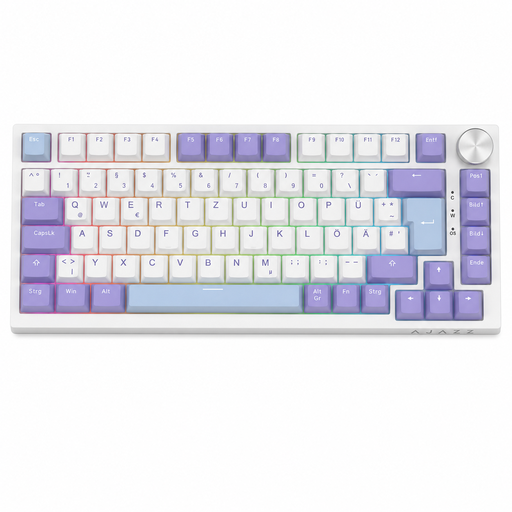 No image available
The compact layout may suit you if you want a German keyboard with arrow and navigation keys. Check that the layout keeps the commands you need within easy reach.
Mechanical keyboard with 82 keys, a volume control and a wired USB-C connection.
No, you create the outline in your writing software. Literature & Latte describes Scrivener as having an outliner that lets you plan and rearrange scenes. Check its commands before choosing programmable keys for the job.
Set up your keyboard and workspace so you can write comfortably. The ASR A6 from the Federal Institute for Occupational Safety and Health sets out requirements for display screen work in workplaces; these don’t automatically apply to writing a novel at home.
Follow the care instructions for your particular model. Logitech recommends regular cleaning in its care guide; bear in mind that this is the manufacturer’s advice for the keyboard in question.
For a standard distance purchase from a trader, you generally have 14 days from delivery to cancel your order; exceptions and possible return costs may apply. If the goods are faulty, you have a statutory minimum two-year guarantee from the seller. Your Europe, the European Union’s information portal, distinguishes these rights from a voluntary manufacturer’s warranty.