Writers of longer handbook documents
If you write longer passages, familiar keys and a setup that suits your desk are important considerations. CHERRY describes the SX scissor mechanism as a feature of the STREAM KEYBOARD.


For longer chapters, a familiar German layout, comfortable typing and a setup that suits your desk are important factors to consider. A split keyboard may take some getting used to. You don’t need a specialist keyboard to track changes: Microsoft Support explains that this feature is part of word processing in Word. When using keyboard shortcuts, check that they work with your chosen layout.
If you write longer passages, familiar keys and a setup that suits your desk are important considerations. CHERRY describes the SX scissor mechanism as a feature of the STREAM KEYBOARD.
When editing, easily accessible standard keys and a layout that suits your computer are important. Microsoft Support notes that documented Word keyboard shortcuts for the US layout may not work in exactly the same way with other layouts.
If you write alongside other volunteers or switch between devices, key noise, desk space and connectivity may all matter. CHERRY describes the STREAM KEYBOARD as quiet, while Logitech says the MX Keys S can switch between up to three devices.
For people writing and collaboratively editing a volunteer handbook, the right keyboard depends above all on whether longer writing sessions, reviewing changes, a quiet workspace or a flexible setup is the priority. Track Changes itself is enabled in your word-processing software; Microsoft Support says you can find it under the ‘Review’ tab in Word.
| Priority | What to look for when buying | Who is it important to? |
|---|---|---|
| Long writing sessions | Key layout and height; with split models, check that the layout suits you and fits on your desk. | When I’m writing longer chapters, familiar keys and a layout that suits my workspace are important to me. Around 40% of consumers put longer writing sessions first. |
| Reviewing changes | Layout and compatibility with your computer and word-processing software; check that keyboard shortcuts work with your chosen layout, as Microsoft Support notes they may differ. | When reviewing a document together, I want to use my word-processing software reliably and avoid confusing extra keys with Track Changes itself. Around 30% of consumers prioritise reviewing changes. |
| Key noise | Compare the key mechanism and how noisy it sounds in your intended workspace; manufacturers’ descriptions such as ‘quiet’ are not comparative noise measurements. | When I’m writing in a shared space, I want a quiet keyboard. Around 20% of consumers put having a quieter workspace first; CHERRY describes the STREAM KEYBOARD as quiet. |
| Switching devices and desk space | Check connectivity and compatibility with the devices you use; consider whether you need a number pad or would prefer more desk space. | If I’m editing the handbook on several devices or need room for papers beside my keyboard, a flexible setup matters to me. Around 10% of consumers prioritise switching devices or saving space. |
Programmable keys are a feature of certain keyboards. Track Changes in Word, on the other hand, is set up and used within the application.
First, check how your word-processing software enables and displays edits. Then decide whether extra keys suit the way you actually work.
Perixx notes that the PERIBOARD-512 B has a different key layout and may take some getting used to.
Choose a split design if it suits your preferred hand position, and allow time to adjust when making your choice.
It may take time for the different layout to feel familiar when you’re typing.
A similar name alone doesn’t tell you whether the model number, layout, connection and items included are the same.
Before buying, compare the full model number, German layout, connection type and what’s included in the offer.
The STREAM KEYBOARD is a wired option with a conventional key layout; the STREAM KEYBOARD TKL omits the number pad.
The MX Keys S is a low-profile keyboard for wireless use with multiple devices; the ERGO K860 has a split key layout.
The PERIBOARD-512 B is a wired split keyboard with a German QWERTZ layout and number pad.
The K10 in the German ISO-DE version is aimed at people looking for a mechanical keyboard with both wired and Bluetooth connectivity.
The IKE-7100 is a more compact option for people who want to use Bluetooth and USB-C.
The Joybuy products below are keyboards for writing and office work; layouts, connectivity and features vary between models.
 No image available
The QWERTZ layout is a familiar option for writing German-language handbook content; switching between devices may be useful if you work across several devices.
QWERTZ layout, low-profile keys and Bluetooth connectivity with switching between up to three devices.
 No image available
The compact folding design is an option if you want to take your keyboard with you; check that the stated connection works with your devices.
The product details list quiet scissor keys, three connection modes, switching between up to three devices and USB-C charging. Compatible systems listed include Windows, Android and iOS.
 No image available
The stated QWERTZ layout is a familiar choice for German-language writing; compare the connections with the devices you actually use.
QWERTZ layout, backlighting and LCD display. The product details list Bluetooth for up to four devices, a 2.4-GHz connection, USB-C and a 2000 mAh battery.
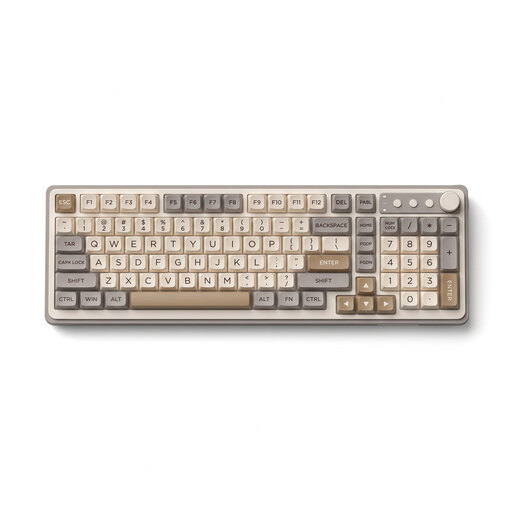 No image available
The product description lists document creation as one of its uses, making it suitable for writing handbook content.
The model name specifies backlighting.
 No image available
The full QWERTZ layout is a familiar option for longer typing sessions, and the wrist rest is detachable.
The product name lists a number pad, quiet keys and a 2.4-GHz USB connection. Compatible systems listed include Windows and Mac.
No. In Word, you turn on Track Changes in the application under ‘Review’; any compatible standard keyboard will work. Microsoft Support notes that keyboard shortcuts may vary depending on the layout.
Yes, but Microsoft describes Word for the web as having a more limited feature set. Choose the appropriate review mode; a different keyboard won’t remove software limitations.
According to Microsoft Support, tracked changes must be accepted or rejected. The ‘No Markup’ view only hides changes temporarily, so check the document before sharing it.
As part of its market surveillance, the Bundesnetzagentur lists the CE marking, identifiable manufacturer details, German-language instructions and a declaration of conformity among the checks for electrical and radio products. These general checks do not prove that a specific listing is compliant.
If a product is faulty, statutory consumer rights generally apply against the seller; a voluntary guarantee is separate. According to the Verbraucherzentrale, online consumer purchases generally come with a 14-day right to cancel, which you must notify the retailer about. The terms of the specific purchase apply.