What should you look for when buying?
Your writing software is what matters for numbered headings: Microsoft Support explains how to use styles and multilevel lists in Word. When choosing a keyboard, focus on access to frequently used commands, the layout and how well it fits your workspace.
| What matters to you |
What to check |
Who will find this most important? |
| Navigation and outlining |
Check the position of the arrow and function keys, as well as the German layout. Try the commands you need in your writing software; Microsoft Support notes that keyboard shortcuts may vary depending on the layout. |
When I move between chapters, I often need to navigate. I want to reach the keys I use most without having to press another layer. Around 40% of consumers put navigation and outlining first. |
| Hand position while typing |
Compare the shape, wrist rest and overall dimensions. If you choose a split keyboard, allow time to get used to it and check that there’s still room for your mouse and papers. |
For longer writing sessions, I’d like to try a split layout while keeping enough room for my other work essentials. Around 30% of consumers prioritise hand position. |
| Customisable commands |
Make a note of the tasks you use most often, then check that the keyboard software, operating system and writing programme support the key assignments you want. |
I want to access recurring tasks more quickly, so I’d like to assign keys myself and am happy to set them up. Around 20% of consumers focus primarily on customisable commands. |
| Space and connection |
Measure the available desk space and check the connection required, along with the operating system requirements for the specific version. |
If my desk is short on space or my computer has specific connection requirements, the keyboard needs to suit my setup. Around 10% of consumers put space and connection first. |
Keyboards at Joybuy
The following products include keyboards for German-language typing, with different space and connection requirements. Layout, key arrangement and connection vary by model.
 No image available
Inateck Bluetooth Keyboard KB01003G, QWERTZ
The QWERTZ layout listed in the title may suit German-language typing and switching between multiple devices.
The title mentions three Bluetooth connections and larger keycaps. According to the description, you can switch between up to three devices. The function keys include shortcuts for screenshots and media functions, among others.
View at Joybuy
 No image available
Inateck Foldable Mini Keyboard N0153BK, QWERTZ
The foldable mini design may be a good option for a portable workspace if you’re comfortable typing on a compact layout.
The product title lists QWERTZ and an integrated touchpad. According to the description, it has three Bluetooth channels and an extra row of function keys.
View at Joybuy
 No image available
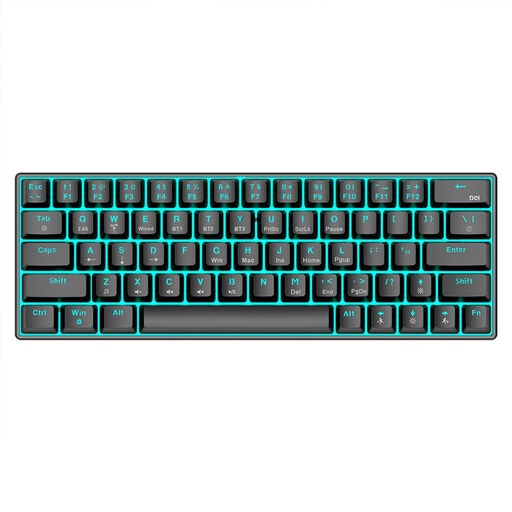
KINSI mechanical keyboard with 63 keys
The compact 63-key format may suit a smaller desk, as long as you’re comfortable with the reduced key layout.
The product title lists Bluetooth 5.0, 2.4 GHz wireless and a USB cable as connection options. It also mentions RGB lighting and a 1450 mAh battery.
View at Joybuy
 No image available
CHERRY MX-LP 2.1 Wireless, German QWERTZ, 65%
The German QWERTZ layout and 65% format are listed in the title. Check that the compact arrangement includes the keys you need for your writing workflow.
The title lists MX Speed low-profile switches, tri-mode connections via 2.4 GHz, Bluetooth and USB-C, as well as RGB lighting. The listed version is white.
View at Joybuy
 No image available
CHERRY XTRFY MX 3.1, German layout
According to the product description, the full-size design and German layout will appeal to writers who prefer a comprehensive set of keys.
The title lists MX2A Brown switches, RGB lighting and a wired USB connection. According to the description, the model has a programmable media panel and function keys; the listed version is white.
View at Joybuy
Frequently asked questions
Do I need a special keyboard for numbered subheadings?
No, you don’t need a special keyboard for numbered subheadings in Word. Microsoft Support explains how to use built-in styles such as “Heading 1” and “Heading 2” together with a multilevel list. Check that keyboard shortcuts match your version of the programme and your layout.
What should I check first when connecting a keyboard?
First check the layout, connection and supported operating system for the specific version. CHERRY lists USB-A and Windows for the KC 4500 ERGO; Logitech lists Bluetooth Low Energy and a Logi Bolt USB receiver for the MX Keys S, with the relevant system requirements.
How should I approach longer writing sessions with a split keyboard?
Allow time to get used to it and make sure you have enough desk space. The BAuA also considers how work equipment is arranged as part of a workstation for computer work; this does not guarantee that a particular keyboard model will relieve discomfort.
What are my rights in Germany if a model bought online is faulty or I want to return it?
For newly purchased goods, you generally have statutory rights against the seller for two years from delivery. Online consumer purchases usually come with a 14-day right to cancel, starting from the day you receive the goods. Verbraucherzentrale distinguishes between statutory rights for faulty goods and a voluntary guarantee.
Does a retailer have to take back my old keyboard?
According to stiftung elektro-altgeräte register, whether a retailer is required to take back old equipment depends on factors including the type of retailer and the size of its sales area. For retailers that are required to accept returns, the organisation describes free one-for-one take-back when you buy a new product of the same type. Check the return process with the retailer you’re buying from.


