Which keyboard is right for you?

Editors and anyone working with outlines

If you often switch between text and subsections, look at how your writing software handles styles and navigation. Google Docs lists keyboard shortcuts for heading styles, while Microsoft Support explains how formatted headings appear in Word’s Navigation pane.

People who write a lot

When you’re writing long, step-by-step guides, key layout, hand position and desk space may all matter to you. A split keyboard is one alternative, but it may take time to get used to, as Perixx notes for the PERIBOARD-512.

People who work across different devices and locations

If you work on several devices or in a confined space, check the layout, connections and position of important keys for each device you use. Logitech, Keychron and Microsoft describe different features and requirements for specific models; these don’t automatically apply to other keyboards.

What should you look for when buying?

Buying criterion What to check before buying Who will find this most important?
Editing headings Check whether your writing software supports styles and the keyboard shortcuts you need. For PCs, Google Docs lists Ctrl + Alt + [1–6] for applying heading styles; shortcuts may vary depending on language and keyboard layout. If you often switch between paragraphs and outline levels while editing, quick access to the right commands will be a priority. Around 33% of consumers put working with outlines first.
Typing feel and hand position Compare the key layout and dimensions, and consider whether you’re happy to get used to a split design. If you write long guides, pay particular attention to how the key layout and hand position feel to you. Around 27% of consumers prioritise typing comfort for longer texts.
German keyboard layout Check the layout details and, where available, the full model number of the specific version. The product family name alone doesn’t confirm that it has a German layout. If you write in German and need a familiar German layout, choosing the right version is essential. Around 20% of consumers prioritise the right German keyboard layout.
Space and switching between devices Measure the available desk space and check the connections supported and operating system requirements for the specific version. If you need room for documents and a mouse beside your keyboard, or switch between devices, the design and connection options will matter to you. Around 20% of consumers put space requirements or switching devices first.

Common buying mistakes

  • Checking only the model name, not the layout version

    A model range may include several layout versions. CHERRY lists JK-1600DE-2 as the German version of the CHERRY KC 6000 SLIM; a Joybuy product page describes version JK-1600EU-2 as having a US/EU layout.

    Before buying, compare the layout details and full model number of the version you want.

  • Assuming a slim keyboard will automatically save space

    A slim profile doesn’t tell you how much desk space the keyboard needs. CHERRY lists the KC 6000 SLIM as 440 mm long.

    Measure the space you actually have beside your mouse and work documents, then compare it with the dimensions of the specific model.

  • Expecting an ergonomic design to guarantee health benefits

    A split layout may feel different to use and take time to get used to. A manufacturer’s description of an ergonomic design doesn’t guarantee the same effect for everyone.

    Choose a design based on how well it suits the way you work and your workspace, rather than expecting a particular health outcome.

Key brands at a glance

Logitech

The ERGO K860 and MX Keys S offer different designs and features: a split keyboard and programmable keys, respectively.

  • Logitech describes the ERGO K860 as a split, curved keyboard and lists Smart Actions for the MX Keys S.
  • Programmable features can help with frequently used commands only if the setup and key assignments work with your writing software. The manufacturer’s ergonomic claims don’t guarantee an individual benefit.

CHERRY

The KC 6000 SLIM is an example of a slim, wired keyboard with scissor-switch keys.

  • CHERRY lists 104 plus 6 keys, USB-A and a length of 440 mm for this model.
  • The German version, JK-1600DE-2, is different from the version listed as having a US/EU layout, JK-1600EU-2. So check the specific model number and layout details.

Perixx

The PERIBOARD-512 is a wired keyboard with a split key field and number pad; a German QWERTZ layout is available to select.

  • Perixx lists USB-A, membrane keys and dimensions of 485 × 236 × 44 mm.
  • Perixx notes that it may take time to get used to the keyboard. Take its dimensions and different key layout into account when choosing.

Keychron

The K3 Max is aimed at buyers considering a compact layout and customisable key assignments.

  • Keychron lists a 75% layout, QMK/VIA, and wired, Bluetooth and 2.4 GHz operation for the K3 Max.
  • The product family includes several ISO versions. Make sure you specifically select the DE-ISO version you want.

Microsoft

The Designer Compact Keyboard is a compact option for a limited workspace and connecting multiple devices.

  • Microsoft describes pairing with up to three devices.
  • For the setup described, Microsoft specifies Windows 10 or 11 and Bluetooth 4.0 or later. Before buying, also check the specific version on sale and its layout.

Joybuy products for compact workspaces and German typing

This selection from Joybuy includes keyboards with a German QWERTZ layout and a compact design or additional controls. Check the listed model features and whether the connection is compatible with your computer for each product.

Razer Ornata V3 Tenkeyless with German layout

Razer Ornata V3 Tenkeyless, German layout

A compact design with a German layout may suit you if you want to use less space for your keyboard and write in German.

Tenkeyless design; German layout.

Joybuy
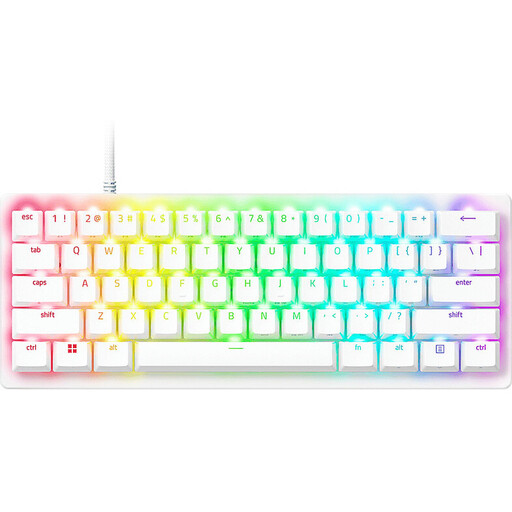
Razer Huntsman V3 Pro Mini 60 per cent, German QWERTZ layout, white

Razer Huntsman V3 Pro Mini 60%, QWERTZ, White

This model is an option if you’re looking for an especially compact format and a German QWERTZ layout; check whether the reduced key layout suits the way you work.

60% format; adjustable actuation distance of 0.1–4.0 mm; Rapid Trigger; PBT keycaps.

Joybuy

Inateck Bluetooth keyboard KB01003G with QWERTZ layout

Inateck Bluetooth Keyboard KB01003G, QWERTZ

A slim keyboard with multiple Bluetooth connections may suit a workspace where you want to switch between devices.

Bluetooth connection for up to three devices; QWERTZ layout.

Joybuy

Inateck foldable mini keyboard N0153BK with touchpad and QWERTZ layout

Inateck Foldable Mini Keyboard N0153BK, QWERTZ

The foldable design with integrated touchpad is one option for a cramped or mobile workspace; check compatibility with your device.

Foldable mini keyboard with touchpad; three Bluetooth channels; QWERTZ layout.

Joybuy

Wireless keyboard with LCD display, rotary dial and QWERTZ layout

Wireless Keyboard with LCD Display and Rotary Dial, QWERTZ

If you’re looking for a wireless keyboard for the office or home office, check that the connection options listed are compatible with your devices.

Four Bluetooth connections; 2.4 GHz and USB-C; 2000 mAh battery; backlighting.

Joybuy

Frequently asked questions

Does a keyboard automatically create nested headings?

No. Apply heading styles in your writing software: Google Docs offers Heading 1–6 styles, while headings formatted in this way appear in the Navigation pane in Word for Windows. Keyboard shortcuts can make this easier, but they don’t replace formatting.

Why doesn’t a Word heading appear in the Navigation pane?

First, check whether the text has a heading style applied. Microsoft Support also points out that headings in tables, text boxes, headers or footers don’t appear there; the instructions described apply to Word for Windows and aren’t the same for Mac or the web version.

What should I check before buying a wireless keyboard?

Check the connection requirements for the specific model. For setting up the Designer Compact Keyboard, Microsoft specifies Windows 10 or 11 and Bluetooth 4.0 or later; these requirements don’t automatically apply to other keyboards.

Is a manufacturer’s guarantee the same as your statutory rights?

No. For goods bought by consumers from business sellers in the EU, the official EU portal describes a legal guarantee of at least two years from receipt. A voluntary manufacturer’s guarantee is separate; check the seller and guarantee terms for the specific offer.

Can you put an old keyboard in household waste in Germany?

No. The German Environment Agency states that waste electrical and electronic equipment must be collected separately from household waste. Removable batteries must be disposed of separately.