A separate, slim Bluetooth keyboard is a good choice if there’s room for your phone or tablet alongside it on the available table; a keyboard case combines typing with a screen stand, but is designed for specific tablet models. Deutsche Bahn says tables are available at many ICE seats, but doesn’t explicitly say they’re available at every seat. So before you buy, check the space you’ll have for both devices, your exact device model, the keyboard layout and how the keyboard is powered.
Which keyboard is right for you?
Writers short on space
If you want to write a cover letter on the train, you’ll need to fit both your keyboard and screen on the available table. Deutsche Bahn says many ICE seats have fixed or folding tables, but doesn’t explicitly say they’re available at every seat.
Frequent typists using a tablet
If you’re editing longer documents, consider not just how much space the keyboard takes up in your bag, but also the usable typing area and how securely the screen can be positioned. With a keyboard case, the exact tablet model matters.
Writers using several devices
If you want to switch between, for example, a phone and a tablet, check that the keyboard supports both devices and that its switching method works with their connection options.
What should you look for when buying?
Separate Bluetooth keyboard
A good choice if: You want to use an existing phone or tablet with a separate keyboard, giving you more flexibility. Logitech describes the Keys-To-Go 2 as a keyboard for multiple operating systems.
Keep in mind: The keyboard doesn’t support the screen, so allow space for both devices.
Compact multi-device keyboard
A good choice if: A full-size keyboard layout and the ability to switch between devices matter more to you than having the smallest possible keyboard. CHERRY says the KW 9200 MINI has two Bluetooth channels.
Keep in mind: Wireless and wired use each require a compatible receiver or connection. You’ll also need somewhere else to position the screen.
Keyboard case for a specific device
A good choice if: You own the specifically supported tablet and want an integrated screen stand. Apple lists the German Magic Keyboard Folio for iPad (A16).
Keep in mind: The case is designed for the model listed; Apple says this version requires iPadOS 18.3 or later.
When you’re writing on the go, both the usable space and how well the keyboard suits your device matter. Deutsche Bahn says tables are available at many ICE seats, but doesn’t explicitly say they’re available at every seat.
| What you need |
What to check before buying |
Especially important if |
| Space for your keyboard and screen |
Compare the packed size and the space needed when set up with your device and the seat you expect to use. |
There’s limited space at my seat, so I need to be able to use my screen and keyboard together. Around 36% of shoppers are likely to prioritise space. |
| Typing feel and keyboard layout |
Check the layout of the specific German version and the key arrangement; try typing on it yourself if possible. |
When writing a longer cover letter, I want a familiar key arrangement so I can type and make corrections comfortably. Around 29% of shoppers are likely to prioritise typing feel. |
| Connection and device compatibility |
Check your exact device model and operating system against the manufacturer’s information; if using a wireless receiver, check which connection it needs. |
If I switch between my phone and tablet, the keyboard needs to work with both. Around 21% of shoppers are likely to prioritise compatibility. |
| Power on the go |
Check which batteries or charging cable the specific keyboard needs, and get it ready before your journey. |
Before setting off, I want to know how the keyboard is powered so it’s ready to use while I’m writing. Around 14% of shoppers are likely to prioritise power. |
Common buying mistakes
-
Focusing only on the keyboard’s packed size
A separate keyboard doesn’t solve the question of where to put your phone or tablet. Deutsche Bahn says tables are available at many ICE seats, but doesn’t explicitly say they’re available at every seat.
Plan for the space you’ll need for both the screen and keyboard. If you’re buying a case, also check that it’s compatible with your exact tablet model.
-
Assuming a similarly named keyboard case will fit
Model names can look alike even when a case is designed for a different tablet. Apple explicitly lists the German Magic Keyboard Folio reviewed for iPad (A16) and iPadOS 18.3 or later.
Check your iPad’s model name and operating system version against the specific version for sale.
-
Confusing battery-powered with rechargeable
Logitech says the Keys-To-Go 2 uses two CR2032 coin cell batteries; CHERRY says the KW 9200 MINI has a rechargeable battery.
Before your journey, check how your chosen keyboard is powered and whether you’ll need batteries or a compatible charging cable. Logitech also says you’ll need a T5 screwdriver to replace the Keys-To-Go 2 batteries.
A guide to relevant brands
The brands below are included as a guide to different types of keyboard. These details refer to the product ranges mentioned and don’t describe each brand’s entire range.
Logitech
Logitech describes the Keys-To-Go 2 as a separate, portable Bluetooth keyboard compatible with several operating systems.
- The integrated cover protects the keys, according to the manufacturer.
- The cover doesn’t support the screen. Logitech specifies two CR2032 coin cell batteries and a T5 screwdriver for battery replacement.
CHERRY
The KW 9200 MINI is described by the manufacturer as a compact, full-size multi-device keyboard.
- CHERRY lists two Bluetooth channels, wireless and wired operation, a rechargeable battery and a carry case.
- For wireless or wired use, the receiver or connection needs to be compatible with your device. This model isn’t listed as having a screen stand.
Apple
The German Magic Keyboard Folio combines a keyboard, trackpad and adjustable stand for the specifically listed iPad (A16).
- For this iPad, the integrated stand can replace a separate screen stand.
- This specific Folio version isn’t a universal keyboard and, according to Apple, requires iPadOS 18.3 or later.
Samsung
The Smart Keyboard Trio 500 is a separate keyboard for users with compatible mobile devices who want to switch between them.
- Samsung describes connections to up to three devices, with switching via F7, F8 or F9.
- Before buying, check the layout and compatibility of the specific version with your device.
Joybuy products for writing on the go
The following Joybuy products include foldable Bluetooth keyboards, compact multi-device keyboards and an iPad keyboard case. For your train journey, check that both the screen and keyboard will fit on the available table and that the specific version is compatible with your device.
 No image available
Inateck N0153BK Foldable Mini Keyboard with Touchpad, QWERTZ
If you’re looking for a foldable keyboard for switching between devices, this version may suit your needs; check that it supports your specific device.
The product name lists a touchpad, three Bluetooth channels, a QWERTZ layout and compatibility with iPadOS, Android and Windows.
View at Joybuy
 No image available
Inateck N0158BK Foldable Bluetooth 5.3 Keyboard and Mouse Set, QWERTZ
If you want to position your screen and keyboard together, the product name lists an adjustable stand included in the set.
The product details also list a foldable QWERTZ keyboard with a number pad, carry case and three Bluetooth channels, as well as compatibility with Windows, iOS and Android.
View at Joybuy
 No image available
NAXSIR Foldable Bluetooth Keyboard with Battery and Magnetic Stand
If you want to use a stand while writing on your phone or tablet, the product name lists a magnetic stand.
The product details list a foldable Bluetooth keyboard, a rechargeable battery and quiet keys; compatibility is listed for mobile phones and tablets.
View at Joybuy
 No image available
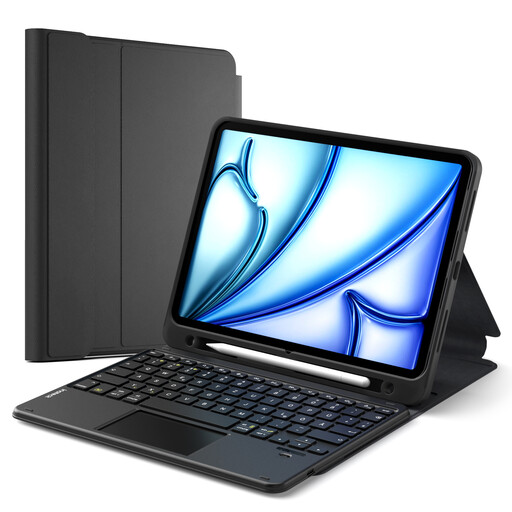
Inateck N0001 QWERTZ Keyboard Case for Listed iPad Models
If you’re planning to write for longer on a compatible iPad, this case with a detachable keyboard and touchpad may be suitable; check the model carefully.
The product details list support for iPad (A16/2025), iPad 10th Gen., iPad Air 11″ (M4/M3/M2), iPad Air 5/4 and iPad Pro 11, plus a pen holder.
View at Joybuy
 No image available
CHERRY KW 9200 MINI, UK English QWERTY layout
If you’re looking for a separate, compact Bluetooth keyboard, this version may suit you; bear in mind that it has an English layout.
The product name lists a rechargeable battery, CHERRY SX scissor mechanism and four connection channels. This version has a UK English QWERTY layout, not a German layout.
View at Joybuy
Frequently asked questions
Do I need space for my phone or tablet when using a separate keyboard?
Yes. Make sure you have somewhere practical to position your screen. Logitech describes the Keys-To-Go 2 as having a cover for the keyboard, but no screen stand. Deutsche Bahn says tables are available at many ICE seats, but doesn’t explicitly say they’re available at every seat.
How do I connect the Keys-To-Go 2 for the first time?
Logitech says to start by pulling the protective tab out of the battery compartment, then select ‘Keys-To-Go 2’ in the Bluetooth settings on your device. Check beforehand that your device is supported.
Do I need to charge the Keys-To-Go 2 while travelling?
No. Logitech says this model uses two replaceable CR2032 coin cell batteries rather than a charging port. Logitech specifies a T5 screwdriver for replacing them.
Is it safe to access job application documents over public train Wi-Fi?
Germany’s Federal Office for Information Security advises you to avoid accessing confidential data over unfamiliar Wi-Fi where possible and, if you have to, to use a VPN. This is security advice, not a legal requirement specific to keyboards.
What are my rights if I buy a keyboard online and want to return it or it’s faulty?
For a standard online purchase from a business based in the EU, Your Europe says you generally have 14 days from delivery to cancel; exceptions and possible return costs apply. This is separate from your legal rights if goods are faulty: Your Europe says you’re entitled to at least two years of coverage from receipt.


