
Lieferung heute & morgen

Qualitätsgarantie

Willkommens-Angebote freischalten: KOSTENLOSE Lieferung | Bis zu 80 % RABATT | Kostenlose 30-Tage-JoyPlus-Testphase
App herunterladen
A keyboard and mouse set may seem straightforward at first glance: unpack it, plug it in and get started. In practice, however, small details determine whether the combination is right for your workspace. The wrong layout, a missing connection or an impractical mouse can make everyday use unnecessarily difficult.
Three marketing traps in particular often lead to disappointing purchases:
For writing, spreadsheets and German software, a German QWERTZ layout is often the obvious choice. Check the product description and the image of the keys. The term “international” does not necessarily mean that it is a German keyboard.
Also check the operating system: Windows, macOS and ChromeOS may use different function keys or special key assignments. For a Mac or Chromebook, the stated compatibility should be listed explicitly.
A wired keyboard and mouse connect directly via USB. They normally do not require batteries and are suitable for permanent workstations, businesses or educational establishments. Important factors include the cable length, the number of available USB ports and the exact connector type.
A wireless keyboard and mouse set usually works via a 2.4 GHz USB receiver or Bluetooth. Check the range, receiver format and battery requirements. A shared receiver can save a port. With Bluetooth, the device must support the relevant connection.
A mechanical keyboard offers a clearly noticeable actuation point, depending on the switch type, and often produces an audible clicking sound. This can be useful for gaming or for users who prefer tactile feedback, but may be disruptive in an open-plan office. A quiet keyboard and mouse is often the more suitable choice in that environment.
When choosing a mouse, consider its shape, size, button layout and sensor. An ergonomic mouse should suit your hand size and preferred grip style. Extra buttons are only useful if you will actually use them in everyday life. For gaming, programmable buttons, adjustable DPI settings and low latency may be important. An RGB keyboard, on the other hand, mainly affects the lighting and appearance, not automatically the quality of input.
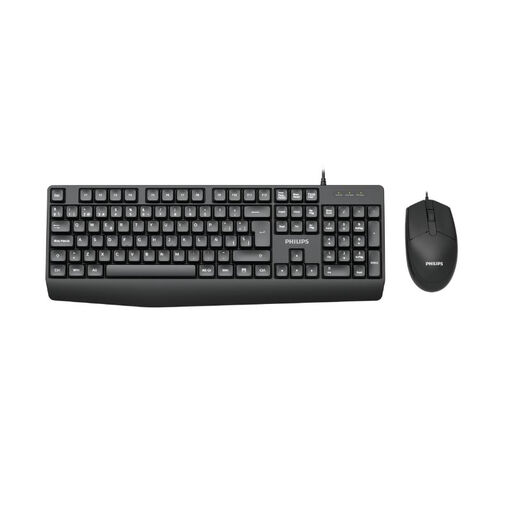
Why this product suits this profile: The wired USB keyboard and mouse combination is designed for basic tasks on a PC or laptop and avoids the need to change batteries.
The German version reduces the risk of choosing an unsuitable keyboard layout. The wired connection requires no wireless configuration.
German layout and a matching set for a simple basic setup.

Why this product suits this profile: The set combines a backlit keyboard with QWERTZ layout, Bluetooth and Logi-Bolt USB connectivity, plus a mouse with up to 8000 DPI.
The German layout is stated explicitly. Support for multiple devices and two connection methods provide alternatives for different work devices.
QWERTZ layout, USB-C charging, backlighting and support for up to three devices.
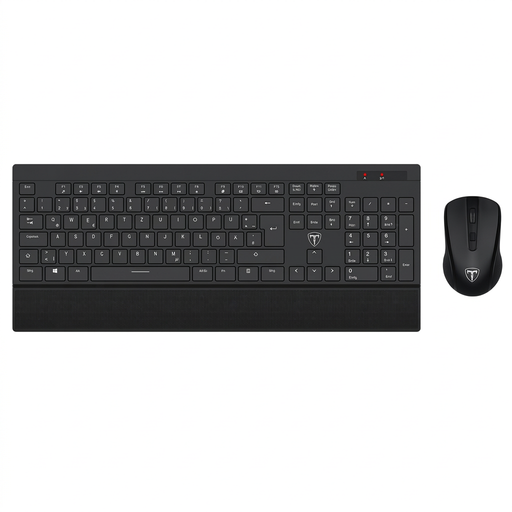
Why this product suits this profile: The wireless set includes a 105-key keyboard, a shared receiver and a stated range of up to 10 metres.
The DE-QWERTZ layout is clearly specified. The shared receiver saves a USB port compared with two separate wireless receivers.
Up to 1600 DPI, an ergonomically designed shape and stated battery life of up to 12 months.

Why this product suits this profile: As an addition to an existing keyboard, this mouse is aimed at gaming and e-sports users who need several buttons and adjustable DPI settings.
The six stated DPI settings from 800 to 6400 allow you to adapt the mouse to different games and screen resolutions without relying on a single setting.
Seven buttons, seven RGB lighting modes and plug-and-play USB connectivity.
We have put together a complete, regularly updated list of products that fully meet these strict selection criteria and the safety regulations applicable in the EU.
With a USB keyboard and mouse combination, you normally only need to plug in the cable or the supplied receiver. Many models work on a plug-and-play basis. With Bluetooth sets, the keyboard and mouse must first be paired in the settings of the device. For wireless models, also check the batteries and the on/off switch.
The service life depends on the key mechanism, switches, cables, mouse wheel, cleaning and daily use. With wireless models, the lifespan of the rechargeable battery or batteries is also relevant. A specific number of keystrokes or months is only meaningful if it is expressly stated by the manufacturer.
Yes, if your workspace is permanently set up and you do not need freedom of movement. A wired set has no ongoing battery costs and is ready to use without wireless pairing. For flexible workspaces or a tidy desk, a wireless keyboard and mouse set may be more practical. The key considerations are the connection, layout and the freedom of movement you require.