For long manuals, start by choosing a keyboard layout and connection that suit your workspace and how long you’ll be typing. For longer sessions, a split keyboard may be an alternative to the layout you’re used to. If your draft and reference images are on different devices, switching between devices and having the software features you actually need are key considerations. Microsoft Support explains that inserting images in Word is a document-software feature – a keyboard doesn’t do this for you.
Who are the different keyboards suited to?
Those who write manuals regularly
If you write longer chapters at a fixed workstation, a suitable keyboard layout and a sensible arrangement of your equipment are important factors to consider. The German Federal Institute for Occupational Safety and Health (BAuA) considers tablet keyboards, which have a less ergonomic design, better suited to short periods of work.
Writers who prioritise ergonomics
For long typing sessions, you may want to compare a split keyboard with a familiar standard layout. The position of your keyboard and other equipment on your desk matters too; however, you can’t infer any health benefits from this alone.
Editors working with image sources on multiple devices
If your draft and reference material are open on different devices, switching between them and having the right software features can affect your workflow. Whether you can set up particular shortcuts depends on the keyboard and the software you use.
What should you look for when buying?
First, check the keyboard layout and connection for writing longer texts. Then consider whether a split keyboard or switching between devices is genuinely necessary for your workflow.
| Priority |
What to check before buying |
Who is it important to? |
| Layout for long texts |
German QWERTZ layout, connection and whether you want a number pad |
When I’m writing longer chapters at a fixed workstation, I want a familiar layout and a suitable connection. Around 36% of consumers prioritise this combination when choosing a keyboard for writing manuals. |
| Hand position while typing |
Try a split layout if possible, and position the keyboard at your own workstation |
For long typing sessions, a different hand position matters to me. I’d want to consider a split keyboard in my own workspace first, as its layout is unfamiliar. Around 29% of consumers prioritise hand position when writing longer texts. |
| Reference images in your workflow |
Check which actions are available in your document software and factor in any additional software you may need |
When I’m inserting and checking images in document software, I mainly need a suitable workflow between the text and image view. Around 21% of consumers prioritise switching between writing and working with images. |
| Switching between devices |
Check the operating system, Bluetooth or an available receiver port, and the keyboard layout for each device |
If my draft and references are on different devices, I want to switch between them without constantly unplugging the keyboard. Around 14% of consumers make switching between devices their top priority. |
Which buying misconceptions should you avoid?
-
Assuming an ergonomic design guarantees relief from discomfort
A split keyboard changes the familiar layout and may take some getting used to. The position of the keyboard and other equipment is also important.
Choose a layout that suits the way you type and your workspace, rather than relying on a promise to prevent or treat discomfort.
-
Assuming the same model name always means a German layout
CHERRY lists different country-specific versions of the KC 6000 SLIM; the German version is listed as JK-1600DE-2.
Before ordering, check the full model variant and the key legends.
-
Confusing shortcut keys with ready-made image editing
Images are inserted using document software. On Logitech’s MX Keys S, Smart Actions are set up through Logi Options+; shortcut keys don’t replace these software features.
First, decide which steps you carry out in your document software. Then check whether extra keys can support those tasks.
Which brands are worth considering?
CHERRY
The KC 6000 SLIM is a slim, wired keyboard for a fixed Windows workstation; the KC 4500 ERGO has a differently shaped, also wired, keyboard layout.
- A German version of the KC 6000 SLIM with scissor keys is listed.
- The KC 6000 SLIM doesn’t support wireless switching. CHERRY describes the KC 4500 ERGO as being shaped to accommodate hand and finger movements; this doesn’t guarantee health benefits for every user.
Logitech
The MX Keys S is designed for workflows involving software features and multiple devices; the ERGO K860 offers a split keyboard as an alternative to the usual straight layout.
- Logitech lists device switching and Smart Actions through Logi Options+ for the MX Keys S.
- F.A.Z. Kaufkompass notes that the ERGO K860 has no backlighting or wired mode. A US product description doesn’t confirm the layout of a German version sold locally.
Perixx
The PERIBOARD-512 B is a wired split keyboard, available with a German QWERTZ layout.
- Perixx lists a number pad and an integrated rest.
- Perixx says the changed layout may take some getting used to. The manufacturer’s claims about preventing discomfort aren’t independently confirmed treatment effects.
Rapoo
The E9800M is designed for workflows involving multiple devices, letting you switch between connected devices.
- Rapoo lists Bluetooth, a 2.4 GHz receiver and scissor keys.
- The general product description doesn’t specify whether the particular version on offer has German key legends. Check the layout of the version you select.
Joybuy products for your workspace and switching between devices
The Joybuy options below include wired keyboards for longer texts, a split layout and wireless options for workflows involving multiple devices.
 No image available
CHERRY MX 2.0S, full-size, German QWERTZ layout, CHERRY MX2A Red switches, black
For writing longer texts at a fixed workstation, the full-size layout is worth considering if you’re looking for a mechanical keyboard with a wired connection.
Mechanical; CHERRY MX2A Red switches; German QWERTZ layout; RGB backlighting; black.
View at Joybuy
 No image available
Logitech K120, wired, full-size, German QWERTZ layout
For continuous typing at a fixed workstation, the wired full-size layout is a straightforward option, as long as the connection and layout suit your device.
USB Plug & Play; German QWERTZ layout; described as spill-resistant in the product name; curved space bar; listed for Windows.
View at Joybuy
 No image available
Logitech ERGO K860, QWERTZ
If you’re considering a split layout instead of a straight standard layout for longer typing sessions, bear in mind the changed key positions and the time you may need to get used to them.
Wireless; split keyboard; QWERTZ layout; Windows and Mac listed in the product name.
View at Joybuy
 No image available
Akko 3084B Plus, 75%, ISO-DE, Black & Gold
If you’re looking for a more compact keyboard for German text and multiple devices, the ISO-DE layout and listed connection options may suit your workspace.
75% layout; ISO-DE; Bluetooth, 2.4 GHz and USB-C; V3 Pro Cream Yellow switches; hot-swappable; RGB.
View at Joybuy
 No image available
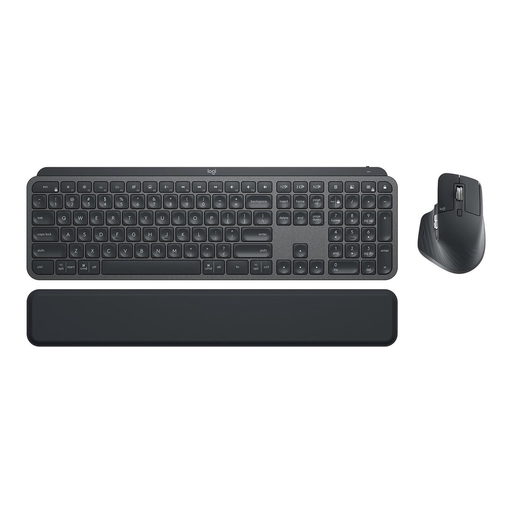
Logitech MX Keys Combo for Business Gen 2, German QWERTZ layout
If your draft and references are on multiple devices, the listed multi-device feature is relevant. Check beforehand which connections your devices support.
Keyboard and mouse set; German QWERTZ layout; Logi Bolt; backlit; multi-device; grey. Smart Actions need to be set up through Logi Options+.
View at Joybuy
Frequently asked questions
Do I need a special keyboard for reference images?
No, not necessarily. As Microsoft Support explains, you select images using the Insert feature in Word. Extra keys are only useful if they support the software you actually use.
What should I check about the connection and layout?
Check that the connection and key legends match your devices. CHERRY lists USB-A for the German KC 6000 SLIM; Rapoo lists Bluetooth and a 2.4 GHz receiver for the E9800M. Also check the exact layout variant before buying.
How should I plan for long periods of writing at my workstation?
Set up your keyboard and other equipment to suit the way you work. The BAuA publishes guidance on workstation design; ASR A6 sets out requirements within its scope and doesn’t apply universally to every private voluntary writing situation.
What are my rights when buying online in Germany as a private customer, if I want to return an item or it’s faulty?
As a general rule, consumers have a right to cancel a distance-selling contract, subject to statutory exceptions. The Verbraucherzentrale states that the cancellation period is usually 14 days from receipt of the goods. Your statutory rights against the seller if goods are faulty are separate from any voluntary guarantee; whether a purchase for an organisation counts as a consumer purchase depends on the buyer and the contract in question.


