What to look for when buying
First, measure the usable desk space, including room for your mouse and a wrist rest. Then check which keys you regularly need for unit testing, and whether the exact keyboard variant gives you direct access to them or requires key combinations.
| What matters |
What to check before buying |
Who it matters most to |
| Desk space and room for a mouse |
Compare the width and depth of the specific model with the space available. Allow room for your mouse and a wrist rest. |
If I need to fit a mouse and other work essentials beside my keyboard, I measure my desk space first. Around 36% of consumers prioritise the keyboard’s footprint. |
| Keys and key assignments |
Make a note of the shortcuts you use often, then check the arrow keys, function row and customisation options for the variant you’ve chosen. |
If I regularly use certain shortcuts when switching between my editor, test runner and terminal, easy access to them matters most. Around 29% of consumers prioritise key assignments and navigation. |
| Typing feel and noise |
Check the switch variant for the specific product and don’t treat manufacturers’ claims about noise levels as independent measurements. |
If I work at a shared desk, I want to choose a typing feel and noise level that suit my surroundings. Around 21% of consumers prioritise typing feel and noise. |
| Connectivity and switching between devices |
Check that the connections and supported connectivity options work with your devices. Confirm what’s included and how the exact variant charges. |
If I want to connect the keyboard to a particular work device or switch between devices, the connectivity needs to suit my setup. Around 14% of consumers prioritise connectivity and switching between devices. |
Joybuy product selection
The models below feature compact 65% or 75% layouts. For each variant, pay particular attention to the actual key assignments and whether its connectivity suits your workspace.
 No image available
CHERRY MX-LP 2.1 Wireless, 65%, white
This compact format may suit you if you’re looking for a smaller keyboard with several connectivity options.
65% layout; German QWERTZ according to the product title; Bluetooth, 2.4 GHz wireless and USB-C; MX Speed switches.
The product details also mention an English US layout with a euro symbol. Check the exact layout variant before buying.
View at Joybuy
 No image available
Ticktype EVO75, ISO-DE, Creamy Rye switches
The stated 75% layout and ISO-DE configuration may suit you if you’re looking for a compact mechanical keyboard with a German layout.
VIA-compatible; Bluetooth, 2.4 GHz wireless and USB-C; hot-swap listed in the product title.
Check that the switch variant and key assignments on offer suit the shortcuts you use regularly.
View at Joybuy
 No image available
Akko 3084B Plus, 75%, ISO-DE
The stated German layout and 75% format may be worth considering for a compact workspace.
Bluetooth, 2.4 GHz wireless and USB-C; hot-swap listed in the product details.
Before buying, check the specific switch variant and the keys that matter to you.
View at Joybuy
 No image available
AULA S75 Pro, 75%, Star Vektor switch
This 75% layout offers a compact alternative if the US QWERTY layout listed in the product title suits your needs.
Bluetooth, 2.4 GHz wireless and USB-C; TFT display and hot-swap listed in the product title.
The title specifies US QWERTY. Check the key legends if you need a German layout.
View at Joybuy
 No image available
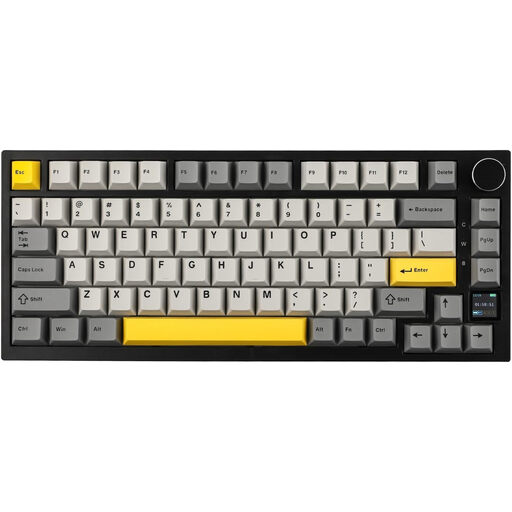
AJAZZ AK820 Pro, 75%, US QWERTY
The compact layout includes arrow and function keys. It may be a good fit if you want direct access to these during your workflow.
82 keys; Bluetooth, 2.4 GHz wireless and USB-C; hot-swap listed in the product details.
The product title specifies US QWERTY. Check the key assignments if you need a German layout.
View at Joybuy
Frequently asked questions
Which keys should I check before buying a keyboard for unit testing?
Make a note of the shortcuts you actually use in your editor, test runner and terminal. Then check the position of the arrow, function and modifier keys in an image of the layout variant on offer. QMK/VIA on the Keychron K3 Max lets you customise key assignments, but you should still check the default layout.
How should I set up a keyboard in a small space?
Don’t just measure the keyboard case: you also need to be able to position your mouse and other work essentials comfortably. The German Federal Institute for Occupational Safety and Health recommends leaving enough space for a flexible arrangement and for resting your hands and arms. A smaller keyboard alone doesn’t guarantee good posture.
Can I fit any low-profile switches in the Keychron K3 Max?
No. According to the product details, the K3 Max described here only works with compatible low-profile mechanical switches from Gateron or Keychron; low-profile optical switches aren’t supported. Check the exact keyboard variant before buying switches.
What are my rights if I buy online and need to return a product or report a fault?
According to the consumer advice centre, consumers who buy online generally have a 14-day right of withdrawal from the date the contract is concluded or the goods are received. You must notify the seller that you’re withdrawing from the contract. If a product is faulty, your statutory rights are against the seller and are separate from any voluntary guarantee. If you’re buying on behalf of an employer, don’t assume that consumer rights apply without checking.
Does ASR A6 specify a particular keyboard size for every home desk?
The ASR A6 from the German Federal Institute for Occupational Safety and Health covers workplaces and teleworking workstations, but excludes display screen equipment used in private settings outside such teleworking workstations. Whether the rule applies to your workspace therefore depends on how it is classified.


