
Lieferung heute & morgen

Qualitätsgarantie

Willkommens-Angebote freischalten: KOSTENLOSE Lieferung | Bis zu 80 % RABATT | Kostenlose 30-Tage-JoyPlus-Testphase
App herunterladen
An LCD writing tablet, often called a magic slate or electronic drawing pad, seems like the perfect gift for children: it encourages creativity, eliminates the mess of pens or paints, and serves as a handy travel toy for the car. However, the market is flooded with models of widely varying quality. Many products fail to live up to their advertising claims.
As a Joybuy Product Recommendation Officer, I see daily what features separate a good product from an unsuitable one. This guide will walk you through the three most common pitfalls when buying and what to look for to make an informed decision.
To avoid the problems mentioned above, you should carefully examine three technical aspects. These features are crucial for the safety, durability, and usability of a drawing pad for kids.
A high-quality drawing tablet for kids should be made from ABS plastic. This material is known for its impact resistance and durability. Look for product descriptions that explicitly state the material is free of BPA, lead, and formaldehyde. Compliance with EU regulations like REACH is another indicator of a safe product.
A critical safety feature is the screwed-in battery compartment. This simple precaution prevents toddlers from removing the coin-cell battery.
Drawing tablets are mainly available in two sizes: 8.5 inches and 10 inches.
Regardless of the size, rounded edges and a low weight are important so the child can hold the tablet comfortably.
A good electronic drawing pad focuses on the essentials. The two most important functions are:
Here are some models that, based on objective features, are suitable for different user profiles.
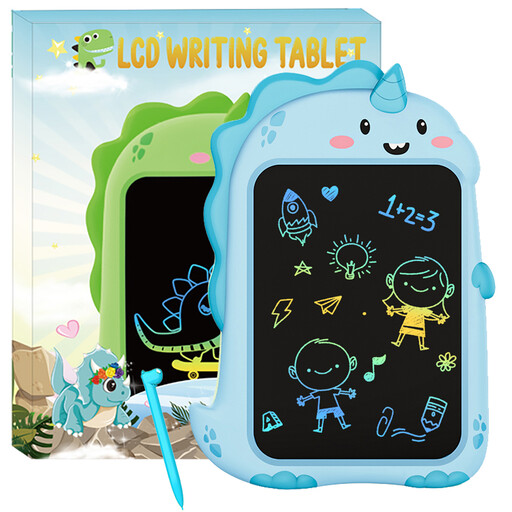
Why This Fits Their Persona: The compact 8.5-inch size and low weight of approx. 166g are ideal for small hands. The appealing dinosaur design motivates toddlers to draw, making it a perfect birthday gift for boys and girls.
The shock-resistant ABS plastic housing and rounded edges minimise the risk of breakage. According to the manufacturer, the battery compartment is securely screwed shut.
Very lightweight and portable, with simple one-button operation that is easy for children aged 3 and up to understand.
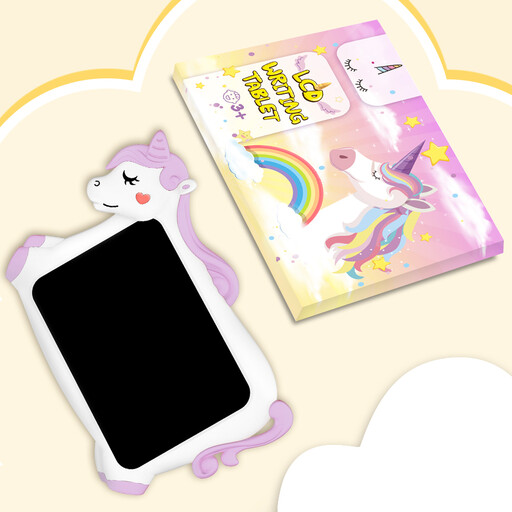
Why This Fits Their Persona: With its 10-inch screen, this model offers a large drawing area, yet remains highly portable at approx. 202g with a slim design. It's an ideal travel toy to keep children occupied on long car rides or at a restaurant.
The moisture-resistant and shockproof material is designed for mobile use. The large screen provides good contrast for clear visibility even in changing light conditions.
Large 10-inch surface for more creativity. The unicorn design makes it a popular birthday gift for girls.
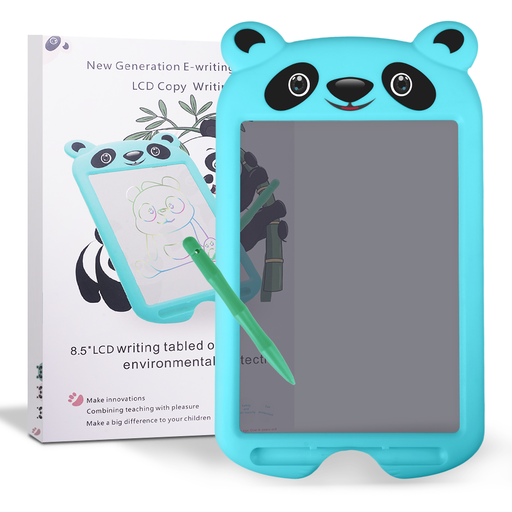
Why This Fits Their Persona: This model is specifically designed as a learning toy. The semi-transparent screen allows children to trace images or letters placed underneath (tracing function). This specifically promotes fine motor skills and hand-eye coordination.
It avoids the "dim display" trap by being optimised for a specific, high-contrast use case (tracing templates). The construction is designed for use as a reusable notebook for exercises.
The tracing function offers a clear educational benefit over conventional drawing pads. The 10-inch screen provides ample space for A5-sized templates.
We have compiled a complete, up-to-date list of products that fully meet these strict selection criteria and German safety regulations.
Most drawing tablets use a standard coin-cell battery (often CR2025), which is sufficient for thousands of erase cycles and can last for many months with normal use. The battery is replaceable. On child-safe models, you will need a small screwdriver to open the battery compartment.
Yes, provided you choose a model that is explicitly designated for this age group. It is essential to look for a screwed-in battery compartment to prevent access to the coin-cell battery. Models made from non-toxic, BPA-free ABS plastic with rounded edges are suitable for children aged 3 and up. Products with small parts often carry a warning and are not recommended for children under 3.
This is a very common issue that usually has a simple solution. Check the lock switch (lock function) on the back of the device. If it is activated, the screen cannot be erased. Slide the switch to the "unlock" position, and the erase button should work again. If the problem persists, the battery may be dead.