Joybuy Insights

2026 Buyer's Guide to Kids' Tablets: A Technical Feature Analysis

Selecting the right toy for a child requires balancing entertainment value, educational benefits, and safety. Kids' tablets, designed as electronic toys, present an alternative to conventional tablets with internet access. These devices focus on age-appropriate learning content and interactive features, without the complexity and risks of a full-featured mobile device. The range extends from simple baby tablets for early sensory development to multifunctional learning tablets for kids at the preschool level.

What to Look for When Choosing a Kids' Tablet

The decision for a specific model should be based on objective criteria. The following technical and material aspects are relevant for making an informed choice.

Materials and Safety According to EU Standards

The material composition is a primary safety feature. Many manufacturers use Acrylonitrile Butadiene Styrene (ABS), a robust and impact-resistant plastic. Look for labels like "BPA-free," which confirm that no harmful plasticisers are included. The CE mark is mandatory and certifies that the product complies with the applicable requirements of the European Union. For devices with small parts or battery compartments, it is crucial to observe the manufacturer's specific warnings, especially regarding choking hazards.

Age-Appropriate Design and Educational Approach

The functionality of a kids' tablet should be tailored to the cognitive and motor skills of the respective age group.

  • For Infants and Toddlers (approx. 6–36 months): Models for this age group, often called baby tablets, focus on auditory and visual stimulation. Large, easy-to-press buttons, simple sounds (animal noises, melodies), and high-contrast colours promote hand-eye coordination and the understanding of cause and effect.
  • For Children Ages 3 and Up: A kids' tablet for ages 3 and up often offers more complex content. This includes drawing tablets for kids with LCD technology that allow for drawing without paper and pens, or a screen-free learning tablet that works with physical cards to teach letters, numbers, and logical concepts.

Technical Specifications

The technical data provide insight into the device's durability and user-friendliness. This includes the power source (disposable batteries vs. a rechargeable battery), as well as the dimensions and weight, which are crucial for easy handling by children's hands. For devices with sound output, adjustable volume is a useful feature to adapt the sound level to the environment.


Our Top Picks for 2026

Based on the criteria mentioned, we present a selection of products that cover different use cases and age groups.
1. Chicco Animal Tablet

Chicco Animal Tablet

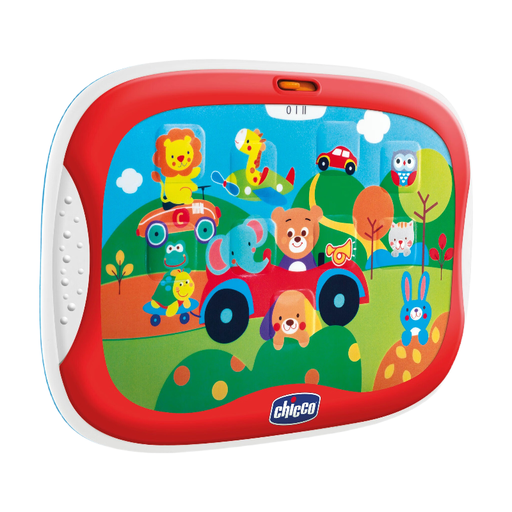
  • Why we recommend it: This toy tablet is designed for early auditory and motor skill development. With nine large buttons and a lightweight body, it is tailored to the abilities of toddlers from 6 months.
  • Advantages:
    • Interactive Learning Content: Promotes auditory perception through animal sounds, vehicle noises, and melodies.
    • Promotes Motor Skills: The slim and lightweight design (0.2 kg) is easy for small hands to grip and hold.
    • Adjustable Volume: Two volume levels allow for adaptation to the surroundings.
    • Safe Materials: Made from ABS plastic, and according to the manufacturer, is BPA-free, lead-free, and CE-certified.
  • Best for: Toddlers aged 6 to 36 months who are ready for their first interactive toy to stimulate hearing and touch.

2. CHEERFUN 10" LCD Writing Tablet, Puppy Design

CHEERFUN 10" LCD Writing Tablet

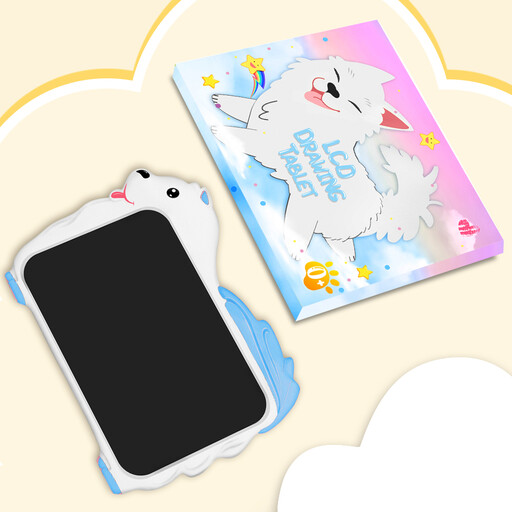
  • Why we recommend it: This drawing tablet for kids offers a large, reusable drawing surface without screen backlighting. It serves as a clean and resource-saving alternative to paper and makes a practical gift for kids.
  • Advantages:
    • Large Drawing Surface: The 10-inch LCD screen provides ample space for creative expression.
    • Easy to Use: Content can be instantly erased with the press of a button.
    • Safety Compliance: According to the manufacturer, the housing is made of eco-friendly ABS plastic and complies with the EU REACH regulation.
    • Lightweight and Portable: Weighing only 0.165 kg and featuring rounded edges, it is designed for transport and use by children.
  • Best for: Children aged 3 to 8 who enjoy drawing and writing. It is suitable as a creative tool for home and on the go. Warning: Contains a button cell battery and small parts, therefore not suitable for children under 3 years and should only be used under adult supervision.

3. alilo Kids Learning Tablet

alilo Kids Learning Tablet

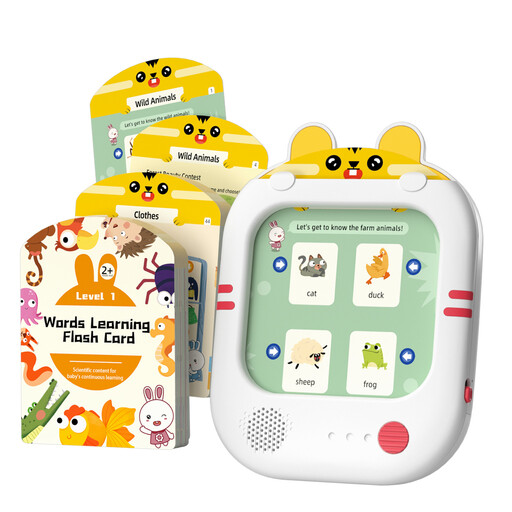
  • Why we recommend it: This screen-free learning tablet combines physical learning cards with interactive audio technology. It promotes structured learning in language and logic without exposing the child to a digital screen.
  • Advantages:
    • Screen-Free Design: Reduces screen time and encourages focus on the learning content.
    • Comprehensive Learning Material: 47 double-sided cards cover over 180 words and more than 180 logic games.
    • Interactive Audio Feedback: A pen reads words and images on the cards aloud, supporting independent learning.
    • Rechargeable and Portable: The integrated battery offers up to 6 hours of use, according to the manufacturer, and is charged via USB-C.
  • Best for: Toddlers aged 3 to 5 for the targeted development of vocabulary, language comprehension, and logical thinking. Warning: Contains small parts and is therefore not suitable for children under 3 years.

Discover More Options

The products presented here are a curated selection. For a more comprehensive overview of different models and designs, you can browse our entire range of toddler tablets.

Frequently Asked Questions (FAQ)

1. From what age is a kids' tablet useful? The benefit of a kids' tablet heavily depends on the specific model. Simple devices for sensory stimulation are suitable for children as young as 6 months. More complex learning tablets that teach letters or logic games are generally designed for children aged 3 and up. The manufacturer's age recommendation provides a reliable guide.

2. What is the difference between a learning tablet and a regular tablet? A learning tablet is a toy with a closed system and predefined content. It does not offer access to the internet or app stores. The focus is on educationally designed games and learning functions. A regular tablet is a multifunctional media device with an open operating system, internet access, and unlimited applications, which requires constant supervision.

3. Are screen-free learning tablets a good alternative? A screen-free learning tablet provides a focused learning environment that minimises distractions. Such devices often use physical cards or buttons in combination with audio feedback. They are particularly suitable for reducing screen time and promoting tactile and auditory learning methods.


About the Author: Joybuy Product Recommendation Officer