
Lieferung heute & morgen

Qualitätsgarantie

Willkommens-Angebote freischalten: KOSTENLOSE Lieferung | Bis zu 80 % RABATT | Kostenlose 30-Tage-JoyPlus-Testphase
App herunterladen
If you’re looking to upgrade a gaming PC with DDR5, you may have your eye on the Kingston FURY Beast RGB DDR5 32GB 6000MT/s CL30. With 32 GB across two modules, a 6000 MT/s data rate, low latency and RGB lighting, it’s a good fit for many current desktop systems. However, even memory that seems like a perfect match can lead to a costly mistake if you haven’t checked platform compatibility, profile support or module height.
This buying guide from the Joybuy Product Recommendation Officer explains which specifications really matter and which 32 GB DDR5 RAM kits are suited to different types of user.
Although desktop DDR4 and DDR5 DIMMs both have 288 pins, they aren’t compatible with each other. The notch is in a different position, and their electrical characteristics and memory controllers also differ. So a DDR5 kit won’t work in a motherboard that only supports DDR4.
Before buying, check your motherboard’s model number. Look for the manufacturer’s specifications on DDR5 SDRAM, supported memory speeds and maximum total capacity.
According to the product specifications, the Kingston FURY Beast RGB DDR5 32GB 6000MT/s CL30 has a standard SPD speed of 4800 MT/s at 1.1 V and CL40-40-40. Its advertised 6000 MT/s speed is achieved using a pre-configured profile.
To use it, you’ll need to enable the relevant profile in the UEFI or BIOS:
Without this setting, the memory may start at a lower default speed. This isn’t a fault; it’s the expected behaviour of a DDR5 overclocking profile.
RGB memory doesn’t need an additional power supply, as the modules draw power through the DIMM slot. You can control the lighting with Kingston FURY CTRL or your motherboard manufacturer’s RGB software. According to the product description, supported options include ASUS Aura Sync, MSI Mystic Light, Gigabyte RGB Fusion 2.0 and ASRock Polychrome.
The Kingston kit is 42.23 mm high. Bear this in mind if you’re fitting it beneath a large CPU air cooler. The position of the fan can also make a difference.
A dual-channel DDR5 kit with 2 × 16 GB provides 32 GB in total. The two identical modules are usually installed in the motherboard’s recommended slots, A2 and B2. This allows the memory controller to use dual-channel mode.
A single 32 GB module isn’t necessarily equivalent if your platform is designed for a parallel configuration. For gaming and demanding multitasking, 2 × 16 GB of DDR5 memory is therefore a sensible choice.
6000 MT/s describes the effective data transfer rate. CL30 refers to the CAS latency for the selected profile. Always consider this figure alongside the full timings. For the Kingston FURY Beast RGB DDR5 32GB kit, these are CL30-36-36.
A low CL number alone doesn’t automatically make a kit suitable for every system. The motherboard, processor, BIOS version and memory profile all need to work together. If stability is your priority, check the motherboard manufacturer’s validated QVL list first.
According to the product specifications, the Kingston kit runs at 1.35 V, or up to 1.4 V with the EXPO/XMP profile. DDR5 also features on-die ECC. This internal error correction isn’t the same as an ECC server module and doesn’t replace a professional ECC platform.
Before installing the modules, switch off your PC and disconnect it from the mains. Handle the modules only by their edges, and avoid touching the gold contacts or components.
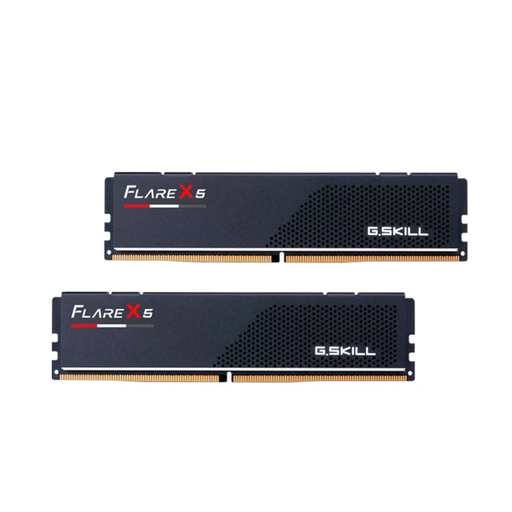
Why this product suits this profile: This kit offers 32 GB, DDR5 at 6000 MT/s and CL30 in a straightforward, non-RGB design. It’s aimed at users who are happy to go without RGB and prioritise the technical specifications.
The capacity, speed, timings and profile support are clearly listed. At 33 mm high, the modules are easier to accommodate beneath large CPU coolers.
32 GB in a dual-channel kit, CL30-38-38 timings, and support for AMD EXPO and Intel XMP 2.0.
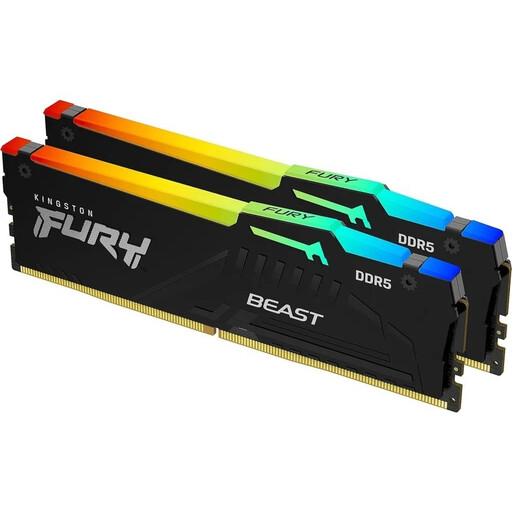
Why this product suits this profile: This kit combines 32 GB with RGB lighting, CL30-36-36 timings, and support for AMD EXPO and Intel XMP 3.0. It’s a good match for gaming PCs where performance and customisable lighting go hand in hand.
The standard SPD specifications and profile values are listed separately. This makes it clear why you need to enable the profile in the BIOS to reach 6000 MT/s.
RGB synchronisation, 2 × 16 GB, on-die ECC, and profiles for AMD EXPO and Intel XMP 3.0.
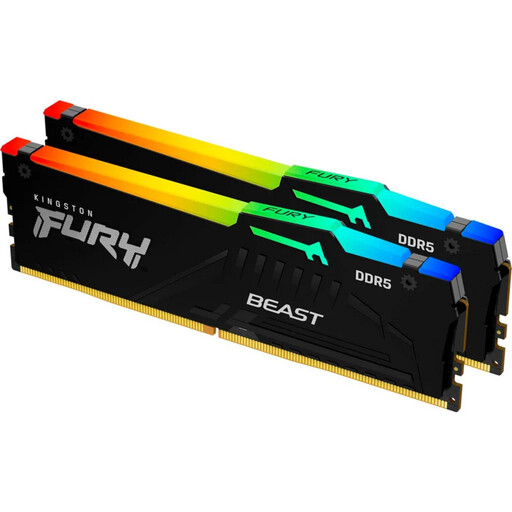
Why this product suits this profile: 64 GB is ideal for users who regularly work on large projects, virtual machines or memory-intensive applications alongside gaming.
The capacity is clearly shown as 2 × 32 GB, so it won’t be mistaken for a single module. Check your motherboard’s maximum memory capacity before buying.
64 GB total capacity, 6000 MT/s, CL30-36-36 timings and RGB support, with the same module height of 42.23 mm.
We’ve put together a complete, regularly updated list of products that meet these strict selection criteria and fully comply with the safety regulations applicable in the EU.
After installation, start your PC with the default settings. Once the memory has been detected, you can enable the relevant AMD EXPO RAM or Intel XMP 3.0 RAM profile. Updating to the latest BIOS may improve memory compatibility, but follow your motherboard manufacturer’s instructions when doing so.
If you experience instability, try these steps:
According to the product specifications, the kit supports AMD EXPO and Intel XMP 3.0. You’ll need a compatible DDR5 motherboard and a processor whose memory controller supports your chosen configuration.
Yes. The standard SPD speed is 4800 MT/s. To reach 6000 MT/s, you’ll need to enable the relevant EXPO or XMP profile in the BIOS. The exact name may vary between motherboard manufacturers.
Lifespan depends on temperature, voltage, operating environment and platform. According to the specifications, this product is designed to operate at temperatures from 0 °C to 85 °C. A well-ventilated case and operation within the specified profile values help ensure reliable long-term use.