Bakers with limited worktop space
If there’s little room beside your mixing bowl, attaching your timer can keep it off the worktop. TFA Dostmann lists a magnet, stand and hanging loop for the 38.2025; the Tescoma PRESTO has a magnet.


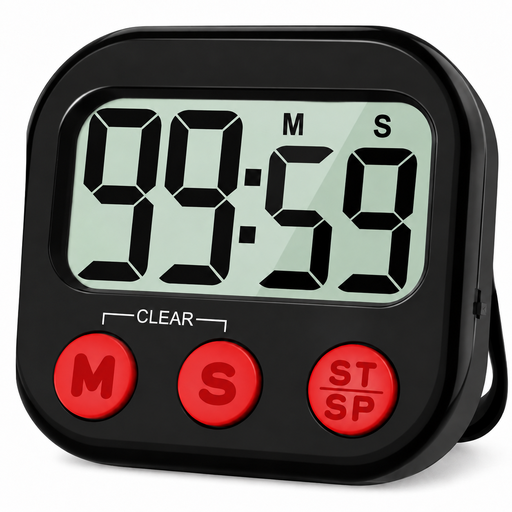
When worktop space is limited, a timer you can attach is a practical choice, as long as the display is easy to see where you place it. For individual stages of up to 99 mins 59 secs, Tescoma lists this timing range for the PRESTO; according to the manufacturer, the TFA Dostmann 38.2025 has two displays and a range of up to 99 hrs 59 mins 59 secs. The countdown reminds you to check on your dough, but it can’t tell you when it’s ready: King Arthur Baking points out that proving time depends on the dough and its surroundings.
If there’s little room beside your mixing bowl, attaching your timer can keep it off the worktop. TFA Dostmann lists a magnet, stand and hanging loop for the 38.2025; the Tescoma PRESTO has a magnet.
If you want to time longer stages or keep track of two processes at once, compare the timing range and display of each model. According to the manufacturer, the TFA Dostmann 38.2025 has two displays and counts up to 99 hrs 59 mins 59 secs; the Tescoma PRESTO counts up to 99 mins 59 secs.
If an audible alarm could be disruptive, a visual alert may be a better option, provided you can see it from where you’re working. TFA Dostmann lists a silent mode with an LED warning light for the 38.2051.02.
First, decide where you can place or hang your timer. Then check that its countdown is long enough for your recipe, and choose an alert you’ll notice where you plan to use it.
The percentages below relate to consumers choosing a timer for this dough-proving situation, and show their main reason for buying.
| What matters | What to check before buying | Who it matters most to |
|---|---|---|
| Attachment without taking up worktop space | Check that there’s a suitable magnetic surface where you plan to place it, and that you can see the display; alternatively, look for a hanging loop or stand. | When there’s hardly any room beside the bowl, I want to attach my timer and be able to see the display from where I’m working. Around 26% of consumers prioritise a timer that can be attached without taking up worktop space. |
| The right countdown length | Compare the maximum countdown with your recipe; the Tescoma PRESTO is listed for up to 99 mins 59 secs. | For a longer proving stage, I want a countdown that lasts the whole time without having to reset it part-way through. Around 26% of consumers prioritise a timer that covers the planned stage. |
| An alert you’ll notice | Check the alert type and how visible it is where you’ll use the timer; a silent LED alert needs to be within your line of sight. | In a quiet home kitchen, I want to know when the time is up without a loud alarm disturbing anyone else. Around 21% of consumers prioritise choosing the right type of alert. |
| Timing two processes at once | Check whether the timer can show two countdowns at once; a stopwatch on its own won’t do the same job. | If I have another task to time while the dough is proving, I want to keep track of both finish times separately. Around 16% of consumers prioritise timing multiple processes at once. |
| Batteries and ease of use | Check the battery type and what’s included; consider how easy the timer is to set and start. | I want to use my timer straight away and know which batteries I need in advance. Around 11% of consumers prioritise easy operation and included batteries. |
The Tescoma PRESTO’s listed range ends at 99 mins 59 secs, so it can’t time a longer stage in a single countdown. TFA Dostmann lists a range of up to 99 hrs 59 mins 59 secs for the 38.2025.
Compare the maximum countdown with the longest stage you want to time in one go.
A magnet only saves worktop space if there’s a suitable surface where you want to place the timer and you can see its display there.
Check the exact spot where you plan to attach it. If there isn’t a suitable surface, a model with a hanging loop or a timer with space set aside on the worktop may suit you better.
What’s included varies by model, so you may need to buy batteries before using your timer for the first time.
Check the battery type for your chosen model and whether batteries are included.
The digital timers covered here offer longer or simultaneous countdowns, along with different ways to attach them and alert options.
PRESTO and ACCURA are digital timers with magnetic attachments; their listed specifications differ in countdown length and features.
The digital Attimo combines a countdown timer and stopwatch with a touch display and several ways to stand or attach it.
KLOCKIS combines a timer with other displays and is a compact freestanding option for kitchens without a suitable magnetic surface.
This product recommendation is for individual dough-proving stages that fit within the listed countdown range.
 No image available
For a single proving stage that fits within the listed countdown range.
Countdown up to 99 mins 59 secs; stopwatch; adjustable alarm volume.
No. Use the countdown as a reminder to check, then assess the dough in the context of your recipe. King Arthur Baking points out that proving time depends on the dough and its surroundings.
Attach it to a suitable magnetic surface where you can see the display while you work. If there’s no suitable surface, look for a hanging loop or stand; TFA Dostmann lists all three options for the 38.2025.
It depends on the model. The TFA Dostmann 38.2025 needs two AAA batteries, which are not included; Tescoma says the PRESTO comes with an AAA battery. Check what’s included with your chosen timer.
Take the electrical device to a suitable take-back point or local authority collection point, separately from household waste. The German Environment Agency recommends disposing of used batteries in collection boxes at shops or at local authority collection points, not in household waste. Remove the batteries before handing in the device if you can do so easily.