Who is this setup for?

Building a counting device

If you want to count rows using your own keys and read the total directly on the device, a macropad with a display is a better fit than a standard PC keyboard. According to Adafruit, the MacroPad RP2040 has twelve keys, an OLED display and a rotary encoder.

Developing an offline project

If you want to work without an internet connection, save the instructions, code and any required libraries locally in advance. Adafruit provides project files with code and libraries; according to QMK Firmware, the QMK Configurator is an online tool.

Developing at your desk

If you mainly write longer texts and code on your computer, a full-size DE-ISO keyboard may be a better choice. A separate number pad serves a different purpose and requires you to have a main keyboard already.

What should you look for?

What you need What to check before buying Who is it especially relevant to?
Counting steps and display Check the keys, display and power supply; test for yourself whether the count is retained after a power interruption. If you want to enter rows directly on the device and read the count there, the display needs to suit your setup. Around 36% of consumers prioritise a counting device with its own display.
Offline documentation Save the relevant instructions, firmware, libraries, examples and, if needed, the local development environment in advance. If you want to work on your project without an internet connection, you’ll need the right files stored locally already. Around 29% of consumers prioritise project materials that can be used offline.
Writing and coding on a PC Check the DE-ISO layout for the specific model and whether you also need separate counting keys. If you write longer project notes and code on your computer, a full-size keyboard is a different choice from a small macropad. Around 21% of consumers prioritise a full-size developer keyboard.
What’s included and assembly Check whether switches and keycaps are included, and what else you’ll need to complete the build. If you want to keep extra parts and assembly steps to a minimum, it’s important to check exactly what’s included. Around 14% of consumers prioritise keeping parts and assembly to a manageable level.

Common pitfalls

  • Assuming “programmable” means it’s a ready-made row counter

    Documented keys and programming options don’t prove that a counter function is already built in. You’ll need to implement the display and storage for your particular setup.

    Decide where the count should be displayed and stored, then test whether it’s still available after a restart.

    Allow time to programme the counter and test the display and data storage.

  • Mistaking an online configuration interface for offline documentation

    The QMK Configurator is an online tool. For a CircuitPython project, you’ll need to copy the required libraries onto the device.

    Save the instructions, tools, examples and the right library versions before working offline.

    Gathering and checking the files you’ll need locally takes time to prepare.

  • Comparing barebones and fully assembled kits by product name alone

    Pimoroni distinguishes between fully assembled kits and barebones versions that don’t include switches or keycaps.

    Compare what’s included in each version and check which parts you still need for your build.

    With a barebones model, you may need to buy switches and keycaps separately.

Brands to consider

Adafruit

The MacroPad RP2040 is a documented hardware platform for building your own programmed counter, with keys, an OLED display and a rotary encoder.

  • The manufacturer’s guide covers inputs, CircuitPython libraries and HID output.
  • The guide is a starting point for development, not proof that the device works as a ready-to-use knitting row counter. The programme and storage logic are still part of the project.

Pimoroni

The Keybow 2040 is a compact, customisable keypad with 16 keys.

  • The manufacturer says it supports USB-C programming and hot-swapping.
  • The product specifications reviewed do not list a counter display. The barebones version doesn’t include switches or keycaps.

Keychron

The V6 Max is a full-size keyboard available in a DE-ISO version; the Q0 Max is a separate, customisable number pad.

  • The manufacturer’s pages list customisation options for both models.
  • Neither a full-size keyboard nor a number pad is automatically a standalone row counter.

Joybuy products for desk-based development

This selection includes full-size keyboards and a keyboard kit for coding, project notes and custom key layouts on your computer. These devices don’t replace a counter programme you’ll need to develop yourself, and a keyboard alone isn’t a ready-made row counter.

Akko 3084B Plus Tri-Mode, 75% ISO-DE, Black & Gold

Akko 3084B Plus Tri-Mode, 75% ISO-DE

For coding and project notes at your computer, if you’re looking for a compact ISO-DE layout; the macro function is no substitute for counter logic you programme yourself.

75% layout; Tri-Mode; USB-C; Hot-Swappable; V3 Pro Cream Blue Switch.

View at Joybuy

Akko 5087S V1 TKL, wired, ISO-DE QWERTZ

Akko 5087S V1 TKL, ISO-DE QWERTZ

For writing and coding at your desk, if you prefer a wired TKL keyboard with a German layout. The macros mentioned don’t provide row-counter logic.

Wired; ISO-DE QWERTZ; Hot-Swap; Akko V3 Pro Cream Yellow Switches.

View at Joybuy

Ticktype EVO75, Tri-Mode, ISO-DE, VIA Compatible

Ticktype EVO75, Tri-Mode, ISO-DE

For project notes and custom key layouts on your computer; the macro functions listed don’t take care of developing the counter logic for you.

75%; Tri-Mode; Hot-Swappable; VIA Compatible; 8000mAh; Creamy Rye Switches.

View at Joybuy
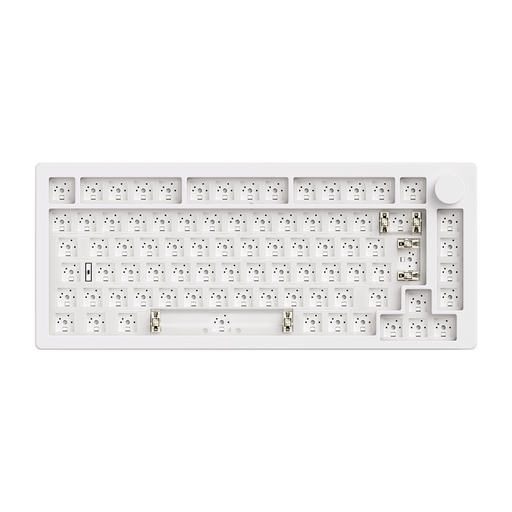
Akko x MonsGeek M1 V5 VIA Barebone DIY Kit, 75%, White

Akko x MonsGeek M1 V5 VIA Barebone DIY Kit, 75%

For building your own keyboard with a programmable rotary knob. This barebones version is supplied without switches or keycaps; you’ll need to buy both separately to complete the keyboard.

75%; Wireless; ISO Layout; VIA; RGB Hot-Swap.

View at Joybuy

Frequently asked questions

Is a programmable keyboard alone enough for a row counter?

No. Assigning functions to keys doesn’t give you counter logic. If you want the count to be visible on the device and available again after switching it off, you’ll need to implement and test the display, programme and data storage for your particular setup.

How do I prepare the project for working offline?

Save the instructions, code examples, firmware and libraries for your model locally in advance. Adafruit describes downloadable project packages with libraries matched to specific versions; QMK Firmware lists documentation files in its source repository, while the QMK Configurator is an online tool.

What should I check about assembly and what’s included?

First, check which parts are included in the specific version. Adafruit describes how to insert switches into hot-swap sockets; Pimoroni distinguishes between fully assembled kits and barebones versions without switches or keycaps. Make sure the switch contacts are aligned correctly when inserting them.

What should I know about costs and returns?

If switches and keycaps aren’t included, you may need to buy them separately. For online purchases in Germany, consumers generally have a 14-day right to cancel; the statutory guarantee is separate from a manufacturer’s voluntary warranty. Verbraucherzentrale explains the difference.

What should I look for in an electrical or wireless device for use in Germany?

Within its remit, the German Federal Network Agency checks matters including CE marking, manufacturer details, German-language instructions and safety warnings, and declarations of conformity. For radio equipment, it also checks requirements under the Radio Equipment Act. This general information from the authority does not confirm that any individual product mentioned here complies with these requirements.