
Lieferung heute & morgen

Qualitätsgarantie

Willkommens-Angebote freischalten: KOSTENLOSE Lieferung | Bis zu 80 % RABATT | Kostenlose 30-Tage-JoyPlus-Testphase
App herunterladen
An L-shaped gaming desk with LED lighting and power sockets can bring several functions together in one corner: a gaming PC, monitors, chargers, paperwork and accessories can all fit on a relatively small footprint. However, not every model is suitable for every room or use. The key factors are not just RGB lighting and product photos, but above all the dimensions, connectivity, stability and position of the shelves.
With a corner desk, it’s not just the width and height that matter. You also need to consider the depth of both sections, the distance from the wall and the space needed for your office chair. A model that’s around 130 cm wide can still take up a lot of floor space in a small room if its second section extends far into the room.
Before buying, make sure you:
A reversible corner desk offers more flexibility if your room layout changes. However, the term ‘reversible’ should actually refer to the assembly position of the shelves, drawers or side sections.
A gaming desk with RGB lighting adds a striking splash of light, but it isn’t a substitute for suitable task lighting. Check where the LED strip is fitted, how it’s controlled and whether the power supply and cables can be kept tidy.
Key things to check include:
The number of lighting modes says little about the quality of the desktop or frame. RGB lighting should therefore be treated as an extra feature, not a deciding factor.
A desk with USB ports and built-in power sockets can help keep cables short. However, the integrated power supply isn’t automatically suitable for high-powered devices. The descriptions of the models featured here warn against using high-load appliances such as fan heaters or microwaves.
So make sure you:
Many desks have a standard working height of around 70 to 75 cm. The right height depends on your height, chair height and monitor position. An adjustable monitor shelf can raise the screen, but it won’t replace an ergonomic sitting position.
For gaming and working from home, you should also check the usable depth. 50 cm may be enough for a laptop or a single monitor. With two monitors, a keyboard and speakers, more space is usually more practical.
A L-shaped computer desk is often made with engineered wood panels, a metal frame or a combination of the two. In the product descriptions featured here, a carbon-fibre effect refers to a textured surface finish and doesn’t necessarily mean the desk is made from carbon fibre.
Check the:
A corner desk with shelving makes use of the room’s height. Even so, it’s best to keep heavy equipment on the main desktop rather than at the outer edges or on lightweight shelves.
Drawers are useful for documents, cables and smaller items. Open shelves keep books, controllers and consoles within easy reach, but need regular tidying. For a desk with drawers, check that the load capacity of each drawer is stated. The fabric drawers on the Rolanstar models are each listed as holding up to 3.6 kg.
For school pupils, students and people working from home, a space-saving desk with vertical storage may be more useful than an especially deep desktop. Gamers with several monitors, on the other hand, should plan the available space and cable routing first.
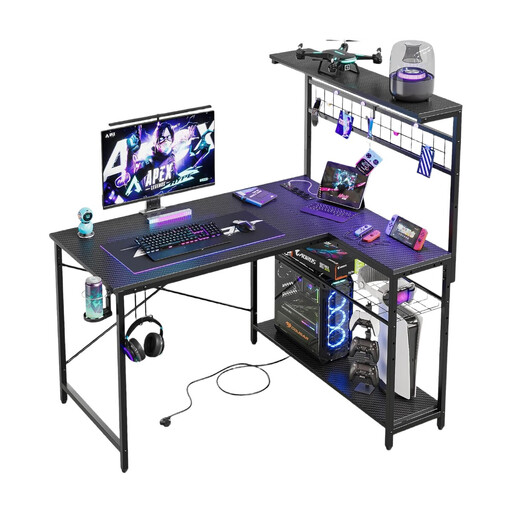
Why this product suits this profile: This compact model measures 80 cm deep, 106,6 cm wide and 134,2 cm high. Its L-shaped design includes four open shelves, making it suitable for gaming, studying or a small home office.
The product description gives specific dimensions, confirms reversible assembly and lists 3 power sockets and 2 USB ports. This makes it easier to check the desk’s footprint and connectivity before you buy.
Four shelves, a headphone hook, a cup holder and RGB lighting with 7 colours and 22 modes.
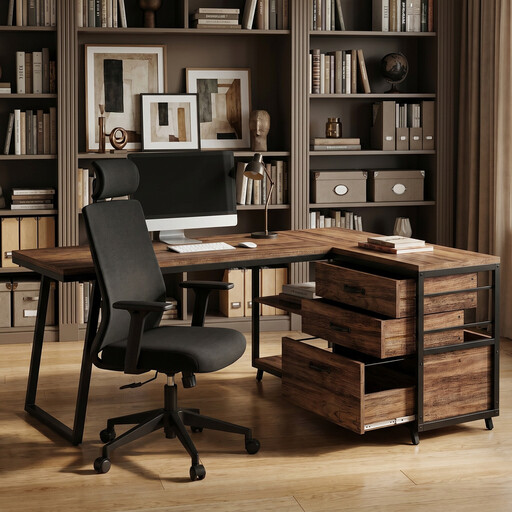
Why this product suits this profile: This model combines a metal frame with engineered wood and provides a work surface of around 134,6 × 50 cm. It’s a good choice for anyone who prioritises storage and a well-defined workstation.
The specifications list the materials, overall dimensions, three drawers and two open shelves. This makes it easier to check whether the storage and footprint will suit your room.
Three drawers, two shelves, reversible assembly and a stated item weight of 35,8 kg.
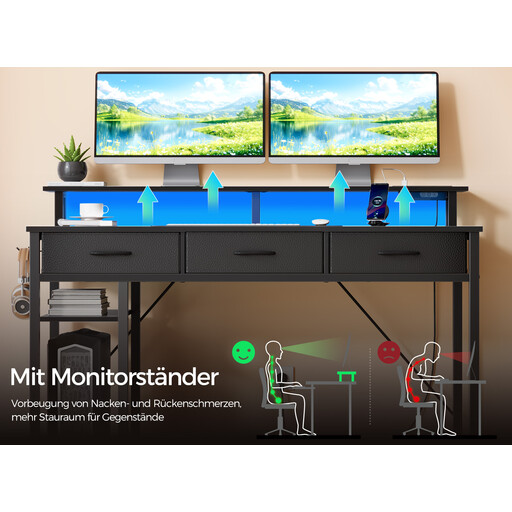
Why this product suits this profile: Its features are designed for users with several devices: it has 2 power sockets, 2 USB ports, a monitor shelf, two side sections and three fabric drawers.
The description gives the load limit for each fabric drawer as 3,6 kg and includes guidance on using the power module safely. This gives you practical points to compare for everyday use.
RGB lighting controlled by app or remote, a monitor shelf, two side shelves and three removable fabric drawers.
We’ve put together a complete, regularly updated list of products that meet these strict selection criteria and fully comply with the safety regulations in force in the EU.
As well as the product dimensions, you’ll need room to move your chair and access the sockets. Measure both sides of the wall and the depth of each section. In smaller rooms, a model with reversible assembly can make it easier to position the desk.
That depends on the stated load capacity of the power module. Built-in power sockets and USB ports are best suited to chargers, monitors, smartphones and other devices with a compatible power requirement. Don’t connect high-powered appliances if the manufacturer advises against it.
Its lifespan depends on assembly, load, moisture and care. After assembling it, check and tighten the screws carefully. Distribute heavy equipment evenly and keep power connections dry. If you notice damage to the cables, sockets or LED components, stop using the desk.