A desktop HDD may suit backups at a fixed workstation, while a USB-powered portable drive is more practical for local copies after location shoots, provided its capacity and connection suit your workflow. Allow space for both existing videos and new projects, keep another copy separately and test that you can restore your files. A single hard drive is no substitute for an additional backup. The German Federal Office for Information Security recommends planning how you’ll restore your data, too.
Who are the different types of drive suited to?
Filmmakers with a growing archive
If your landscape footage is building up across multiple projects, you’ll need enough space and a clear restoration process. The German Federal Office for Information Security advises planning how to restore your data, too.
Filmmakers on the move
If you want to copy footage locally to your laptop after a location shoot, check the power supply and make sure you have the right cables. Toshiba Storage Solutions lists different cable connections for its Canvio variants.
Filmmakers using Mac and Windows
If you switch between different computers, check the file system and which folders are backed up. Apple Support explains how to set up Time Machine, while Microsoft Support shows you how to include folders in File History.
What should you look for when choosing?
| What matters |
What to check before you buy |
Who is it important for? |
| Space for videos |
Allow for file sizes, planned growth and the number of backup copies you want; compare the capacity of the specific variant. |
If you collect several projects, you’ll want to leave room for new footage and keep your files well organised. Around 36% of consumers prioritise a growing archive. |
| Restoring files without the cloud |
Set a backup routine, keep an additional copy separately and test restoring a file. |
If your footage would be difficult to replace, you’ll want to make sure you can actually restore a copy when needed. Around 29% of consumers name this as their main concern. |
| Backing up after location shoots |
Check USB power, cables and your computer’s connection; confirm the protection details for the specific model. |
After a shoot, you may want to copy files to a drive while you’re out and about, without carrying an additional power adapter. Around 21% of consumers mainly back up on the move. |
| Connection and backup workflow |
Check the cable connector, file system and which video folders are actually included; back up any existing files before reformatting. |
If you use Mac and Windows, or different backup features, you’ll want the setup to work with your computers and file locations. Around 14% of consumers make this their main priority. |
What mistakes should you avoid?
-
Moving your only copy to the new hard drive
If the drive fails, you could lose your only copy of the footage. The German Federal Office for Information Security points out that the lifespan of storage media can’t be predicted precisely and that restoring data needs to work.
Copy the files rather than simply moving them, keep another copy separately and test that you can restore your files.
-
Confusing a permanently connected drive with an offline backup
A connected drive remains exposed to risks affecting the system it’s connected to. The German Federal Office for Information Security recommends disconnecting offline backups after you’ve made them.
Set a regular time for backups. If you’re using the drive as an offline copy, disconnect it properly afterwards.
-
Checking only for ‘USB-C’ or ‘Mac compatible’
The cables differ between the Canvio variants described by Toshiba. Toshiba lists NTFS as the file system for the models covered and says reformatting is required for certain macOS versions.
Check that the cable supplied with the specific variant matches your computer’s connection. Before formatting the drive, check whether it already contains files.
Brands to consider
Seagate
Expansion Desktop models may suit larger local archives kept at a fixed workstation.
- A Seagate datasheet for a specific generation of Expansion Desktop products lists a USB cable and separate power adapter.
- Check what’s included with the specific variant; details for one product generation don’t automatically apply to every current version.
Western Digital
My Book desktop variants are an option for stationary local storage.
- The desktop version is worth considering if you have a dedicated spot for backups.
- Check the exact model and capacity variant rather than assuming that features of one version apply across the whole brand.
Toshiba
Portable Canvio Basics variants are an option for making local copies from a laptop.
- Toshiba Storage Solutions lists variants of the Canvio ranges with capacities up to 4 TB and USB power.
- Cables and file systems vary by model. Toshiba says reformatting is required for the macOS versions listed.
LaCie
The Rugged Mini is designed for frequent transport of photo and video files.
- LaCie states that the Rugged Mini is protected against drops from up to 1.2 m and against rain.
- These are manufacturer claims about the enclosure’s design, not a guarantee against data loss or a replacement for keeping another copy.
Joybuy products for local backups
The following Joybuy picks include portable external WD hard drives and a desktop model for local files and video archives.
 No image available
WD Elements Portable 5TB USB-C
A portable drive for making local copies while you’re on the move.
Capacity: 5 TB. Connection: USB-C.
View on Joybuy
No image available
WD Elements Portable 4TB USB-C
A portable drive for storing video and other files locally.
Capacity: 4 TB. Connection: USB-C.
View on Joybuy
 No image available
WD Elements Portable 2TB, USB-C, USB 3.2 Gen 1, 2.5-inch, exFAT
A portable hard drive for storing video and other files locally.
Capacity: 2 TB. Connections: USB-C, USB 3.2 Gen 1. Form factor: 2.5-inch. File system: exFAT.
View on Joybuy
 No image available
WD Elements Desktop 8TB, USB 3.0, 3.5-inch
A desktop hard drive for large local file and media archives.
Capacity: 8 TB. Connection: USB 3.0. Form factor: 3.5-inch. The supplied power adapter is required while the drive is in use, so check that you have a suitable power socket. The product description says reformatting is required to use it with a Mac. Back up any existing files first.
View on Joybuy
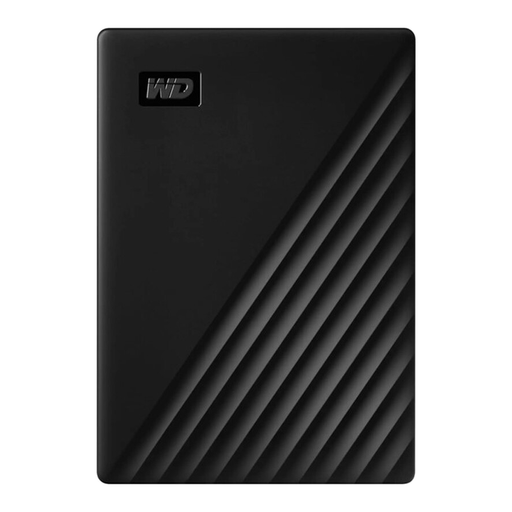 No image available
Western Digital My Passport 1TB Black
A portable option for storing files and videos locally.
Capacity: 1 TB. According to the product description, you may need to format the drive for your operating system before transferring files.
View on Joybuy
Frequently asked questions
How do I back up files on a Mac without using the cloud?
You can set up a directly connected external drive as a Time Machine volume. Apple Support recommends using a drive with at least twice the storage capacity of your Mac and notes that it may need to be erased during setup. Back up any footage already stored on it first.
Will Windows File History back up my video folders?
Microsoft Support lists the default ‘Videos’ library as a location that’s included. If your footage is stored elsewhere, you can add the folder to an existing or new library. Then check where the files are actually stored and test restoring a file.
Does a desktop external hard drive need a power socket?
The Expansion Desktop product generation described by Seagate comes with a USB cable and a separate power adapter, so you’ll need a power socket where you keep your backups. Check what’s included with the specific variant, as this doesn’t automatically apply to every generation.
What are your rights if a hard drive is faulty in Germany?
If you buy as a consumer from a business seller, the EU information website Your Europe says you’re entitled to a legal guarantee of at least two years from the date you receive the goods. This applies to your contract with the seller; an additional manufacturer’s warranty doesn’t replace it.


