What should you look for when buying?
Directional microphone for one teaching voice
A good fit if: You’ll mostly be speaking yourself and can point the microphone towards your seat.
The trade-off: A cardioid pickup pattern won’t silence a shared room; a dynamic microphone used close-up requires you to speak from the right position.
Switchable pickup patterns for a dialogue
A good fit if: You want to record both people together on a single audio track.
The trade-off: The omnidirectional mode on the CHERRY UM 6.0 ADVANCED picks up sound from all directions, including other voices and room noise.
Separate microphones for multiple voices
A good fit if: You want to adjust or edit each voice separately.
The trade-off: Your recording device and software need to support the extra equipment. Audio-Technica notes that setting up two USB microphones at the same time isn’t always straightforward.
First decide whether you want to record one voice or a dialogue. Then you can choose monitoring features and a desk setup to match.
| What you need |
What to check before buying |
Who is this especially relevant to? |
| Your own voice despite background noise |
Check the pickup pattern and whether you can position the microphone close to you; make a test recording from the intended seat. |
If I mainly want to record my own speech, I want to know whether other voices and desk noise will still be audible. This is a priority for around 36% of consumers. |
| Dialogue with multiple voices |
Plan the seating arrangement and decide whether you want a shared or separate audio track. |
If learners are going to respond, their voices need to be captured too. Around 29% of consumers prioritise recording a dialogue together. |
| Control while recording |
Check whether the specific model has a headphone socket, level control and mute function. |
During longer lessons, I want to monitor the audio and adjust the level or mute the microphone when needed. Direct monitoring is the main priority for around 21% of consumers. |
| Easy desk setup |
Check that the recording device connection, what’s included and the space needed for a stand or arm suit your setup. |
If desk space is limited, I need a setup that works with the connections I have and the space available. This is a priority for around 14% of consumers. |
Microphones for language lessons at Joybuy
This selection includes USB microphones for a single teaching voice, a USB/XLR set with different recording modes, and a wireless lavalier set for two voices.
 Image unavailable
FIFINE AM8, dynamic USB/XLR microphone with desk stand
It’s worth considering for a single teaching voice at your desk if you can position the microphone to suit the way you speak.
Positioning it well doesn’t guarantee that other voices and room noise will be excluded; check with a test recording.
View at Joybuy
 Image unavailable
Razer SEIRÉN V3 MINI White, ultra-compact USB microphone with tap-to-mute
It’s worth considering for a single teaching voice if a compact USB microphone with a mute function suits your setup.
Mute won’t replace a test recording if you want to check which sounds are being picked up at your desk.
View at Joybuy
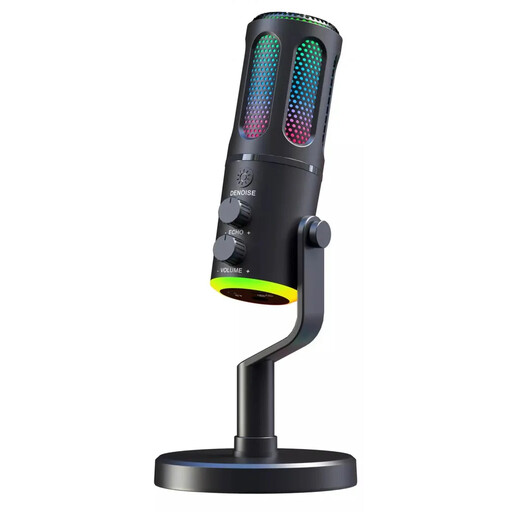 Image unavailable
The G-Lab K-MIC-NEON, wired cardioid microphone with RGB
It’s worth considering for a single teaching voice at your desk if a wired microphone is compatible with your recording device.
Check the positioning and how it picks up other people’s voices with a test recording.
View at Joybuy
 Image unavailable
Dynamic USB/XLR microphone set with RGB, gain control, echo, mute and desk stand
This set is worth considering if you want to switch between a single voice and a conversation, depending on the lesson.
Omnidirectional mode picks up sound from all directions, including room noise. Choose the pickup pattern that suits the recording you have planned.
View at Joybuy
 Image unavailable
Moman M1CXT, wireless lavalier microphone with USB-C, 2TX+1RX and 150m range
This set is worth considering for a two-person dialogue if wireless transmitters suit your setup.
The microphones are omnidirectional, rather than a directional option designed to capture only one teaching voice.
View at Joybuy
Frequently asked questions
Can I simply record other people at a shared desk?
Not necessarily: Section 201 of the German Criminal Code (StGB) covers the unauthorised recording of another person’s privately spoken words. Before recording, check who will be heard and whether you’re authorised to record them; a microphone’s pickup pattern doesn’t remove the need to do this. Whether a particular teaching situation is considered private depends on the circumstances.
How should I set up the microphone for an initial test?
Select the microphone as the input on your recording device and point the intended speaking side towards the person being recorded. Record a short section with the people who will actually be at the desk, then listen back to check the voice, background noise and levels. For the Sennheiser Profile, the instructions also cover positioning, the gain control and headphone monitoring.
Do I need an additional audio interface for USB recording?
Generally, no, if you’re recording directly to a computer with a compatible USB microphone. If you want to use the XLR output on a hybrid model, your signal chain will need a suitable microphone input. Check the connections and what’s included against your recording device.
Which microphone is suitable for one voice, and which for a dialogue?
For a single teaching voice, a directional microphone is a sensible starting point if you can position it appropriately. For a shared dialogue, a wider pickup pattern may work, but it will also capture sound from other directions. If you want to edit voices separately, check first that your recording device and software support multiple inputs.
How can I tell whether two similarly named microphone models are the same?
Compare the full model name and the specific version of the set. The original Shure MV6 is not the same as the MV6 Gen 2; the Sennheiser Profile table stand and streaming sets may also differ in what’s included. Check the connections, mount and supplied cables too.


