One person at a fixed recording position
If you’re mainly recording one person sitting down and can run a cable to your device, first check that the audio input is compatible and that the mic clip will stay in place on the clothing you’re wearing.


For one person sitting down, a wired lavalier mic is a sensible place to start, provided its connection and the recording app are compatible with your device. A wireless option may suit you better if a cable gets in the way or you want to move the recording position, but the transmitter, receiver and signal path all need to work with your setup. If a second person regularly joins the discussion, they’ll need their own audio source too – a set with two transmitters is one possible solution.
If you’re mainly recording one person sitting down and can run a cable to your device, first check that the audio input is compatible and that the mic clip will stay in place on the clothing you’re wearing.
If a second person regularly joins in, plan to give them their own audio source too. DJI describes a Mic Mini combo with two transmitters for recording two people; RØDE Wireless Micro also has two transmitters.
A wireless set may suit you if you want to move your recording device or avoid a cable between the device and the speaker. Bear in mind that you’ll also need to consider the transmitter, receiver and signal path, and test the connection.
First check the input and recording app, then how many people will be speaking, and finally whether a cable will get in the way where you’re sitting. This helps you choose a setup that suits the way you’ll actually be recording.
The figures show the main considerations when choosing a lapel mic for a book discussion that will mostly be recorded with everyone seated.
| What matters | What to check before buying | Who should pay particular attention? |
|---|---|---|
| Compatible connection | Sennheiser lists USB-C for the XS Lav USB-C and 3.5 mm TRRS for the XS Lav Mobile; RØDE lists 3.5 mm TRS for the Lavalier GO. Also check that your device and recording app can use the mic as an audio input. | I want to connect the mic directly and know in advance whether my device and app will recognise it. Shoppers who prioritise a compatible input account for around 40%. |
| Clear speech | Check the clip and windscreen, where the mic will sit on your collar or top, and how it sounds with the clothes you’ll actually wear for the discussion. Listen to a test recording with normal speech and page-turning, too. | If fabric rubs against the mic while you’re speaking or turning pages, it can affect the recording. Shoppers who prioritise clear speech and a practical way to attach the mic account for around 30%. |
| A second voice | DJI describes Mic Mini combos with one or two transmitters; according to the manufacturer, the two-transmitter combo is intended for two people. Check what’s included in the specific set. | If a second person regularly joins in, plan an audio source for them too. Shoppers who prioritise recording a second voice account for around 20%. |
| No cables | RØDE lists two transmitters for Wireless Micro; according to the instructions, the recording app must support USB audio. With wireless equipment, you should also check the frequency band and product information for the specific device. | If I don’t want a cable between the speaker and the device, I’m happy to use extra wireless components. Shoppers who prioritise a cable-free setup account for around 10%. |
TRS and TRRS are different connection types. Even if a plug fits physically, that doesn’t confirm that your device or recording app supports the mic.
First find out which audio input your recording device has, then choose a compatible mic or an adapter that’s specifically suitable. Test the combination in the app you plan to use.
DJI describes Mic Mini combos with one or two transmitters. The model name alone therefore doesn’t tell you whether the specific set is configured for one or two voices.
Check that the contents of the combo you choose match the number of people who’ll be speaking regularly.
In an article dated 28 April 2026, heise online reported an audible difference when recording with DJI Mic Mini on an iPhone, comparing a direct Bluetooth connection with a USB-C receiver. This applies to that particular use case and isn’t a blanket statement about every wireless recording.
Test and listen to the intended signal path with your device and recording app before you record the discussion.
The XS Lav models offer wired connection options for compatible mobile devices and computers.
The Lavalier GO and Wireless Micro are designed for different connection and recording needs.
The Mic Mini is available in combos described for recording one or two speakers.
The BY-M1 is a wired lavalier mic with smartphone and camera modes.
The V.Lav is a wired option for devices with a compatible 3.5 mm mic input.
This selection includes wired 3.5 mm lavalier mics and wireless sets for recording one or two voices.
 No image available
This wireless set may suit you if you want to record without a connecting cable. The product name lists two transmitters, one receiver and a charging case; the description lists smartphones, cameras and PCs as recording devices.
 No image available
This wired mic may suit a fixed seating position if you can run the cable to your recording device. The description lists a 3.5 mm connection, an adapter kit, a clothing clip and a windscreen; check compatibility with your specific device.
 No image available
This set may suit wireless voice recording with a compatible USB-C device. The product name lists two transmitters and one receiver; the description mentions omnidirectional microphones and real-time audio monitoring.
 No image available
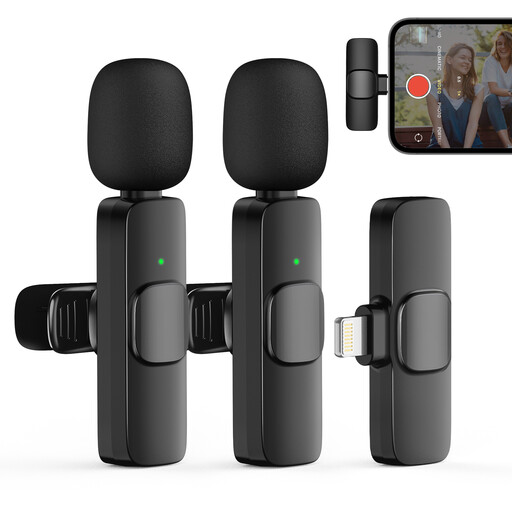
According to the product description, this wireless set is designed for iPhone and iPad and may suit discussions where a second person regularly joins in. The description lists two transmitters and one receiver; check compatibility with your specific recording device.
 No image available
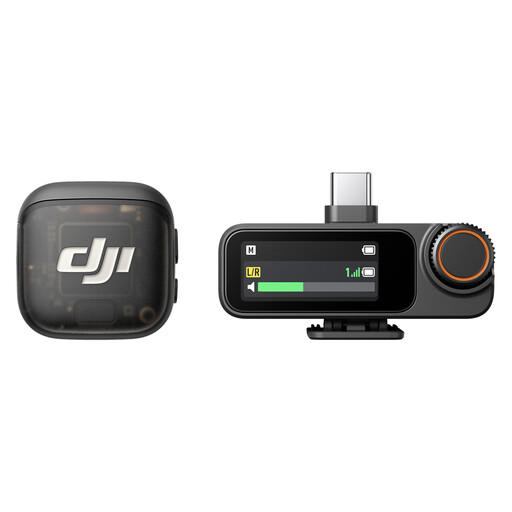
This set may suit a wireless solo recording. The description lists iPhones, Android devices and cameras, as well as a USB-C adapter and clip attachment; check the connection with the recording device you’ll actually use.
Not just because the plug is the same size. Sennheiser describes the XS Lav Mobile as having a 3.5 mm TRRS connection and the XS Lav USB-C as having a USB-C connection; RØDE lists 3.5 mm TRS for the Lavalier GO, for compatible inputs. Check the specified audio input on your device and test the mic in the recording app you plan to use.
Attach the mic to the clothes you’ll wear for the discussion using the supplied clip, and use the supplied windscreen if there is one. For its own CVL model, Shure recommends positioning the mic 15–25 cm from your mouth; don’t assume this distance will work for other models without testing it. Listen to a test recording with normal speech and page-turning.
Make sure you have a suitable audio source for both voices. DJI describes a Mic Mini combo with two transmitters for recording two people; RØDE Wireless Micro also has two transmitters. Check exactly what’s included in each set.
Not without first checking that you’re allowed to. Section 201 of the German Criminal Code (StGB) covers the unauthorised recording of another person’s non-public speech. Before recording, check with everyone involved whether the discussion can be recorded and for what purpose; this doesn’t automatically cover publishing the recording later.
No, that can’t be assumed for every wireless set. In its Order 37/2026, dated 15 April 2026, the Federal Network Agency lists permitted frequency bands and the associated technical and operational conditions; Order 109/2025 has been repealed. Check the frequency band and information for the specific device.