Recording a greeting despite household noise
If you’re recording a short greeting on your own, clear speech, a suitable way to attach the mic and a tidy cable setup all matter. Shure says that the directional MX185 needs to be positioned correctly.


For a greeting recorded in one place, a wired lavalier with a connection that matches your recording device is usually the best place to start. Attach it close to your mouth, keep it from rustling and make a test recording. Shure says its directional MX185 reduces background noise, but notes that it needs to be positioned correctly. A wireless set gives you more freedom to move, but won’t automatically eliminate noise in your flat. Also check how your phone provider lets you set up a greeting: not every service lets you use a separately recorded file directly as your greeting.
If you’re recording a short greeting on your own, clear speech, a suitable way to attach the mic and a tidy cable setup all matter. Shure says that the directional MX185 needs to be positioned correctly.
If you want to use a smartphone or computer, check that the microphone connector matches your device’s input and the way you’ll record the phone greeting. Apple Support and Telekom describe different options for setting up your own greeting, depending on the service.
If you want to move around while speaking or find a cable distracting, a wireless set may be a good option. Check that the receiver is suitable, that it connects to your recording device and that your chosen version includes everything you need.
| What matters | What to check before buying | Who is this important to? |
|---|---|---|
| Clear speech | Attach the microphone close to your voice and prevent rustling; with a cardioid model, make sure it’s positioned correctly. | If I want to minimise household noise in my greeting, I pay particular attention to the microphone’s position and make a test recording. Around 36% of consumers put speech clarity first. |
| The right connection | Check that the device input matches the microphone plug; allow for a suitable adapter if needed. | If I want to keep using my existing smartphone or computer, the signal path needs to be compatible: USB-C, 3.5 mm TRS and 3.5 mm TRRS are different connections. Around 29% of consumers prioritise device compatibility. |
| Using it for a phone greeting | Check in advance whether your service allows you to record a greeting directly, use your own greeting or upload a separate audio file. | If I want my recording to play as my voicemail greeting, my provider’s process matters just as much as the microphone. Around 21% of consumers put having a usable phone greeting first. |
| Freedom to move | Check whether one transmitter is enough, which receiver is included and how the set connects to your device. | If I want to move around while recording, a wireless set is more practical than a cable. For a short recording in one place, the extra setup may be unnecessary. Around 14% of consumers prioritise going cable-free. |
The plugs may look similar, but they aren’t automatically interchangeable. RØDE’s Lavalier GO uses TRS, while its smartLav+ uses TRRS.
Check the specific microphone input on your device and find out whether you need a suitable adapter.
A good recording won’t necessarily be set as the greeting for your phone service. Apple Support and Telekom describe different methods and requirements.
First check how your device or provider lets you set up a personal greeting, then listen to the greeting that callers will actually hear.
DJI gives the Mic Mini’s maximum range for an open, interference-free environment. This figure doesn’t tell you how well it filters out household noise when recording a greeting.
Choose wireless for the freedom to move, and test your recording in the conditions you have at home.
The MX185 is a cardioid lavalier microphone for speech recording with a compatible recording system.
The XS Lav USB-C is designed for recording with a compatible USB-C mobile device or computer.
The smartLav+ and Lavalier GO offer different wired connection options.
DJI says the Mic Mini is available in a set with one transmitter and one receiver for one speaker, among other options.
This selection includes wired and wireless lavalier microphones. Check that the connection and what’s included in the set suit your recording device, and consider whether you want to move around while speaking.
 No image available
A wireless option if you want to move around while recording.
The product title specifies 48 kHz/24-bit audio and a microphone or transmitter weighing 9 g.
 No image available
A wired option for speech recording, provided your recording device has a compatible input.
It uses a 3.5 mm connection. Check that this suits your device or whether you need a suitable adapter.
 No image available
A wireless option if you want to move around while recording.
The product name lists iPhone 7–17, Android and cameras as compatible devices. Check the specific receiver connection and compatibility with your device before buying.
 No image available
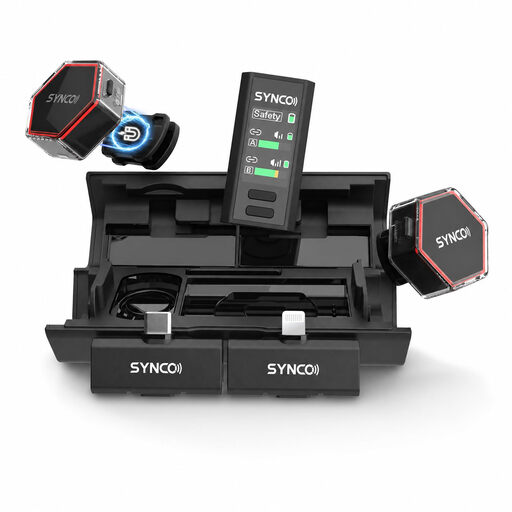
This set may be a good fit if you need two transmitters and the connection suits your recording device.
The product title specifies two transmitters and USB-C and Lightning connections. For a single greeting, a set with two transmitters may include more than you need.
 No image available
A wireless option for a compatible USB-C recording device.
The product name specifies 2TX+1RX, meaning two transmitters and one receiver. Check that this setup suits your greeting.
Simply buying one won’t reliably do that. Attach the microphone close to your voice, avoid movement noise and listen to a test recording. Shure says the directional MX185 picks up less background noise, but it needs to be positioned correctly.
This isn’t guaranteed with every combination of iPhone, microphone and network provider. Apple Support explains how to record a greeting through the greeting settings, but notes that availability can vary by provider and region. Test the microphone input using the process you intend to follow.
Attach the microphone and cable so they rub as little as possible against your clothes; RØDE describes a method for securing the cable to reduce strain. Listen to a test recording, then check which greeting callers actually hear.
A wireless set is most useful if you want to move around while recording or find a cable distracting. For a short recording in one place, a compatible wired microphone may be simpler. With a wireless set, check which receiver is included and how it connects to your recording device.