Which option is right for you?

Recording with a phone you already own

If you want to record the introduction on a mobile device you already own, check its input and any adapters you may need before choosing a microphone. Sennheiser, RØDE and Shure describe different connection options for specific models.

Recording in a busy exhibition space

If clear speech matters despite room noise and clothing rustle, test the microphone position and attachment where you’ll actually be sitting. A test recording will tell you more than a general promise about sound quality.

For anyone responsible for a one-off take

If it will be difficult to repeat the introduction, check the power supply and storage space beforehand, and make sure the recording is actually running. For oral history recordings, the Library of Congress recommends testing equipment, battery life and storage space, among other things.

What should you consider when choosing?

Wired lapel microphone

A good fit if: The speaker is sitting and the recording device is close enough. Sennheiser specifies a 2-m cable for the XS Lav USB-C, for use with compatible USB-C recording devices.

Things to consider: Cable routing and the connection limit where you can position your equipment; USB-C, TRRS and TRS are not interchangeable. RØDE lists the smartLav+ as a TRRS model and the Lavalier GO as a TRS model.

Wireless kit

A good fit if: You need flexibility when positioning the camera or recording device, and the receiver and its connection are compatible with your device.

Things to consider: Charging, pairing and possible interference are all part of the setup. DJI gives the Mic Mini a maximum range of 400 m under open, interference-free test conditions; this is not a guarantee of range in an exhibition space.

Lapel microphone with a standalone recorder

A good fit if: You want to record the audio as a separate file, independently of your smartphone or camera. Zoom describes the F2 as a recorder supplied with a lapel microphone.

Things to consider: Check that recording has started, and make sure you have power and enough storage. You may need to sync the separate audio file with the video later.

What matters What to check when buying Who is it especially relevant to?
Connection to the recording device Check the device model and input, whether it uses TRRS, TRS or USB-C, and which adapters and recording app you need. RØDE specifies TRRS for the smartLav+ and TRS for the Lavalier GO. If I want to use a phone I already own, the microphone needs to work with its input and recording app. Around 31% of consumers are likely to have compatibility as their main concern.
Clear speech from the seat Record and listen back from the intended position; if you hear rustling, adjust the attachment or cable routing. If audience noise or clothing might affect the introduction, I want to hear clear speech on the spot. Around 31% of consumers are likely to have clarity as their main concern.
Making sure the take is recorded Test recording, power, storage and playback beforehand. The Zoom F2 setup includes a memory card and a power supply. If it will be difficult to repeat the talk, I want to be sure the recording runs through and is saved. Around 23% of consumers are likely to have recording reliability as their main concern.
Freedom to position the camera Check whether you really need wireless, and test the complete setup where you’ll be recording. Don’t treat wireless range figures measured under interference-free conditions as indoor range. If the camera can’t be placed right next to the seated speaker, I need more freedom to position it. Around 15% of consumers are likely to have camera flexibility as their main concern.

Avoid common selection mistakes

  • Assuming the same jack size means the same connection type

    A 3.5-mm plug alone doesn’t tell you whether a microphone is compatible with your recording device’s input. RØDE specifies TRRS for the smartLav+ and TRS for the Lavalier GO.

    Check the input and required power for your specific device, and test the entire connection, including the recording app.

  • Assuming the maximum wireless range applies to an exhibition space

    DJI’s maximum range of 400 m was measured in an open, interference-free environment. The Bundesnetzagentur also points out that wireless microphones are not guaranteed to be free from interference.

    Test the wireless kit where you plan to sit and position the camera. If the camera will stay in one place, a compatible cable may be the simpler option.

  • Assuming a separate microphone is a complete recording solution

    A microphone on its own doesn’t ensure that a recording can be saved and played back later. Depending on your setup, you may need a compatible receiver, an adapter or a memory card.

    Check the entire signal path, from microphone to a saved, playable file, as well as what’s included with the specific package.

An overview of relevant brands

Sennheiser

The XS Lav USB-C is a wired option for compatible mobile devices or computers that can record via USB-C.

  • Sennheiser lists a 2-m cable, clip and foam windscreen for the XS Lav USB-C.
  • A USB-C socket alone doesn’t guarantee that your particular device supports recording through it.

RØDE

The smartLav+ and Lavalier GO are designed for different, compatible microphone inputs.

  • RØDE specifies TRRS for the smartLav+ and TRS for the Lavalier GO.
  • RØDE specifies a compatible TRRS-to-TRS adapter for connecting a smartLav+ to a Wireless GO transmitter.

DJI

The Mic Mini is a wireless kit for recordings where you need more flexibility in positioning the camera.

  • DJI lists the transmitter’s weight as approximately 10 g.
  • The stated maximum range was measured in an open, interference-free environment. Test the connection in your exhibition space.

Zoom

The F2 is a standalone recorder supplied with a lapel microphone for recording audio separately.

  • Zoom specifies mono WAV with 32-bit float and a HOLD switch.
  • The memory card, power supply and, if needed, syncing the recording with the video later are all part of the setup. The recording formats do not prove that room noise is suppressed.

Shure

The MVL is designed for compatible mobile 3.5-mm inputs; the MoveMic One works with compatible apps.

  • Shure lists a CTIA-compliant adapter as a possible connection requirement for the MVL, and describes the MoveMic One as compatible with its own MOTIV apps.
  • For cameras and third-party apps, Shure says a separately available receiver is required for the MoveMic One.

Joybuy products for speech recording

This selection includes wired lapel microphones and wireless kits for recording speech while seated. Before choosing, check that the connection and, where applicable, the receiver are compatible with your recording device.

DJI Mic Mini 2S wireless kit with two transmitters, receiver and charging case

DJI Mic Mini 2S (2 TX + 1 RX + Charging Case)

This wireless kit is worth considering if you need flexibility when positioning the camera or recording device.

The product is described as including two transmitters, a receiver and a charging case. The description lists connections to cameras, smartphones and PCs, as well as a clip or magnetic mount; check that the signal path is compatible with your specific device.

Test the wireless connection where you plan to sit and position the camera.

View at Joybuy

SYNCO S8 lapel microphone for smartphone, PC, laptop and camera

SYNCO S8 lapel microphone

This wired lapel microphone is a possible choice if the recording device is close enough to the seated speaker.

The product details list a 3.5-mm connection, a clip and an adapter kit for different devices. Check that the connection works with your recording device and app.

View at Joybuy
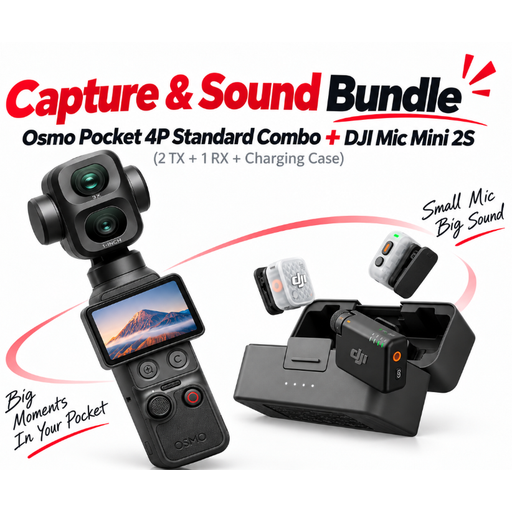
DJI Osmo Pocket 4P Pro Audio Bundle with Mic Mini 2S kit

DJI Osmo Pocket 4P Pro Audio Bundle

This bundle may suit a mobile camera setup if the included camera and wireless kit fit your recording plans.

The product name lists a Pocket 4P Standard Combo and a Mic Mini 2S kit with two transmitters, a receiver and a charging case. Check the full contents and test the wireless connection where you’ll be recording.

View at Joybuy

Wireless lapel microphone kit with two transmitters and receiver

Wireless lapel microphone kit with 2 transmitters

A wireless kit with two transmitters is one option if you want to record wirelessly and the listed connections are compatible with your device.

The product name lists 2.4 GHz, latency under 20 ms, a range of up to 40 m, a 500 mAh charging case, plus USB-C and Lightning. Test the connection on site; the stated range is not a guarantee of range in an exhibition space.

View at Joybuy

SYNCO P1XT wireless USB-C microphone

SYNCO P1XT USB-C Wireless Microphone

This wireless microphone is worth considering if you want to record with a compatible USB-C mobile device.

The product is described as including a USB-C receiver, transmitter and receiver. The details list Android devices with OTG support as compatible; check compatibility with your specific device and test the wireless connection where you’ll be recording.

View at Joybuy

Frequently asked questions

Can I connect a lapel microphone with a 3.5-mm plug to any smartphone or camera?

No. RØDE specifies TRRS for the smartLav+ and TRS for the Lavalier GO; the manufacturer recommends a TRRS-to-TRS adapter to connect the smartLav+ to a Wireless GO transmitter. Check the input, any adapters you need and the recording app on your specific device.

How should I attach and test the microphone before the introduction?

Attach it to the speaker, route the cable without pulling it and, where possible, keep it away from rustling clothes. Listen back to a test recording made from the actual seat. Also check the power supply and storage; these are practical steps for recording, not legal requirements.

What extra components should I allow for before buying?

Check whether your setup needs an adapter, a separate wireless receiver or a memory card. Shure says the camera receiver for the MoveMic One is sold separately; Zoom lists microSD as the storage medium for the F2.

Can I simply record the speaker and background conversations in Germany?

You can’t assume that recording is permitted in every situation. Section 201 of the German Criminal Code prohibits recording another person’s non-public spoken words without authorisation; whether this applies to particular background conversations depends on the circumstances. Discuss the recording and intended publication with the speaker beforehand, and avoid recording other people’s conversations without authorisation. If consent under data protection law is used as the legal basis, guidance from the Data Protection Conference says it must be freely given, informed and specific to the circumstances.

Does every wireless lapel microphone in Germany need an individual frequency allocation?

Not in every case: the Bundesnetzagentur publishes general frequency allocations for wireless microphones and other short-range applications. Whether a particular system is covered depends on its frequency and technical conditions; this does not guarantee freedom from interference. Check the details for the specific version intended for use in Germany.