Speakers in reverberant rooms
If your main aim is to record a script clearly, test the microphone position, your clothing and where you’ll be speaking beforehand. RØDE describes positioning as an important factor when using a lavalier microphone.


If you’ll be speaking mostly from one spot, a wired lavalier microphone with the right connector is a sensible starting point. If you’ll actually be moving around, a wireless set may be more practical. Either way, test your speech recording from the position where you’ll be speaking: keeping the microphone close to your mouth can help capture your voice, but it won’t automatically eliminate room echo. A wireless system also requires a compatible receiver, charged components and the frequency allocation applicable to that specific system.
If your main aim is to record a script clearly, test the microphone position, your clothing and where you’ll be speaking beforehand. RØDE describes positioning as an important factor when using a lavalier microphone.
If you want to speak directly into your phone, the microphone connector or adapter and recording app all need to work with the signal path. RØDE and Shure specify different TRRS connection requirements for their smartphone lavalier microphones.
If you’ll be walking around while recording, weigh the freedom of movement offered by a wireless set against the receiver, power supply and charging arrangements you’ll need. DJI describes different ways to attach the Mic Mini.
A good fit if: you’ll stay more or less in one place while recording and your recording device supports the right TRS or TRRS signal path.
What to consider: The cable limits your freedom of movement, and plugs of the same size don’t necessarily have the same wiring.
A good fit if: you’ll actually be moving during the recording and the receiver is compatible with your recording device.
What to consider: The transmitter and receiver need to be connected and sufficiently charged. The frequency allocation for the specific system determines whether it can be used.
| What matters | What to check | Who it matters to |
|---|---|---|
| Speech clarity | Check the microphone position, attachment and wind protection with a test recording of the loudest section of your script. | If I want to record clearly in an untreated room, I’ll test the capsule in the intended position and listen for clothing noise. Around 36% of consumers put speech clarity first. |
| Device connection | Check the input, TRS or TRRS wiring, any required adapter and whether the recording app recognises the microphone. | If I want to record with the smartphone or recorder I already own, the entire signal path needs to be compatible. Around 29% of consumers prioritise device connection. |
| Freedom of movement | Test cable tug or the wireless receiver with the clothing you plan to wear and the movements you’ll actually make. | If I’m walking around while recording, I don’t want a cable connecting me to the recording device to get in the way. Around 21% of consumers put freedom of movement first. |
| Longer takes | For wireless systems, plan for the battery life of the components you need. In the camera mode described for the BOYA BY-M1, remember to account for the LR44 battery. | If I want to record longer sections of a script without interruption, I’ll check the power supply and charge level beforehand. Around 14% of consumers prioritise being able to plan how long a take will last. |
A 3.5 mm TRS lavalier and a TRRS smartphone microphone aren’t automatically interchangeable. If the signal path isn’t compatible, the recording app may not use the external microphone.
Before buying, check your device’s input, the plug wiring and whether an adapter is suitable, if needed. Then make a short test recording with the app you plan to use.
A wireless feature or advertised noise reduction doesn’t prove that it will eliminate room echo or clothing rustle.
Make a test recording in the room you plan to use, keeping the microphone in the same position. Listen out for echo, breathing and clothing noise.
Receiver options and what’s included in a set can vary. BOYA also specifies different battery requirements for the BY-M1 and BY-M1S.
Check the full model name, what’s included and the intended operating mode. For a wireless set, also check that the receiver is compatible with your recording device.
Wired lavalier options with different types of connector.
The MVL is a wired smartphone lavalier with a 3.5 mm TRRS connector.
The BY-M1 is a wired lavalier with switchable smartphone and camera modes.
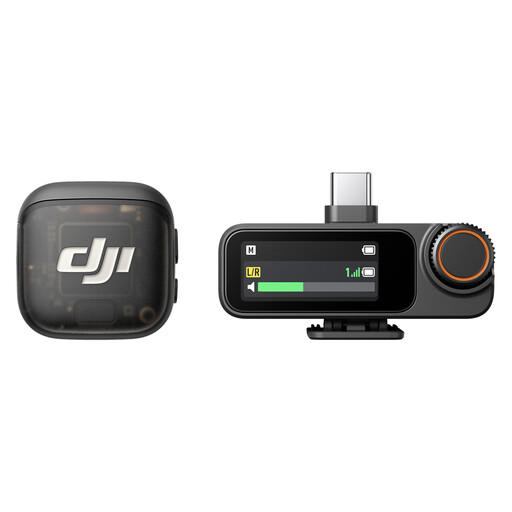
The Mic Mini is a compact wireless set, with some sets including two transmitters.
The LARK M2 is available with different receiver options for different recording devices.
These are wireless sets for recording scripts while moving. Make sure the receiver and set version are compatible with your recording device. Before use, also check the frequency allocation that applies to the specific wireless system.
 No image available
For recording scripts on the move, provided you can use the compatible receiver and check the system’s frequency requirements before use.
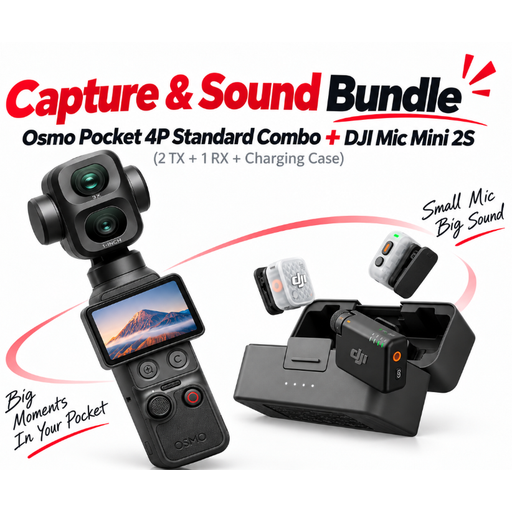
According to the product name, the set includes two transmitters, one receiver and a charging case. Attach the microphone capsule in the intended position for a voice test, then check whether any echo or clothing noise is still audible.
 No image available
A suitable audio bundle for recording on the move, provided the exact combination listed is compatible with your recording device and workflow.
The product name lists a Pocket 4P Standard Combo and a Mic Mini 2S set with two transmitters, one receiver and a charging case. Check the specific set version and the wireless system’s frequency requirements before use.
 No image available
For recording while walking, provided the receiver and set version are compatible with your recording device and meet the applicable frequency requirements.
The product name lists two transmitters, one receiver and a charging case. Test the microphone position in the untreated room, and plan for the power needs of the components you’ll need if you’re recording longer takes.
No, a lavalier microphone won’t automatically eliminate room echo. Attach the capsule close to your body and test it in the room you plan to use. Also listen out for clothing rustle.
No, the connector needs to match your smartphone’s signal path. RØDE specifies the Lavalier GO for compatible TRS microphone inputs, while the smartLav+ and Shure MVL are designed for TRRS signal paths. Check the socket or adapter, then make sure the recording app is using the external microphone.
Make a short test recording in the clothes you’ll actually be wearing and at your usual speaking volume. For a wireless set, check the charge level of every component you need. If you’re using the BOYA BY-M1 in the camera mode described, make sure you have an LR44 battery too.
Not just because it’s described as a “wireless microphone”: the frequency range of the specific system and the general frequency allocation that applies to it are what matter. The Bundesnetzagentur publishes the applicable allocations; a German sales listing alone doesn’t prove that a device meets their requirements.