Speakers in noisy rooms
If a fan is running while you speak, clear speech, a consistent microphone position and a test in the actual room all matter. Complete suppression of ambient noise isn’t guaranteed.


If you’re giving an audition speech with an audible fan in the background, the right lapel microphone can help, but no microphone is guaranteed to eliminate ambient noise. Clip it close to your voice and check a test recording in the actual room. If you’ll be staying in one place, a wired microphone with the right connector offers a simpler signal path. If you’ll be moving around, a wireless set may suit you, provided the receiver works with your recording device. Test noise cancellation alongside the sound of your voice. These claims come from the manufacturers, not from an independent comparative test.
If a fan is running while you speak, clear speech, a consistent microphone position and a test in the actual room all matter. Complete suppression of ambient noise isn’t guaranteed.
If you’re speaking in front of a fixed camera or smartphone, a wired set-up may be worth considering. The key things to check are your device’s input and whether the cable is long enough for your set-up.
If you’ll be moving during your speech, a wireless set can free you from a cable. Check that the receiver is compatible, the microphone can be clipped securely and the complete set has a suitable power supply.
A good fit if: You’ll mostly be speaking in one place and your recording device supports the microphone’s specific connector.
Things to consider: The cable length and connector limit where you can set up, but you won’t need a wireless receiver or a transmitter battery.
A good fit if: Your speech involves movement and the set you choose includes a receiver that’s compatible with your recording device.
Things to consider: The transmitter and receiver need to be charged, and you should check the connection before recording. Advertised noise cancellation is no substitute for listening to a test recording.
A good fit if: You have a suitable audio set-up and can keep the microphone pointing reliably towards your voice.
Things to consider: A directional capsule may reject more ambient sound, but positioning matters and complete noise removal isn’t guaranteed.
| Priority | What to check before buying | Who is this important to? |
|---|---|---|
| Clear speech with fan noise in the background | Clip the microphone close to your voice; listen to a test recording with noise cancellation both on and off. | If the fan is still audible during my speech, I want my voice to be clear without sounding unnatural to me. Around 36% of consumers put this first. |
| The right connector | Check the input and connector type on your recording device; record and listen to a test file using the app you plan to use. | If I want to use my existing smartphone, computer or camera, the microphone signal needs to reach it properly. Around 29% of consumers prioritise compatibility with their recording device. |
| Freedom to move | Check how many transmitters you need and what’s included in the set; test the clip and connection during a full rehearsal. | If I need to move during my speech, I don’t want a cable tying me to the camera. Around 21% of consumers place particular importance on freedom of movement. |
| Recording at different volumes | Record the loudest section and check the levels and microphone positioning for clipping and rustling. | I want a usable recording of both quiet and loud sections, without having to rely on an automatic feature alone. Around 14% of consumers pay particular attention to reliable levels and a secure, quiet clip. |
Microphone positioning also matters when you record. Sennheiser points out that placing a microphone closer to your voice can reduce unwanted ambient noise. That doesn’t guarantee a fan will disappear, so listen for both the sound of your voice and any remaining background noise.
A manufacturer’s claim about reducing fan noise doesn’t prove that all background noise will disappear in your room or that the sound of your voice will remain unchanged.
Record the same quiet and loud sections in the room you plan to use. Listen to the remaining fan noise and speech clarity together.
A microphone may be unusable if its connector doesn’t match the input. RØDE says you need an additional adapter to connect the smartLav+ to a TRS input on a Wireless GO system.
Check the specific input and connector type, then listen to a saved test recording on the device you plan to use.
Wireless microphone sets can contain different components. For recording, the transmitter, receiver and device connector all need to suit the signal path you plan to use.
Check the number of transmitters, the receiver and what’s included in the exact version before testing the connection.
Shure says its MX184 supercardioid model rejects more ambient sound than the lavalier capsules it compares it with. The manufacturer also notes that the sound may change when you move outside the microphone’s axis.
Check that it works with your audio set-up, then listen to a test recording while making the head movements you’ll use when speaking.
The XS Lav USB-C is a wired lavalier for compatible mobile devices and computers, and may suit a fixed recording position.
The Mic Mini is a wireless clip-on microphone for recordings involving more movement. The sets vary in what they include.
The smartLav+ is designed for a suitable smartphone TRRS input. The Lavalier GO is a different model with a TRS connector.
The MVL is a TRRS option for compatible mobile devices. Directional Microflex lavaliers are a more specialised option for a suitable audio set-up.
This selection includes wired lavalier options for a fixed recording position, as well as wireless clip-on microphones for greater freedom of movement. Before buying, check that the connector, receiver and features work with your recording device and planned rehearsal.
 No image available
This wireless set may suit a speech that involves movement. Check the complete signal path with your recording device.
The product title lists 2 transmitters, 1 receiver and a charging case. The description mentions two-level noise cancellation and internal 32-bit float recording. Test speech quality and clarity in the room you plan to use.
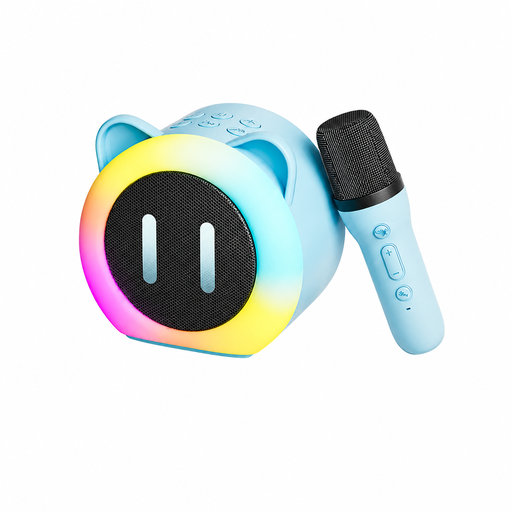 No image available
This product is described as a karaoke speaker with a wireless microphone. Before using it to record an audition, check that this combination suits your recording set-up.
The description mentions a 3.5 mm wired microphone with a clothing clip and an adapter set. Check the socket and any adapters you may need against your recording device.
 No image available
The two transmitters may be useful for recordings involving movement or two speakers. The receiver and connector need to be compatible with your recording device.
The product title lists 2.4 GHz, DSP noise reduction, latency under 20 ms, a range of up to 40 m, a 500-mAh charging case, USB-C and Lightning. Test the noise reduction in the setting where you’ll be recording.
 No image available
The wireless design may give you more freedom of movement if the USB-C receiver works with your device and recording app.
The description mentions audio monitoring, charging via a port on the receiver while recording, and one-button noise reduction. Android devices need to support OTG. Check the connection and sound of your voice before recording.
 No image available
The product title says this set is designed for USB-C phones. It may suit a recording involving movement if the connection and recording set-up are compatible.
The description lists a battery life of up to 7 hours and three recording modes, including a noise-cancellation mode. Test the recording in the room where you plan to speak.
Try clipping it high on your chest, then listen to a recording made with the clothes and gestures you’ll actually use. Shure notes that placing a microphone directly at the throat may affect the sound, and that clothing and cables can rustle.
Don’t rely on a foam windscreen alone to deal with fan noise. Sennheiser lists one as an accessory for the XS Lav USB-C, but that doesn’t prove it will reduce the sound of a fan in the room. Test the recording where you plan to use it.
Before buying, check whether any adapters or a wireless receiver you need are included. For a consumer purchase from a trader, EU consumer information states that you’re generally entitled to a legal guarantee of at least two years from receipt of the goods. This is separate from any additional manufacturer’s warranty.
No. The term ‘wireless microphone’ doesn’t mean that all models are automatically approved for use. Germany’s Federal Network Agency sets out technical and operating conditions for wireless microphones and certain short-range devices. Check the frequency band and details for the specific set against the relevant general assignment, including Vfg. 37/2026 or Vfg. 91/2025, where applicable to the device.