If you’ll mostly be sitting still, a wired lavalier microphone is an obvious choice – provided you’ve confirmed that its connector and power requirements are compatible with your recording device. For significant movement or multiple voices, a wireless set may suit your workflow better. If you need to capture takes that are difficult to repeat, check whether the specific model actually records internally. A microphone positioned close to your mouth is no substitute for a test recording to check for clothing rustle and desk noise, or for being considerate of other people’s private conversations.
Which setup is right for you?
Readers who stay in one place
If you’ll mostly be reading while seated and don’t want an extra wireless system, pay particular attention to choosing the right input, routing the cable safely and securing the microphone so it doesn’t rub against your clothing. RØDE and Shure explain the connection and placement requirements for their respective microphones.
Readers who move around
If you stand up to gesture or change roles, a wireless set can give you more freedom to move around your desk. Check that the transmitter, receiver and power supply suit your recording setup; Shure highlights the trade-offs between wired and wireless operation.
Readers recording takes that are hard to repeat
If a recording includes both quiet and loud passages, check whether the exact model has an internal recording function as well as adjusting the recording level. DJI lists this feature for the Mic Mini 2S, but not for the similarly named Mic Mini.
What should you look for when buying?
Wired connection to your recording device
A good fit if: you usually stay in one place and your recording device’s input and power requirements are compatible with the microphone.
Trade-off: The cable limits your movement and needs to be routed safely around a shared desk.
Wireless set with receiver
A good fit if: you move around a lot while reading or want to record several voices. For two people, the set needs to include enough transmitters.
Trade-off: You’ll need to plan for the transmitter, receiver, batteries and the receiver’s connection.
Wireless set with internal transmitter recording
A good fit if: you want a separate recording as well as wireless transmission for passages that are hard to repeat. DJI describes this feature for the Mic Mini 2S.
Trade-off: Internal files need to be managed and, if necessary, matched up with the main recording. Make sure you choose the right model and set version.
Microphone for an existing bodypack transmitter
A good fit if: you already use a Sennheiser bodypack transmitter that is explicitly listed as compatible and need a suitable lapel microphone.
Trade-off: A 3.5 mm plug alone doesn’t prove that the microphone will work with any smartphone or recorder.
| What matters |
What to check when buying |
Who is this important to? |
| Voice and desk noise |
Test the attachment and cable routing with the clothing you plan to wear; listen to a test recording that includes page turns, typing and loud passages. |
When I read at a shared desk, I want my voice to remain clear without fabric or keyboard noise getting in the way. That’s why around 36% of consumers prioritise voice clarity despite background noise. |
| Device connection |
Check that the input, connector wiring and power requirements match your specific recording device, then make a test recording. |
If I want to connect the microphone directly to my smartphone, computer, camera or recorder, I need to make sure the connection method is right. Around 29% of consumers focus primarily on reliable device compatibility. |
| Movement and number of voices |
Check what’s included in the set, the receiver connection and the number of transmitters you need. If you’re recording two voices, find out how your recording device saves the signals. |
If I stand up while reading or record two voices, freedom of movement or a suitable multi-transmitter setup matters to me. Around 21% of consumers put these requirements first. |
| Backing up takes |
Record and listen back to loud and quiet passages in advance; if needed, check whether the exact model has an internal recording function. |
If a particularly expressive passage is hard to repeat, I want confirmation that a backup recording is available for my exact model. Around 14% of consumers prioritise backing up these takes. |
Common buying and recording mistakes
-
Assuming similar-looking 3.5 mm plugs are interchangeable
TRRS on the RØDE smartLav+ and TRS on the RØDE Lavalier GO are designed for different connection setups. A plug that fits physically doesn’t automatically mean it’s electrically compatible.
Before buying, check that the input, connector wiring and power requirements match your specific recording device. Depending on the device, you may need a suitable adapter.
If your device doesn’t have a suitable input, you may need an adapter or a different microphone.
-
Choosing a wireless set or long cable without testing it at your desk
Freedom of movement, cable routing and power requirements vary depending on the setup. A cable can get in the way at a shared desk, while a wireless set needs compatible devices and charged batteries.
Plan a full test recording with the recording device you intend to use and in your actual seated or moving position. Also check what’s included and how many transmitters you need.
According to the manufacturer, the BOYA BY-M1 requires an LR44 battery when used in camera mode.
-
Assuming the DJI Mic Mini and Mic Mini 2S are the same
DJI describes internal 32-bit float recording for the Mic Mini 2S. You can’t assume that the Mic Mini has this feature just because its name is similar.
Check the full model name, number of transmitters and the recording features explicitly listed for the version on offer.
-
Assuming a lapel microphone means you can record other people’s conversations
Positioning a microphone nearby doesn’t change the restrictions on recording other people’s non-public conversations.
Plan your reading so that other people’s private conversations aren’t recorded without permission.
Key brands at a glance
RØDE
The models covered offer different wired connection options: the smartLav+ for compatible TRRS smartphone inputs, and the Lavalier GO for compatible TRS inputs or wireless transmitters.
- RØDE specifies a 1.2 m cable for the smartLav+.
- TRRS and TRS aren’t interchangeable simply because their plugs have a similar diameter.
BOYA
The wired BY-M1 may be worth considering if its longer cable and specified camera or smartphone modes suit your setup.
- BOYA specifies a 6 m cable for the BY-M1 and a switchable camera/smartphone mode.
- According to the manufacturer, the BY-M1 requires an LR44 battery in camera mode. This doesn’t apply to every BOYA model.
DJI
The Mic Mini and Mic Mini 2S should be considered separately: their documented features vary by model.
- DJI says the Mic Mini receiver can pair with two transmitters; internal 32-bit float recording is described for the Mic Mini 2S.
- Check the features and what’s included for the exact model and set version.
Sennheiser
The ME 2 is mainly an option if you use one of the Sennheiser bodypack transmitters explicitly listed as compatible.
- Sennheiser specifies an omnidirectional polar pattern, a 1.6 m cable and certain compatible bodypack transmitter series.
- The 3.5 mm plug alone doesn’t make the ME 2 a general-purpose direct-connect option for smartphones.
Shure
The MVL is a wired lavalier microphone for compatible mobile recording devices with a TRRS connection or a suitable adapter.
- Shure lists device compatibility requirements and includes a clip and windscreen with the MVL.
- General placement guidance isn’t an independent assessment of how the MVL sounds at a shared desk.
Joybuy products for readings
This selection includes wired and wireless lavalier systems for readings at a fixed position or while moving around. Connections, transmitter numbers and what’s included vary by model.
 No image available
DJI Mic Mini 2S (2 TX + 1 RX + charging case)
Could suit a reading that involves moving around if you also want internal recording for passages that are hard to repeat.
The set is listed as including 2 transmitters, 1 receiver and a charging case. DJI describes internal 32-bit float recording for the Mic Mini 2S.
View at Joybuy
 No image available
Lark M2 Wireless Lavalier Microphone System
The wireless version may suit a reading where you want to move away from your recording device.
Before buying, check that the receiver connection and what’s included suit your recording device and the number of voices you plan to record.
View at Joybuy
 No image available
SYNCO S8 lavalier microphone for smartphones, PCs, laptops and cameras
The wired version may suit a reading at a fixed position if its connection is compatible with your recording device.
The product name lists smartphones, PCs, laptops and cameras as compatible devices. Check the specific connection method before relying on a direct connection.
View at Joybuy
 No image available
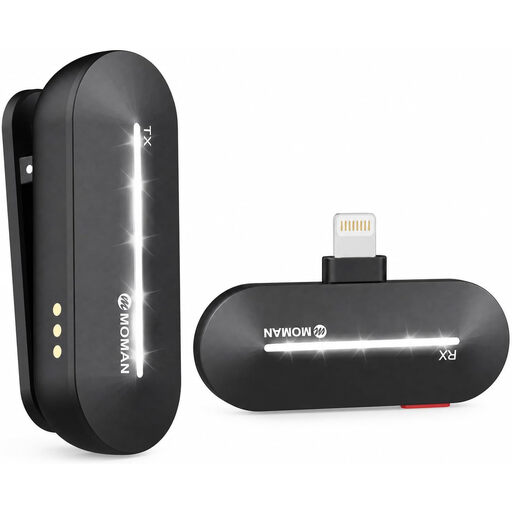
Moman M1CL wireless lavalier microphone for iPhone 14/13/12/11/X (1 TX + 1 RX)
The wireless set may suit one reader if the specified device connection matches your recording device.
The product title lists 1 transmitter and 1 receiver, as well as iPhone 14/13/12/11/X. Check compatibility with your specific device.
View at Joybuy
 No image available
Moman MS1X(C) wireless lavalier microphone for USB-C Android phones (2 TX + 1 RX)
Could suit a reading that involves moving around or a recording with two microphone-equipped speakers, if you’re using a compatible USB-C Android phone.
The product title lists 2 transmitters and 1 receiver. Check how your recording device saves the signals.
View at Joybuy
Frequently asked questions
How can I prevent clothing rustle and other unwanted noise while reading?
Attach the capsule so it doesn’t rub against the fabric, route the cable without pulling on it, and listen to a test recording that includes page turns and loud passages. For the ME 2, Sennheiser specifies a distance of 25 cm from the mouth as a product-specific mounting instruction; this isn’t a general rule for all lavalier microphones.
Can I connect any 3.5 mm lapel microphone directly to my phone?
No. The connection needs to be compatible with your specific phone. The RØDE smartLav+ uses TRRS, while the Lavalier GO uses TRS. Shure specifies a compatible TRRS input or a CTIA-compliant adapter for the MVL. Check your device’s input or adapter, then make a test recording.
What batteries or extra equipment should I allow for in my setup?
It depends on the model and recording setup. The manufacturer specifies an LR44 battery for the BOYA BY-M1 in camera mode; wireless sets need charged batteries and a compatible receiver connection. Check the requirements for the exact version you’re considering.
Am I allowed to record other people’s conversations at a shared desk?
Section 201 of the German Criminal Code (StGB) makes it a criminal offence to record another person’s non-public conversations without permission. If such conversations might be picked up, check that you have the necessary authorisation or consent before recording, or choose a place and time when those conversations won’t take place. The law doesn’t prohibit recording your own reading in general. Source: Federal Ministry of Justice and Federal Office of Justice.


