Recording alone in one place
You want to record your own voice for your training log without much set-up. With a wired microphone, a compatible USB-C connection and tidy cable management are essential.


If you’re recording a training log with a fan running, a wired USB-C lapel microphone is a good fit if you’re staying in one place and your device and app support it. If you need to move around, or want adjustable reduction of steady background noise, a compatible wireless set may be a better choice. Clip the microphone close to your mouth and make a test recording with the fan running. Noise reduction is no substitute for good microphone placement, and depending on the setting, it can affect how natural your voice sounds.
You want to record your own voice for your training log without much set-up. With a wired microphone, a compatible USB-C connection and tidy cable management are essential.
If a fan is running while you speak, weigh up the microphone position and any available noise reduction. A windscreen is not the same as reducing steady room noise.
If you move around while talking, a wireless set lets you move freely without a microphone cable running to your recording device. Check that the receiver, device connection and power supply are all suitable.
The percentages below relate to consumers choosing a lapel microphone for this recording scenario; each row represents their main buying consideration.
| Consideration | What to check before buying | Who it matters most to |
|---|---|---|
| Fan noise and speech clarity | Compare the microphone capsule position and available noise-reduction levels by making a test recording with the fan running. | When I record my training log with a fan running, I want my voice to remain clear. Around 36% of consumers prioritise speech clarity over fan noise. |
| Connection and recording app | Check the device connection, receiver version and whether the app you use supports external audio input. | If I want to keep using my existing device and usual app, the entire recording set-up needs to be compatible. Around 29% of consumers put connection and app compatibility first. |
| Freedom of movement | Consider the cable length or wireless connection, and, for a wireless set, the transmitter, receiver and battery level. | If I move around while talking, I don’t want to feel restricted by a cable running to my recording device. Around 21% of consumers value freedom of movement above all else. |
| Easy set-up for solo recordings | For a wired model, check the connection and cable length; for a wireless set, check what’s included. | If I only record my own voice from time to time, I don’t want to choose components I don’t need. Around 14% of consumers prioritise a straightforward set-up for recording alone. |
A windscreen is designed to deal with airflow directly at the microphone capsule. Steady fan noise in the room is a different source of interference.
Clip the microphone close to your mouth and compare a test recording with and without any available noise reduction while the fan is running.
A compatible connection alone doesn’t guarantee that the recording app will process audio from an external microphone. Wireless sets can also differ in their receiver and what’s included.
Check your device, app and set version together, then listen back to a short test recording.
DJI’s Mic Mini battery-life measurement is based on noise cancelling being switched off and interference-free conditions. BOYA notes that strong noise reduction on the Mini 2 can affect how natural your voice sounds.
Test the battery level and sound of your voice using the settings you actually plan to use for your recording.
Section 201 of the German Criminal Code (StGB) covers, among other things, the unauthorised recording of another person’s private speech. A self-recording may therefore be treated differently if other people’s voices are captured too.
Choose a suitable place to record and check that you have permission beforehand if other people’s conversations could be picked up.
The Mic Mini range includes wireless options for recording alone or with two voices.
Wireless Micro is a wireless option for smartphone recording; the connector version and app you use need to be compatible with your recording device.
XS Lav USB-C is a wired option for one speaker using a compatible USB-C device.
The Mini-2 range is a compact wireless option with switchable noise reduction; choosing the right receiver version matters.
The Joybuy picks below are wireless lavalier sets for mobile recording. For each model, check the listed device connection and whether your recording app supports it.
 No image available
The USB-C wireless connection is worth considering for recordings where you need to move around, provided your device supports it.
The product title lists two transmitters and one receiver. The product description mentions DSP noise reduction, but this doesn’t independently confirm how well it works with fan noise.
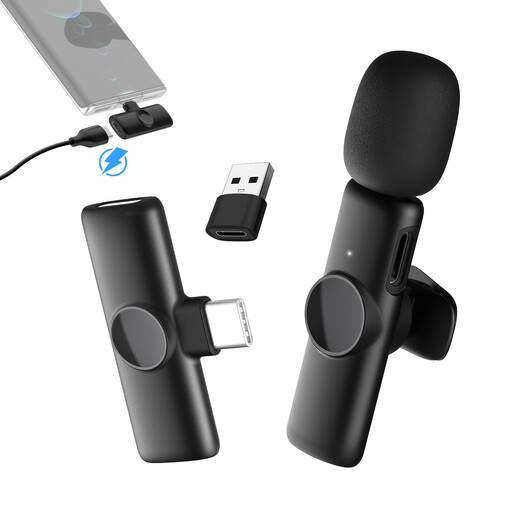 No image available
This version is worth considering if you record using a compatible USB-C phone and want to move around while speaking.
The title lists one transmitter and one receiver, as well as 2.4 GHz. The product description says the transmitter can be clipped to your collar.
 No image available
This version is designed for mobile recording with a compatible USB-C Android phone.
The title lists two transmitters and one receiver. According to the product description, the stated range applies when there’s a clear line of sight.
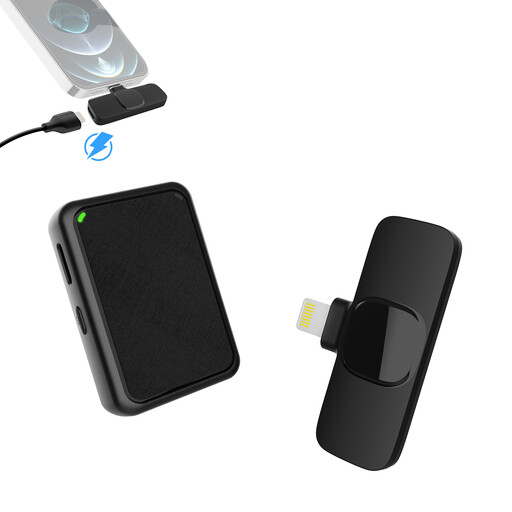 No image available
This wireless version is worth considering if you’re recording with one of the iPhone or iPad models it’s designed for and need two transmitters.
The product title lists two transmitters and a Lightning receiver. The product description mentions a noise-reduction mode, but this doesn’t independently confirm how well it works with fan noise.
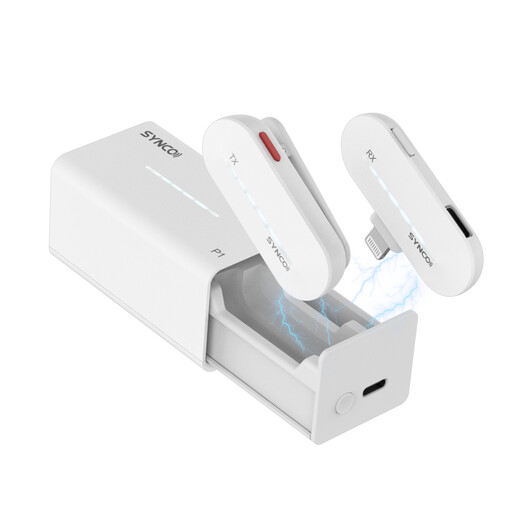 No image available
This wireless lavalier microphone is worth considering for mobile recording with a compatible iPhone.
The product title lists 2.4 GHz and a charging case. Before recording, check that your specific device and app can use external audio.
Connect the specific wired or receiver version, select it as the input if necessary, then listen back to a short test recording. RØDE specifically lists apps that accept USB audio for the Wireless Micro; having a compatible plug alone doesn’t prove that the app is using the microphone.
A windscreen is mainly designed to deal with airflow directly at the microphone capsule and plosive sounds. For steady fan noise in the room, test the microphone position and, if available, a suitable noise-reduction setting separately by making a test recording.
Not without considering the legal position first. Section 201 of the German Criminal Code (StGB) covers the unauthorised recording of another person’s private speech, as well as certain uses of the recording. If other people’s conversations could be captured, check that you have permission and consider the specific workplace circumstances before recording.
There isn’t a general answer that applies to every wireless microphone. The German Federal Network Agency lists frequency bands that can be used without registration within the terms of the relevant general allocation and the specified parameters. Check the frequency of your specific microphone and the conditions currently in force.
Your statutory rights against the seller are separate from any voluntary manufacturer’s or retailer’s guarantee. The German Consumer Advice Centre recommends asking for the fault to be remedied first; also keep the paperwork and terms for any specific guarantee.