Planning a long speech by one person
If you want to record a longer speech with as few interruptions as possible, consider using a cable or a recorder that records audio separately.


For a speech delivered from a fixed position, a wired lapel microphone is an obvious choice, provided its plug is compatible with the microphone input. A complete wireless set is more practical for speakers who move around or take turns speaking. If you don’t want the recording to depend on a wireless connection, consider a lapel recorder, but remember that you’ll need to synchronise its audio file with the video later. For long takes, check the battery life of every device in use and make a continuous test recording before the event.
If you want to record a longer speech with as few interruptions as possible, consider using a cable or a recorder that records audio separately.
When filming on your phone, make sure the connection and the specific USB-C, Lightning or jack version are compatible with your recording device.
Freedom of movement matters when speakers are walking around or taking turns. Check how many transmitters the set actually includes, too.
| What matters | What to look for when buying | Who is this important for? |
|---|---|---|
| Continuous recording time | For a wireless set, check the battery life of the transmitter and receiver separately. With a recorder, remember to allow for batteries and storage space, too. | If you need to record the speech without a planned break, the battery life of the entire active recording setup matters. Around 33% of consumers prioritise the length of a single take. |
| Connection and what’s included | Check the microphone input and any required adapter function against the specific TRRS, TRS, USB-C or Lightning version. Check what’s included in the box. | If you want to record using your existing smartphone, camera or recorder, you need a compatible signal path—not just a plug of the right size. Around 27% of consumers prioritise device compatibility. |
| Movement and speakers taking turns | Check how many transmitters are included and that the receiver version is suitable. | If speakers move around or take turns, a suitable wireless setup is more useful than a short microphone cable. Around 20% of consumers prioritise freedom of movement and speakers taking turns. |
| Voice and background noise | Test the microphone attachment and wind protection in a practice recording. Only use noise cancellation after listening to the results. | If you want the speech to be clear while retaining the atmosphere of the club, check the sound at the recording location. Around 20% of consumers focus particularly on this balance. |
Figures that include charging cycles in the case don’t automatically tell you how long the transmitter and receiver will last during an uninterrupted recording.
Compare the battery life of each active component separately, and test the complete recording setup before the event.
Having to stop and recharge could interrupt your planned continuous take.
The RØDE smartLav+ uses TRRS, while the Lavalier GO uses TRS. What matters is whether the recording device’s input is compatible with the specific microphone and whether you have any necessary adapter.
Before buying, check that the microphone version, input and adapter function are all compatible.
Depending on your recording device, you may need a suitable connection solution.
The Sennheiser ME 2 is designed to connect to a compatible bodypack transmitter. Wireless sets can also differ in the components included, depending on the version.
Check what’s included with the specific version and trace the signal path all the way to the recording device.
You may need a compatible bodypack or receiver to complete the recording setup.
The range includes wired lapel microphones and compact wireless kits for smartphones.
The Mic Mini is a wireless option if you need transmitters and a compatible receiver to give speakers freedom to move around.
The LARK M2 is available in versions for different recording devices, including camera and USB-C options.
The F2 pairs a lapel microphone with a recorder that records audio locally, so you don’t have to rely on a wireless connection to the camera.
The ME 2 is a lapel microphone option for a compatible bodypack transmitter, for example if you already have a suitable recording setup.
The following Joybuy products include wired lapel microphones and wireless sets for recording with a smartphone or camera. For long takes, compare the complete signal path, what’s included and the battery life of the devices you need.
 No image available
For two speakers, provided the specific receiver version is compatible with your recording device. The transmitters are described as recording internally; check the complete signal path before recording.
 No image available
For a speech delivered from a fixed position, if your recording device has a compatible connection. It’s listed as including a 3.5 mm connection, an adapter kit, a clip and a windscreen. Check compatibility with your specific device.
 No image available
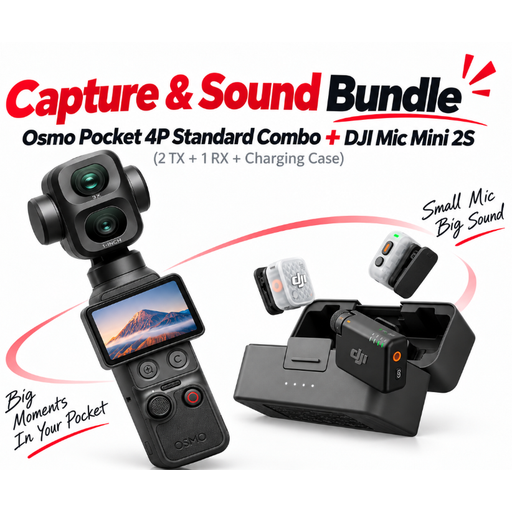
For a setup where the camera and wireless microphone are supplied together in a bundle. The product name lists two transmitters and one receiver. Check in advance that the included components are compatible with your planned recording setup.
 No image available
For two speakers using a USB-C recording device, provided the receiver is compatible. The description mentions a local backup recording to a TF card. Check in advance that this feature suits your planned setup.
 No image available
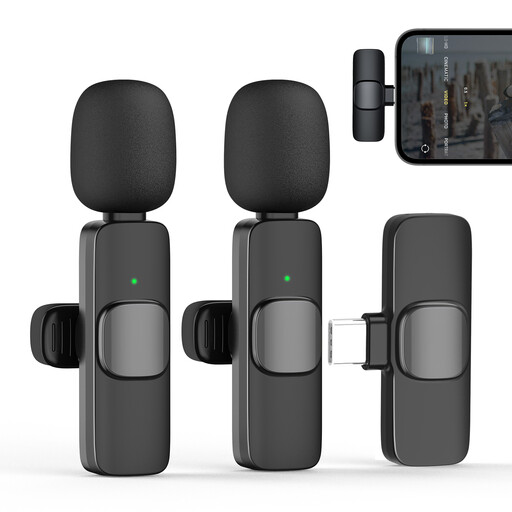
For one speaker using a compatible USB-C recording device. The product name lists one transmitter and one receiver. Also check that the frequency band and specific version are suitable for your needs.
Not on the basis of that figure alone. RØDE’s claim of up to 21 hours for the Wireless Micro includes use of the charging case. For an uninterrupted take, check the battery life of each active component in the specific version separately.
Attach the microphone to your clothing and make a test recording to check speech clarity, possible clothing noise and the wind protection you plan to use. Sennheiser’s instructions recommend a distance of around 25 cm from the mouth for the ME 2. Don’t assume this model-specific measurement applies to other microphones.
It depends on the device you already have. An incompatible connection may require a suitable adapter or receiver. The Zoom F2 records to microSD and needs two AAA batteries, so check that you have a memory card and a power supply ready for your planned take.
Under § 201 StGB, recording another person’s privately spoken words without authorisation is a criminal offence. Discuss the planned recording with the speakers, and don’t record incidental conversations without their knowledge. If you later process recordings containing personal data, you’ll also need an appropriate legal basis under data protection law. The specific circumstances can’t be assessed in general terms.
No. The Federal Network Agency lists frequency bands for wireless microphones that are subject to technical and operational conditions. Check the frequency band and the details for the specific version before using it.