Choose your laptop based on your animation software and the type of projects you work on. For demanding Blender scenes, a supported GPU rendering path and enough graphics memory are essential, while RAM, the display or the ports may matter more for other workflows. Compare the full specification rather than just the model name, and factor in a screen, input devices and power supply for your workspace.
Which laptop is right for you?
3D animators working on rendering projects
For large scenes, it’s worth matching the GPU rendering path and graphics memory to the size of your project and the type of device you want. The Blender Foundation explains that complex scenes can be limited by the available GPU memory.
2D and motion graphics designers
What matters is a computer that suits the software you use, along with a practical workspace for drawing and previewing your work. The most powerful 3D GPU isn’t necessarily the top priority.
Home workers who need a large screen
If you use external equipment, consider the specific screen features and ports as well as processing power. ASUS eShop Germany and Apple list different display and device features for certain configurations.
What should you look for when buying?
Windows creator laptop
A good fit if: you want a built-in display for colour work and drawing, plus a dedicated GPU supported by your software. The ASUS ProArt P16 is one example; specifications vary by model.
The trade-off: a touchscreen or OLED display doesn’t replace the need to check the full model number, GPU performance and ports.
Mobile Windows workstation
A good fit if: upgradability or a professionally designed work device matters more to you than a slim creator-focused design. Notebookcheck notes that the tested ThinkPad T1g Gen 8 has upgradeable RAM and two SSD slots.
The trade-off: Notebookcheck describes the tested configuration as expensive; check other configurations separately.
MacBook Pro
A good fit if: your animation software and extensions run on macOS, and you want to make use of its display and media features.
The trade-off: don’t confuse unified memory with dedicated graphics memory. Check that your specific software and features are supported.
Prioritise specifications according to your biggest bottleneck: rendering path, project size, drawing area or existing peripherals.
| Buying criterion |
What to look for |
Who will find this especially important? |
| GPU and graphics memory |
Check your Blender version, supported rendering path and the graphics memory of the specific GPU. |
If I render demanding 3D scenes, I want to be sure that the software and graphics card work together. Around 36% of consumers say GPU support and graphics memory are their main concern. |
| RAM and project storage |
Compare your programmes’ requirements, project sizes, SSD capacity and upgrade options. The Blender Foundation recommends 32 GB of RAM; this isn’t a blanket minimum for every type of animation. |
When working with large projects and lots of files open at once, I want to make sure the memory and upgrade options suit my workflow. Around 29% of consumers have this as their main concern. |
| Display and drawing input |
Check the resolution and display of the exact model, as well as whether it’s compatible with any stylus device you already own. The Blender Foundation recommends a minimum of 1920 × 1080 pixels for navigation. |
If I draw directly on the laptop and assess previews, the screen and input options are particularly important to me. Around 21% of consumers say visual checks and drawing input are their top priorities. |
| Ports and accessories |
Check the display outputs, what’s included in the box and the required charging power for the exact model against your existing accessories. |
With an existing home office setup, I want to connect my current screens and devices as easily as possible. Around 14% of consumers prioritise ports and accessory costs. |
Common buying misconceptions
-
A particular GPU model automatically means faster rendering
For Blender, GPU rendering depends on the supported rendering path. With complex scenes, the available graphics memory can limit what you’re able to process.
Before buying, check that your software version is supported, along with the intended rendering path and the graphics memory of the exact model.
-
The specifications of a review unit apply to the whole product range
Configurations within a range can differ in GPU, RAM and display. The Yoga Pro 9i described here has soldered RAM.
Check the full model number and the specifications of the device on offer against the features you need.
-
A USB-C port means any power adapter will do
The port alone doesn’t confirm that your existing power adapter provides the charging power specified for that particular laptop. Apple lists a minimum required power of 140 W for the documented 16-inch MacBook Pro.
Check the charging power and what’s included with the model you’ve chosen against your existing power adapter. Depending on the specification, you may need to buy a suitable adapter separately.
Relevant brands and product ranges
ASUS
ASUS describes the ProArt P16 range as being designed for creative professionals. One documented German configuration combines an OLED touchscreen with GeForce graphics.
- ASUS eShop Germany lists an RTX 4060 Laptop GPU with 8 GB of graphics memory for one advertised configuration.
- This configuration has 32 GB of soldered RAM. These specifications don’t automatically apply to other P16 models, and may matter if you need more memory later.
Lenovo
The ThinkPad T1g Gen 8 and Yoga Pro 9i cater to different priorities: upgradeability and display features, respectively.
- Notebookcheck notes that the tested ThinkPad T1g Gen 8 has upgradeable RAM and two SSD slots. Lenovo Germany lists 64 GB of RAM and an RTX 5070 with 8 GB for the Yoga Pro 9i 83L0007XGE.
- The RAM is soldered in the Yoga model mentioned here. Its glossy 16-inch Tandem OLED display is a feature of this specific configuration, not a description of every Yoga model.
Apple
MacBook Pro configurations with M5 Pro or M5 Max offer a macOS option, provided the animation software and extensions you need are supported.
- Apple Support lists a 16.2-inch display for the 16-inch MacBook Pro, with different chip and memory configurations available.
- The stated minimum charging power of 140 W applies to the documented device specifications. Manufacturer battery-life claims aren’t a measure of performance when running animation software.
Dell
The Pro Max 16 range is a Windows workstation option for buyers who value professional graphics options and configurable memory.
- Dell Germany lists different RTX PRO graphics cards and RAM configurations, depending on the model.
- Check the suitability and exact specifications of each configuration individually.
Laptops available at Joybuy
The following Joybuy offers show a range of configurations for animation when working from home – from laptops with dedicated RTX graphics to models with integrated Intel Arc graphics and a MacBook running macOS. Pay particular attention to graphics memory, RAM, software compatibility and the accessories you’ll need.
 No image available
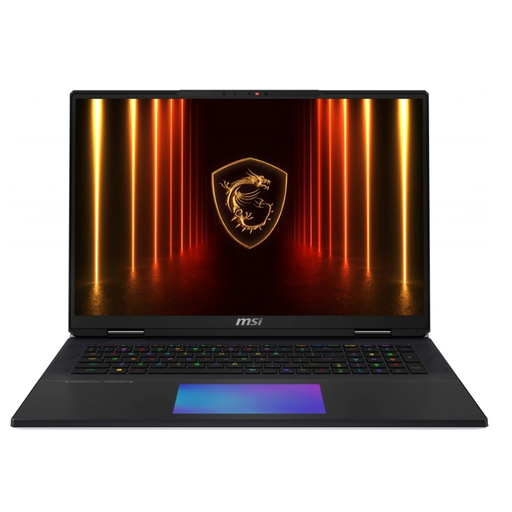
MSI Titan 18 HX Dragon Edition Draco Epic A2WJ-1218
For large 3D projects, graphics memory and RAM are important specifications to compare.
The listed configuration includes an Intel Core Ultra 9 290HX Plus, an NVIDIA GeForce RTX 5090 with 24 GB, 96 GB DDR5, a 4 TB SSD and an 18-inch UHD+ Mini LED display with a 240 Hz refresh rate.
View at Joybuy
 No image available
MSI Titan 18 HX AI A2XWJG-656
The listed memory configuration is worth comparing when working with large project files and complex scenes.
The specifications include an Intel Core Ultra 9 285HX, an NVIDIA GeForce RTX 5090 with 24 GB, 64 GB of RAM, a 6 TB SSD and an 18-inch UHD+ Mini LED display.
View at Joybuy
 No image available
Lenovo Yoga Slim 7i Aura Edition, 14-inch
For animation with Blender, compare the listed RAM against the Blender Foundation’s recommendation of 32 GB.
The specifications include a 14-inch 2.8K OLED display, Intel Core Ultra 7 355, Intel Arc graphics, 16 GB of RAM, a 1 TB SSD and Windows 11 Evo. The RAM can’t be upgraded.
View at Joybuy
 No image available
Apple MacBook Pro 14-inch (M5 Pro, 2026)
This configuration is an option if the animation software and extensions you need run on macOS.
The listed specifications include a 15-core CPU, a 16-core GPU, 24 GB of Unified Memory, a 1 TB SSD and a 14.2-inch XDR display. It supports up to three external displays; according to the product description, a power adapter isn’t included. The Blender Foundation recommends 32 GB of RAM, which is worth bearing in mind when comparing configurations.
View at Joybuy
 No image available
ASUS Zenbook 14 UX3405CA-QD1303W
If you work directly on the laptop screen, the display and touchscreen are specific features worth comparing.
The specifications include a 14-inch WUXGA OLED touchscreen, Intel Core Ultra 7 255H, integrated Intel Arc graphics, 16 GB of RAM and a 1 TB SSD. The RAM can’t be upgraded; the Blender Foundation recommends 32 GB.
View at Joybuy
Frequently asked questions
Do I always need a dedicated graphics card for animation?
No, that isn’t a universal requirement for every type of animation. If you want to render with Cycles on the GPU in Blender, check the supported rendering path and the memory requirements of your scenes. The Blender Foundation also highlights memory limitations with complex scenes.
How should I set up drawing input and a screen for working from home?
Check that the resolution, ports and any stylus device you already own suit your workflow. The Blender Foundation recommends a minimum of 1920 × 1080 pixels for navigation and mentions stylus devices for tasks such as drawing and Grease Pencil; they aren’t essential for every type of animation.
Will new laptops sold in the EU have to charge via USB-C?
The European Commission lists 28 April 2026 as the start date for common charging requirements that also cover laptops. For affected devices, USB-C is the harmonised charging port. This doesn’t mean that every USB-C power adapter you already own will provide the power required by a specific laptop.


