Which setup suits your needs?

Writers with limited desk space

If you write API documentation directly on your laptop and need room for your hands and papers, dimensions, screen readability and keyboard matter more than having the largest possible display. The Federal Institute for Occupational Safety and Health highlights the importance of overall weight, particularly if you often work in different locations.

Writers who need a side-by-side preview

If you often switch between your editor, reference and preview, you need a window layout that remains easy to read on the screen you have available. For longer periods of work at a fixed desk, the German Social Accident Insurance describes setups that use an additional monitor and separate input devices.

Writers with a permanent workspace

If you regularly work on longer texts at the same desk, you may be able to set up your screen, keyboard and mouse separately. The German Social Accident Insurance suggests using a laptop stand or another stable riser to position the screen; a separate keyboard and mouse are required.

What should you look for when buying?

Compact laptop without a permanent external monitor

A good fit if: you want to keep your desk clear and can comfortably read your API documentation on the built-in display.

Trade-off: A smaller display may leave less room for several views open at once. Apple lists the MacBook Air at 13.6 inches; Lenovo specifies 13.3 inches for the particular ThinkPad X13 configuration.

14-inch laptop with a built-in workspace

A good fit if: you regularly switch between your editor, reference and preview, and the laptop will fit on your desk.

Trade-off: Measure your available desk space and check what’s included with the exact configuration. Dell doesn’t list a power adapter with the Pro 14 we checked, while HP includes one with the EliteBook 8 G1i we checked.

Laptop with a separate monitor and input devices

A good fit if: you spend longer periods writing at a fixed desk and have room for an additional monitor, keyboard and mouse.

Trade-off: Raising your laptop on its own won’t create a suitable typing position: the German Social Accident Insurance recommends using a separate keyboard and mouse. Make sure you have room for everything and the right ports.

Priority What to check before buying Who it matters most to
Desk space and portability Width and depth of the specific model; space required with the display open. If I need room for my hands and papers as well as my laptop, I want to know how much desk space it actually takes up, rather than just the display size. Around 25% of consumers prioritise desk space.
Readability across multiple views Your usual window layout and how readable text is at your preferred scaling; if using an external monitor, also check its footprint and connection. If I want to read my editor, reference and preview side by side, the layout needs to suit my workflow. Around 25% of consumers prioritise having a clear overview on screen.
Workflow compatibility Check the operating system and processor architecture against the requirements of every application you need and any potential company policies. If my documentation or testing tool requires a particular platform, I check this before choosing a laptop. Around 20% of consumers prioritise compatibility with their tools.
Ergonomics for longer writing sessions Try out the keyboard and pointing device; if raising the laptop, make room for separate devices and check that you have the necessary ports. If I’m writing for longer periods and want to position the screen higher, I also need a practical setup for my keyboard and mouse. Around 15% of consumers put workplace ergonomics first.
Total cost and support Check what’s included with the exact configuration and what accessories you’ll need; consider warranty terms separately from your statutory rights. If I need to budget for additional accessories, I want to understand what’s included and the terms before buying. Around 15% of consumers pay particular attention to total costs and after-sales support.

Common buying and planning pitfalls

  • Assuming the display size tells you how much desk space you’ll need

    The screen size in inches doesn’t tell you how much room the open laptop will take up on your desk, or whether you’ll have space for your hands and papers.

    Measure your available space and check a typical documentation view at your preferred scaling.

  • Forgetting input devices when using a laptop stand

    When your laptop is raised, the built-in keyboard and touchpad may not be in a comfortable position for typing and navigation. The German Social Accident Insurance says a separate keyboard and mouse are necessary for this setup.

    Plan the screen height, keyboard and mouse as one complete workspace, and check that everything will fit on your desk.

  • Assuming what’s included and the warranty from the brand name

    Even specific offers in the same size category can differ when it comes to whether a power adapter is included. A voluntary warranty is also not the same as your statutory consumer rights.

    Check what’s included with the exact configuration, and read the warranty terms alongside your statutory rights against the seller.

Key brands to consider

Apple

The 13-inch MacBook Air with M5 is a compact macOS option, provided it’s compatible with the tools you need.

  • Apple Germany lists a 13.6-inch display, 16 GB of unified memory, a 512-GB SSD and two Thunderbolt 4 ports for the 13-inch base configuration.
  • Check that your tools and existing peripherals work with the specific configuration and its ports. The manufacturer’s specifications are not a comparative test.

Lenovo

The ThinkPad X13 Gen 6 is a compact Windows option if you’re looking for a 13.3-inch display and a German keyboard.

  • Lenovo Germany lists a matt 1920 × 1200-pixel display, Windows 11 Pro and a German keyboard for configuration 21RK0042GE.
  • These specifications apply to this exact configuration. Having the same operating system doesn’t automatically guarantee compatibility with your API tools.

Dell

The Pro 14 PC14250 is a Windows option with a 14-inch display, provided the larger case fits on your desk.

  • Dell Germany lists an IPS display with a resolution of 1920 × 1200 pixels, 16 GB of RAM and a 512-GB SSD for the configuration we checked.
  • The offer we checked doesn’t include a power adapter. Specifications and what’s included may vary for other PC14250 configurations.

HP

The EliteBook 8 G1i 14 is a 14-inch business option for a Windows workflow.

  • For configuration D84XYET#ABD, HP lists Windows 11 Pro, a 14-inch display with a resolution of 1920 × 1200 pixels, 16 GB of RAM and an included power adapter.
  • These specifications apply to the configuration listed. Manufacturer claims about productivity or battery life don’t prove a particular advantage for writing API documentation.

Joybuy products for this workflow

This selection includes compact 13-inch devices and 14-inch laptops designed for working on the built-in display. Check the footprint, compatibility with your tools and what’s included against your needs.

Lenovo Yoga Slim 7i Aura Edition, 14-inch

Lenovo Yoga Slim 7i Aura Edition, 14-inch

For a workflow using the built-in display; check that the 14-inch format will fit on your desk.

The listing specifies a 2.8K OLED display, Intel Core Ultra 7 355, 16 GB of RAM, a 1 TB SSD and Windows 11 Evo. It also lists a weight of 1.14 kg and dimensions of 31.2 × 22.1 cm.

View at Joybuy

HP OmniBook Ultra Flip 14-fh0670ng, 14-inch

HP OmniBook Ultra Flip 14-fh0670ng, 14-inch

For a Windows workflow with a 14-inch display; check the dimensions against your available desk space.

The title lists a 2-in-1 touchscreen with a 2.8K OLED display, Intel Core Ultra 7 258V, 32 GB of RAM, a 1 TB SSD and Windows 11 Home. The listed weight is 1.34 kg and the dimensions are 313.7 × 216.2 mm.

View at Joybuy

Apple 13-inch MacBook Air M5, 2026, Sky Blue, German QWERTZ keyboard

Apple 13-inch MacBook Air (M5, 2026), Sky Blue

For a compact macOS workspace; before buying, check that your API tools are compatible and that the German QWERTZ keyboard layout suits you.

Specifications include a 13.6-inch display, 16 GB of unified memory, a 512-GB SSD, a 10-core CPU and an 8-core GPU. It measures 30.41 × 21.5 cm and weighs 1.23 kg. The description states that a power adapter isn’t included.

View at Joybuy

Apple 13-inch MacBook Neo A18 Pro, Indigo, German QWERTZ keyboard

Apple 13-inch MacBook Neo A18 Pro, Indigo

For a compact workspace using the built-in display; check that the operating system and specific configuration support the applications you need.

Specifications include a 13-inch display, 8 GB of unified memory, a 512-GB SSD, a 6-core CPU, a 5-core GPU and a German QWERTZ keyboard. The listed weight is 1.23 kg. The description states that a power adapter isn’t included.

View at Joybuy
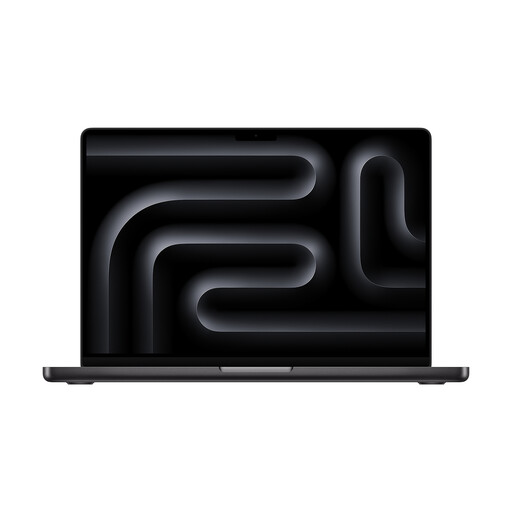
Apple 14-inch MacBook Pro with M5, Space Black, German keyboard

Apple 14-inch MacBook Pro with M5, Space Black

For a macOS workflow with a 14-inch display; check that the tools you need are compatible and that you have enough desk space.

The title lists an Apple M5 chip with a 10-core CPU and 10-core GPU, 24 GB of memory and a 1-TB SSD. The description lists a German keyboard. It also states that a power adapter isn’t included.

View at Joybuy

Frequently asked questions

Should I choose the largest display that will fit on a small desk?

Don’t choose based on screen size alone. Check how readable your usual text and window layout are, and measure the space the laptop takes up when open. For longer periods of writing, the German Social Accident Insurance suggests a suitably positioned external monitor as one possible solution.

How can I raise a laptop for longer writing sessions?

If you raise your laptop screen with a stand or another stable support, make sure you have a separate keyboard and mouse. The German Social Accident Insurance says both are necessary for this setup; check that they’ll fit on your desk first.

Should I budget for a charger as well?

It depends on the specific offer: Dell explicitly lists no power adapter with the Pro 14 configuration we checked, while HP includes one with the EliteBook configuration we checked. Check the charging requirements too, rather than assuming what’s included based on the model range.

Is a manufacturer’s warranty the same as your statutory rights?

No. According to the consumer advice centre, your statutory rights are set out in law and apply against the seller; a warranty is a voluntary service with its own terms. If a product is faulty, your statutory rights are separate from any warranty.

How should I dispose of an old laptop in Germany?

Waste electrical equipment must be collected separately; as the Federal Environment Agency explains, local collection points generally accept it free of charge. Under Section 17 of the German Electrical and Electronic Equipment Act (ElektroG), retailers with at least 400 square metres of sales space for electrical and electronic equipment are required, subject to statutory conditions, to take back an old item of the same type free of charge when you buy a new one.