Start by choosing a laptop based on the operating system and processor architecture you actually need to test the desktop app on. Then consider memory, SSD storage and ports. Windows x64, macOS and Windows on Arm cover different testing scenarios, while Hyper-V also requires the right Windows edition and hardware. Without details of the app, version and dependencies, it isn’t possible to confirm that any one model is suitable.
Which requirements matter to you
App compatibility comes first
You need to test a specific desktop app and its dependencies on the intended platform, and want to avoid finding out that the operating system or architecture isn’t compatible. Microsoft notes that Windows on Arm has specific requirements for native Arm64 kernel drivers.
Multiple test environments
You want to run separate test systems alongside the app. Microsoft Learn lists Windows 11 Professional or Enterprise among the requirements for Hyper-V. The resources you need also depend on the virtual machines you actually plan to run.
Studying at a small desk
You’ll mainly test the app in your room and use the same laptop for your studies. The screen, ports and connections for your monitor and peripherals should suit your workspace.
What to consider when buying
| Priority |
What to check before buying |
Who it matters most to |
| Platform and app compatibility |
Check the supported operating system version, processor architecture, installer, plug-ins and drivers. Decide whether you need to test native performance or emulation. |
If I need to test a particular app and its dependencies on a specific platform, I want to check these requirements before buying. Around 33% of consumers say app compatibility is their top priority. |
| Running multiple test environments |
Check how many VMs you’ll run at once and what resources they need, as well as the Windows edition, virtualisation features, RAM and available SSD space on the specific configuration. Microsoft Learn lists Professional or Enterprise as the Windows editions for Hyper-V. |
If I need to run several virtual test systems at once, I have to plan for the host, VMs and available storage together. Around 27% of consumers say having multiple test environments is their main priority. |
| Workspace and ports |
Check the space available on your desk, your external monitor and the connectors on your existing devices against the ports on the specific configuration. |
At a small desk, I want to connect my monitor and peripherals without overlooking how much space I have available. Around 20% of consumers say their workspace and ports are their top priority. |
| Total cost and accessories |
Compare the price and what’s included with the exact configuration. Only factor in extras such as an adapter or power supply if they’re needed and confirmed by the specific offer. |
With a limited budget, I want to know which features I’ll actually get for my test plan. Around 20% of consumers say total cost is their top priority. |
Common misconceptions
-
Assuming a high RAM figure proves a laptop is suitable for testing
Hyper-V requires more than enough RAM: the Windows edition and hardware requirements matter too. An unfamiliar app may have additional requirements.
First, make a note of the requirements for the app and the VMs you plan to run. Then check the device’s full configuration. You may need a different Windows edition if your test plan relies on Hyper-V.
-
Confusing emulated Windows x64 with a native x64 test
Windows on Arm can emulate x64 applications. Microsoft also points out that kernel drivers need a native Arm64 version.
Before buying, decide whether you need to test emulation or native x64 behaviour, and check the app and each of its dependencies individually.
-
Assuming every model in a range has the same specification
Manufacturers offer different configurations within a product range. Acer’s specifications for the Swift 16 AI OLED apply to the specific model number NX.J42EG.00A.
Check the full model or product number and what’s included against the specific offer. Depending on the ports available, you may need an adapter for your peripherals.
-
Looking only at the laptop, not the complete setup you can use
For the 13-inch MacBook Air M5 version considered here, Joybuy states that the power adapter isn’t included. This applies to this version only and shouldn’t be assumed to apply to other offers.
Before buying, check that you have a compatible power adapter and the connection accessories you need.
Relevant brands at a glance
Lenovo
The ThinkPad E14 Gen 7, 21SX000RGE, is a specific option to consider for Windows x64 and potential Hyper-V testing.
- For this version, Lenovo Germany lists Windows 11 Pro, an Intel Core Ultra 5 225U, 16 GB RAM, a 512 GB SSD and a matt 14-inch display.
- These specifications don’t prove that an unfamiliar app will work on it, and they don’t apply to every E14 version.
Apple
A MacBook with an Apple chip is worth considering if you need to test a macOS version of the app.
- For the 13-inch MacBook Air M5 base configuration considered here, Apple Germany lists 16 GB of unified memory, a 512 GB SSD and two Thunderbolt 4 ports.
- These specifications don’t confirm that it’s suitable for running a Windows x64 app natively. Also check that your existing accessories are compatible with the ports.
HP
According to HP Germany, the OmniBook 5 range offers different sizes for studying and desk-based work.
- HP Germany lists HDMI and USB-C, as well as 14-inch and 16-inch display options.
- These details relate to the product range as a whole. They don’t prove that every configuration has the same ports or is compatible with a particular app.
Acer
The Swift 16 AI OLED SF16-51T is worth considering if you want a larger Windows display for a dedicated workspace.
- For model number NX.J42EG.00A, Acer Store Germany lists a 16-inch OLED touchscreen, Windows 11 Home and 32 GB RAM.
- If you plan to use Hyper-V, check that the Windows edition meets the requirements of your test plan. These details apply to the model number specified.
Joybuy products for app testing
The following Windows laptops have the listed configurations for desk-based work and test environments. Whether a particular app can be tested successfully on one of them depends on the operating system, architecture and the app’s specific requirements.
 No image available
Lenovo ThinkBook 16 Gen 9, Intel Core Ultra 5 325
For a dedicated desk setup, if Windows 11 Pro and the app’s requirements are a good match for your test plan.
Listed specifications include 32 GB DDR5, a 512 GB PCIe SSD and Windows 11 Pro.
For Hyper-V, the Windows edition, hardware and resource requirements of your planned VMs all need to be suitable.
View at Joybuy
 No image available
YOGA laptop, 11.6-inch, Intel Pentium Gold 6500Y
The compact touchscreen design could suit a small desk, provided the operating system and app requirements are a match.
Listed specifications include an Intel Pentium Gold 6500Y, 8 GB RAM, a 256 GB SSD, Windows 11 Pro and a 360° hinge.
Check whether it can handle several VMs running at once against the requirements of your specific test plan.
View at Joybuy
 No image available
16-inch laptop, Intel Core i5-8210Y
For a larger screen and wired network connection, if the specific app is compatible with this configuration.
Listed specifications include 16 GB RAM, a 512 GB SSD, RJ45 and Windows 11 Pro. The description specifies an anti-glare display with a resolution of 1920 × 1200 pixels.
For Hyper-V, check the other hardware requirements and the needs of your planned test environments.
View at Joybuy
 No image available
HP ProBook 4 G1a, 16-inch, AMD Ryzen 5 230
For a workspace with a monitor and peripherals, if the ports and app requirements suit the way you plan to use it.
Listed specifications include 16 GB DDR5 RAM, a 512 GB SSD, a WUXGA IPS display and Windows 11 Pro. The description lists HDMI, USB-A, USB-C and RJ45.
Check the app’s requirements and resource needs before planning to run multiple test environments.
View at Joybuy
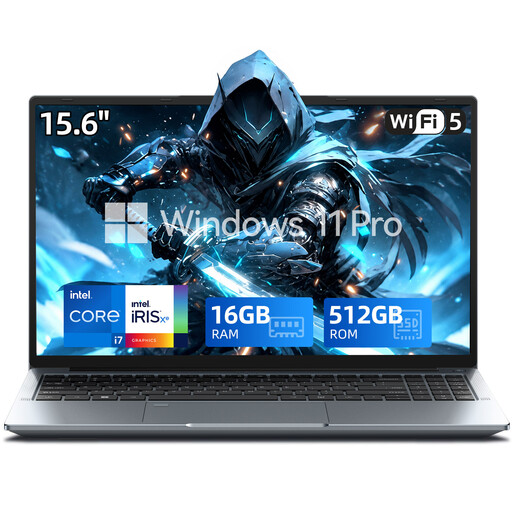 No image available
15.6-inch FHD laptop, Intel Core i7-1255U
For a workspace with an external monitor or other peripherals, if the app runs on the specified Windows configuration.
Listed specifications include 16 GB RAM, a 512 GB SSD, Windows 11 Pro, USB-C and HDMI.
These specifications alone don’t confirm that the app, plug-ins or drivers are compatible with the platform you need.
View at Joybuy
Frequently asked questions
Is Windows 11 Home enough for Hyper-V test systems?
Not necessarily. Microsoft Learn lists the Professional or Enterprise editions of Windows 11 for Hyper-V, along with additional hardware requirements. Whether you need Hyper-V depends on the test environments you plan to use.
Can I test a Windows x64 app on a Windows on Arm laptop?
Windows 11 on Arm can emulate x64 apps, but that isn’t a substitute for a native x64 test. Microsoft points out that kernel drivers need a native Arm64 version, so check the app’s specific dependencies.
Which ports should I check for my desk setup?
Check the ports on the specific version against your monitor and existing USB devices. Apple Germany lists two Thunderbolt 4 ports on the 13-inch MacBook Air M5. For the ThinkPad E14 Gen 7 Intel range, Lenovo lists HDMI and USB-A among the ports, but notes that they vary between versions.
What are my rights when buying online in Germany, including returns and warranties?
The Verbraucherzentrale says that online purchases generally come with a 14-day right to cancel. Your statutory rights for faulty goods and a voluntary warranty are different things, so check the terms that apply to your purchase.
Does CE marking matter for a laptop?
CE marking is relevant for products covered by applicable EU harmonisation rules. The Bundesnetzagentur describes it as the manufacturer’s declaration that a conformity assessment has been carried out. It doesn’t prove that a particular app can be tested on the laptop.


