Audio drama writers who work in long sessions
If you write and edit a lot of dialogue, check that the keyboard and display make extended writing comfortable, and that you can see your script and notes clearly.


Start by choosing your writing software. For Final Draft 13, the manufacturer lists Windows 11 or macOS 12 or later; Chromebooks are not supported. Then consider whether the keyboard and display will suit long writing sessions, and whether you would prefer more screen space or a more compact device. The information on supported operating systems comes from Final Draft.
If you write and edit a lot of dialogue, check that the keyboard and display make extended writing comfortable, and that you can see your script and notes clearly.
When sharing drafts, everyone involved needs to be able to track edits, comments and approvals in the software you choose. Microsoft Support explains how to track changes in Word, while Google Docs Editors Help explains how to use Suggesting mode.
If you work in different places, check the device’s size, its ports and whether your writing software supports offline access. Google Docs Editors Help explains what you need to work offline on a computer.
Choose your writing software and agree on how you’ll work together first. Then you can decide how much screen space, portability and connectivity you need.
| Buying priority | What to check | Who is it important to? |
|---|---|---|
| Writing comfort and space for notes | Try the keyboard on the specific model; check whether the script and comments will fit on screen at the same time. | If I write long stretches of dialogue and want to see corrections alongside the text, I pay particular attention to the keyboard and usable screen space. Around 33% of consumers put writing comfort and room for the script and notes first. |
| Revision notes and collaboration | Share a sample file with collaborators and test comments, tracked changes and exporting. | If I need to incorporate other people’s feedback reliably, it matters that everyone can use the same file format and approval process. Around 25% of consumers prioritise collaboration and traceable revisions. |
| Portability and offline working | Consider the device and power adapter when travelling; make sure the files you need are available before a session without an internet connection. | If I write somewhere without a reliable connection, I prepare for offline access and choose a format that’s easy for me to carry. Around 17% of consumers put portability and offline working first. |
| Ports for audio recordings | Check that your headphones or audio interfaces are compatible with the ports on the specific laptop configuration. | If I want to listen to voice recordings while working on my script, I check whether I can connect my existing audio equipment directly. Around 17% of consumers prioritise ports for listening to audio recordings. |
| Software and what’s included | Check that your writing software is compatible, and confirm what’s included with the specific offer, such as a power adapter and any accessories you need. | If I want to know in advance whether the device and accessories will suit my writing routine, I compare the exact configuration with the software I need. Around 8% of consumers put software and what’s included first. |
According to its product information, Final Draft does not support installation on Chromebooks. Writing in a browser is a different way of working.
Decide first which programme and file format you actually need.
If Final Draft 13 is essential, you may otherwise need a different device or to switch writing software.
You need to set things up in advance to access Google Docs offline on a computer, and the file you need must be available for your session.
Open and check your script before your first offline session. Google lists Chrome or Edge and an enabled offline extension as requirements.
What’s included can vary between configurations; the configurations described by Dell do not list a power adapter.
Check the specific offer to see whether it includes the power adapter and any other accessories you need.
The ProBook 4 G1i 14 is a Windows option with a 14-inch WUXGA display for writing and reviewing comments.
The Dell 15 range includes configurations with a larger display, suited to a mainly desk-based writing setup.
The 13-inch MacBook Air with M5 is a compact option for writers who prefer macOS.
The ThinkPad E14 Gen 6 AMD series may be worth considering if you need different types of ports or expandable storage.
The devices below include Windows laptops and a MacBook for writing. Before choosing, check that your writing software runs on the operating system in question.
 No image available
A 14-inch option for writers looking for a Windows 2-in-1 in this size.
 No image available
The 15.6-inch format is worth considering if you want to work on your script and notes on a larger display.
 No image available
A 15.6-inch configuration for writers looking for a larger display and Windows 11.
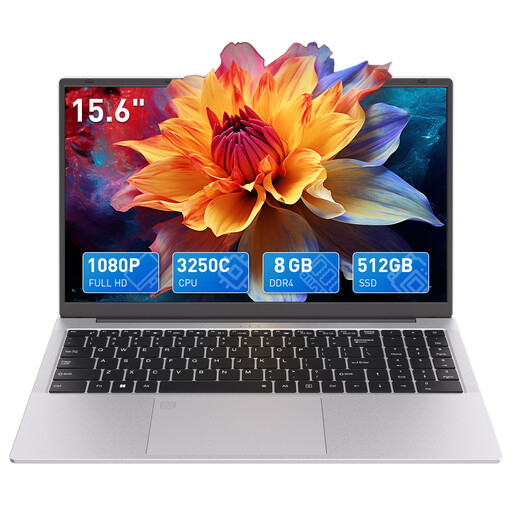 No image available
This 15.6-inch laptop is an option if you’re looking for a larger display for writing digitally.
 No image available
A compact macOS option if your writing software and workflow are compatible with the MacBook.
No. Word offers tracked changes, while Google Docs offers Suggesting mode and comments; Final Draft 13 also supports revisions and comments. What matters is whether the file format and approval process work for everyone involved.
You can work offline with Google Docs on a computer if you set it up in advance. Google lists Chrome or Edge, an enabled offline extension and enough local storage as requirements; check that the specific file is available before your session.
Check the operating system requirements for your writing software against the specific laptop configuration, and confirm that a power adapter and any accessories you need are included. For Final Draft 13, the manufacturer lists Windows 11 or later, or macOS 12 or later.
For consumer purchases of new goods, Germany’s Federal Ministry of Justice generally specifies a two-year limitation period for claims relating to defects. Online purchases usually come with a 14-day right to cancel; for goods, the period starts after delivery is complete, provided you have been properly informed about this right. Your statutory rights relating to defects and a manufacturer’s voluntary guarantee are separate claims.
No. According to its product information, Final Draft does not support Chromebooks. The manufacturer lists Windows 11 or later with an Intel or AMD processor, or macOS 12 or later, as the system requirements.